How to know if is a BMW FEM or BDC model? There is a list?
Yes, there is a list.
BMW Chassis number list. The easy way to tell if the car is EWS, CAS or FEM/BDC model.


Car OBDII diagnostic tool, odometer correction tool, ECU chip tuning tool, car key programmer, OBDII software technical support center.
How to know if is a BMW FEM or BDC model? There is a list?
Yes, there is a list.
BMW Chassis number list. The easy way to tell if the car is EWS, CAS or FEM/BDC model.
Pitted four different smart keys against each other on a 2018 Nissan Kicks, a vehicle equipped with a proximity smart key system. The four contenders were:
All four keys were successfully programmed to the vehicle and had fresh Energizer batteries. The test focused on a single, crucial metric: the key’s ability to be detected by the vehicle’s internal smart antenna to allow for engine start.

The Aftermarket Key: Basic Function, Poor Detection
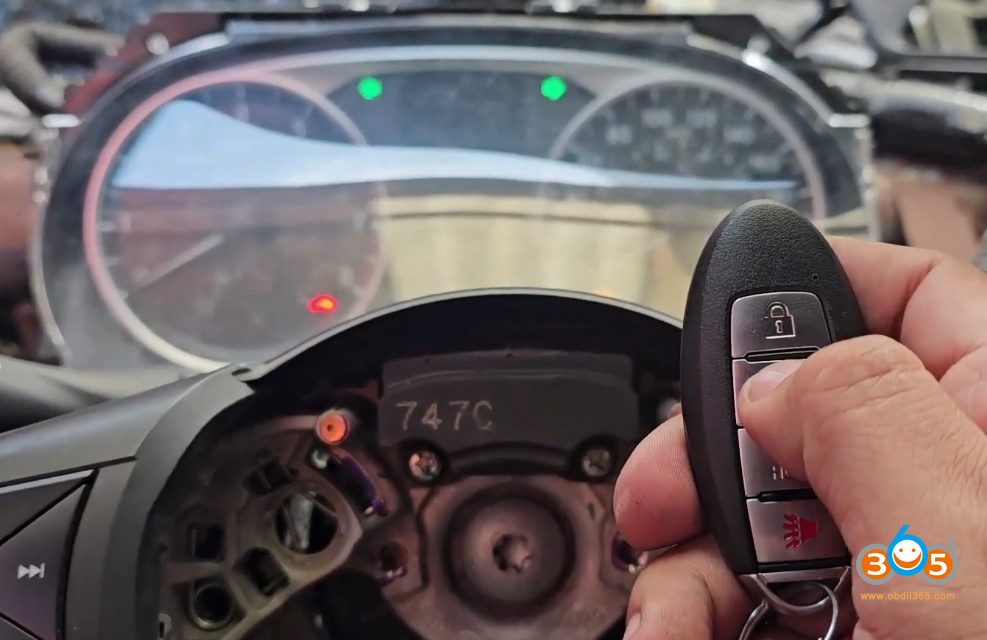
The test began with the standard aftermarket key. While the remote control functions (locking and unlocking) worked perfectly, the key struggled with passive detection.
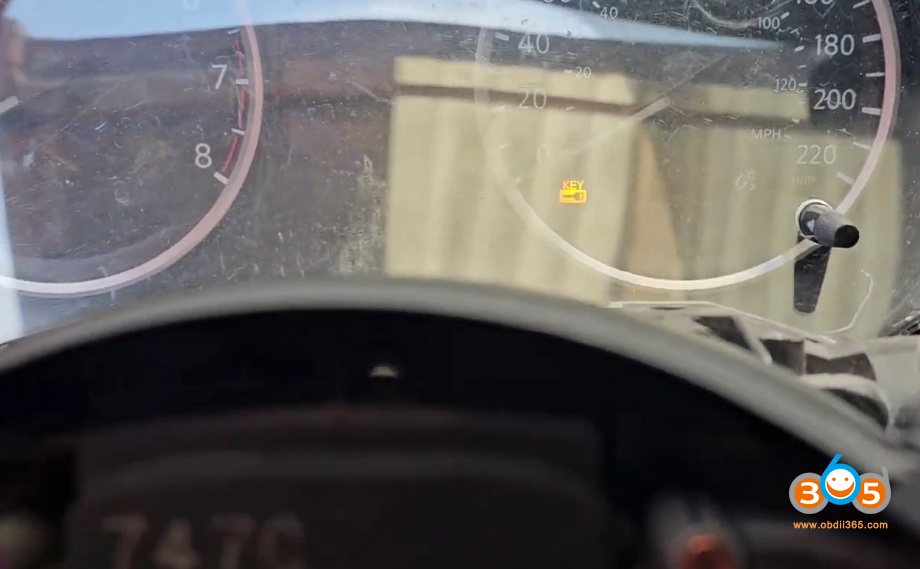
When we entered the vehicle with the key, the dashboard displayed an error message and a key warning light. The vehicle did not recognize the key’s presence, even though the remote buttons were functional. The engine could only be started by physically holding the key directly against the start button, indicating a severe lack of detection range.
Xhorse XS Series: Requiring Precise Placement
The first Xhorse key, the XS series smart key, was next. The results were slightly better but still problematic. Like the aftermarket key, it failed to be detected when we simply sat in the driver’s seat.
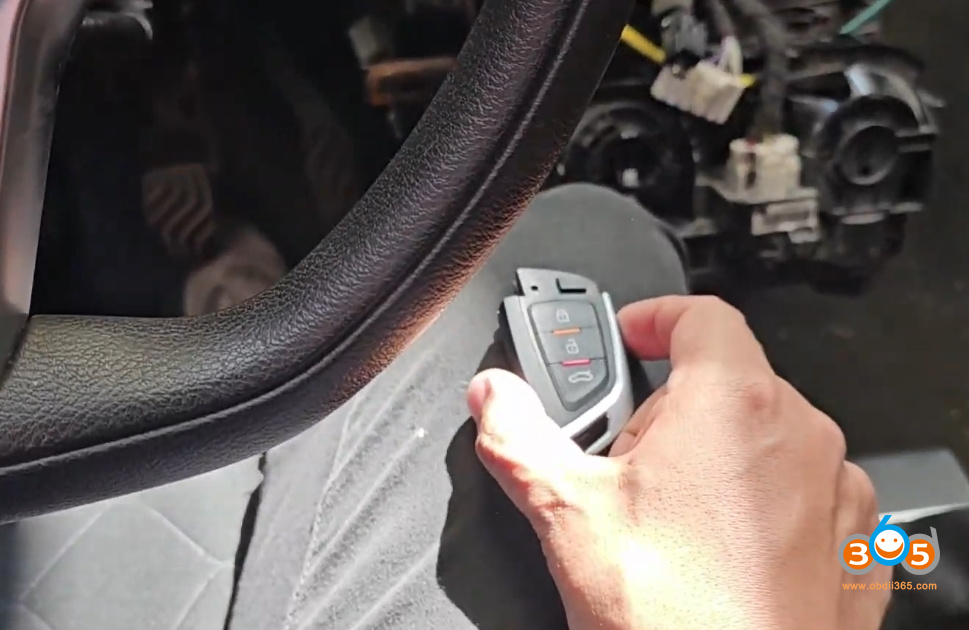
However, after some trial and error, it was discovered that the key would work if it was moved very close to the vehicle’s smart antenna, located near the driver’s right leg. While this is an improvement over the aftermarket key, the need for such precise placement would be inconvenient and unreliable for daily use.
Xhorse XM38 Series: A Noticeable Improvement
The Xhorse XM38 series key showed a marked improvement in performance. Upon entering the vehicle, the system almost immediately recognized the key, indicated by the prompt to press the clutch to start the engine.
To push the key further, we placed it in his back pocket, exited and re-entered the vehicle. Initially, the key was not detected. However, after a second attempt, the system recognized it. While better than the XS and aftermarket keys, the detection was not instantaneous from all locations, showing some inconsistency.
Autel Smart Key: The Clear Winner
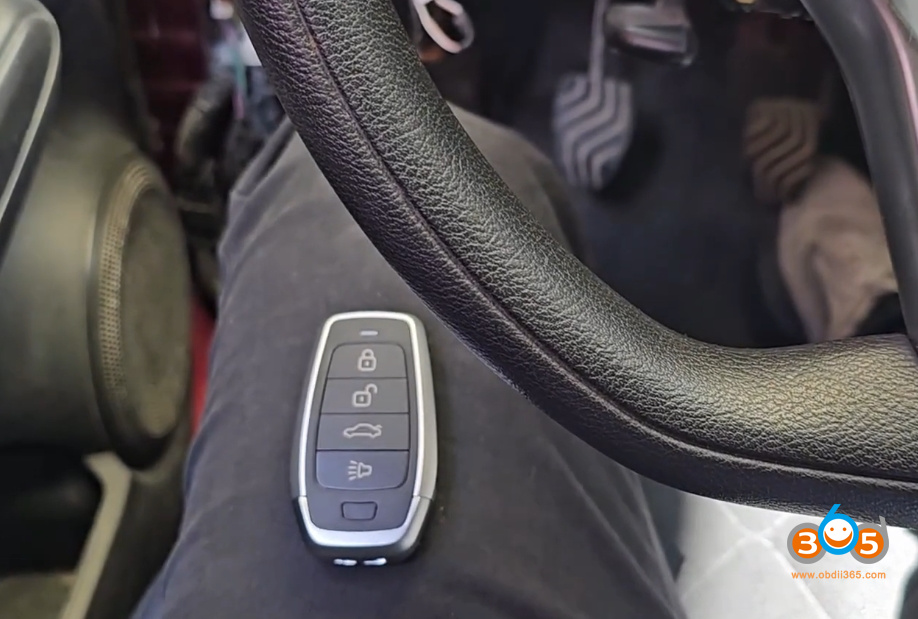
The Autel ikey universal smart key was the final key tested, and its performance was immediately superior. The moment we entered the vehicle with the key, the system detected it and prompted him to press the clutch. The engine started without any delay or need to reposition the key.
Then we conducted more extreme tests:
In the back pocket: The key was placed in the rear pocket, and the vehicle still detected it without issue.
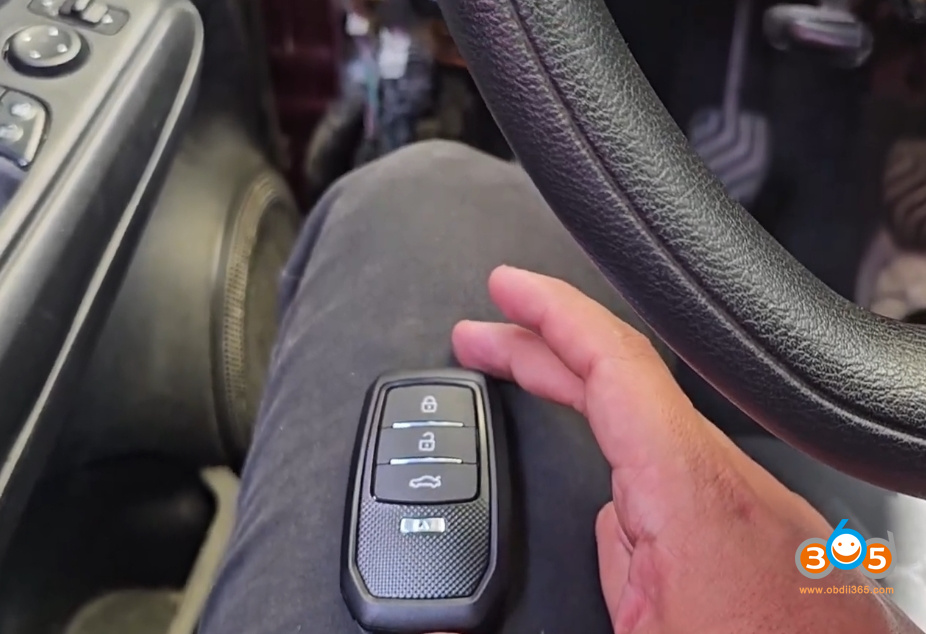
Extreme placement: The key was moved further to the left side of the vehicle’s interior, away from the typical antenna location. Even from this position, the vehicle consistently detected the key and allowed for a start.
Conclusion: Autel Dominates in This Test
For the 2018 Nissan Kicks tested, the Autel smart key demonstrated the most reliable and robust performance. It offered seamless detection from various locations within the vehicle, closely mimicking the performance of an original equipment (OE) key.
The Xhorse XM38 showed decent but inconsistent performance, while the Xhorse XS and the standard aftermarket key required the driver to place the key in a very specific, often inconvenient, location to start the car.
We notes that this is a single test on one vehicle model (Nissan Kicks). The results may vary across different makes and models. However, this comparison clearly shows that while a key may be programmable, its quality and the performance of its internal transponder and antenna can significantly impact the user experience. Further tests on other vehicle models are planned to see if Autel’s superior performance remains consistent across the board.
Problem:
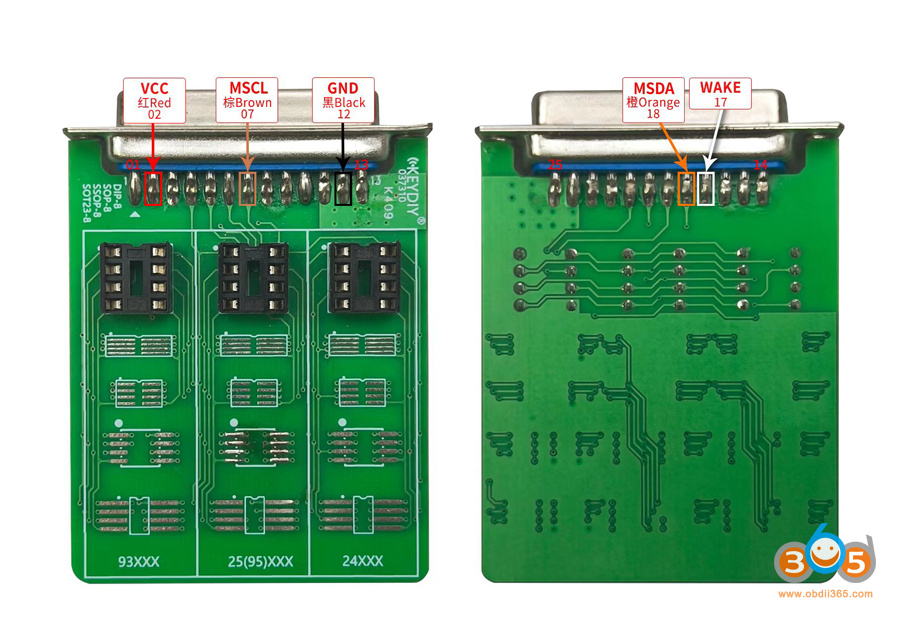
Failed to read BMW BDC3 encrypted key data with Keydiy KD-X4. The APP said the wake line is not connected. Any solution?


Solution:
The WAKE line (encrypted pin 17) is not connected.
Use the wrong adapter.
You can modify the keydiy adapter like this:

Or use the Keydiy dedicated DB25 adapter without modification.

In the world of ECU and TCU programming for chip tuning, two standout all-in-one tools dominate the market: Alientech’s KESS3 and Dimsport’s The Genius (the brand-new tablet version). Both devices now combine OBD, Bench, and Boot/Open modes into a single unit—eliminating the need for separate tools like the older KESS V2/K-TAG or Dimsport’s New Genius + New Trasdata setup.
This marks a major evolution for both brands. However, they differ significantly in hardware design, usability, performance, and workflow. Whether you run a busy workshop, do mobile tuning, or specialize in cars, trucks, bikes, or agricultural vehicles, the choice depends on your priorities: raw speed and advanced software vs. true standalone portability. Below is a side-by-side comparison focused on hardware, licenses/subscriptions, features, and real-world use cases.

Hardware & Build Quality
Alientech KESS3
Dimsport The Genius (New Tablet)
Key Difference:
KESS3 is a powerful “black box” that lives in your workshop next to a PC. The Genius is a true tablet you can take into the field or onto a truck/ag machine without dragging a laptop. This makes The Genius far more mobile-friendly.
Operating Modes & Compatibility
Both tools now support the full trio:
KESS3 adds TCU coverage (automatic/robotized transmissions) without extra protocol costs and integrates DynoDrive — an on-road power/torque measurement tool using the built-in GPS + OBD. The Genius emphasizes safety sensors and seamless use of legacy harnesses. Both cover cars, LCVs, trucks, bikes, marine, tractors, and off-highway vehicles with daily/regular protocol updates.
Performance & Features
Speed: KESS3 wins here — its CPU is 7× more powerful, and USB file transfer is up to 10× faster than previous tools (and faster than the old Dimsport Genius). Reads and writes are noticeably quicker, saving time on high-volume work.
Software Experience: KESS3 uses the redesigned Alientech Suite on Windows (cloud-based, daily-updated vehicle database, multi-language instructions, history/favorites, direct helpdesk).
The Genius runs everything on its large touchscreen — no PC software needed. Built-in ticket system, screen-mirroring for remote tech support, video tutorials, and “Dimsport World” news feed.
Extra Perks: KESS3 has DynoDrive for real-world dyno testing without extra equipment. The Genius offers offline operation and contract/license management directly on-screen.
Licenses, Subscriptions & Master vs. Slave
Both manufacturers use an almost identical licensing model: Master Version Full file reading/writing in clear text. Ideal for professional tuners who create their own maps.
Slave Version Files are encrypted — you read, send to your Master tuner for editing, then write back. Perfect for beginners or multi-shop networks.
Protocol Activations Purchased by vehicle group (Cars/LCV, Bikes/ATV, Trucks, Tractors/Agriculture, Marine, OHW, etc.).
OBD + Bench + Boot/Open are included in the same activation.
Subscriptions Annual renewal required for new protocols, software updates, and technical support.
First year is typically included with purchase.
Without renewal you can still use the tool with existing protocols, but you stop receiving updates.
Dimsport includes built-in contract management on The Genius screen to track expiry dates.
Pricing Structure (approximate, dealer-dependent as of 2026)
Base hardware + initial protocol packs + 12-month subscription.
KESS3 often starts around €3,000–4,000 for a Master Car/LCV package (plus extras for other groups).
The Genius follows a similar structure (replacing the old two-tool combo of New Genius + Trasdata, so overall cost is usually lower than buying both legacy units).
Annual renewals typically €1,000–1,500 per category or full bundle (exact figures vary by dealer and promotions).
No major difference here — both are premium tools with ongoing costs typical of the industry.
Which One Should You Choose?
Choose KESS3 if:
Choose Dimsport The Genius if:
Many tuners now run both for maximum coverage, but if you’re buying one tool in 2026, the decision boils down to workflow: PC-based power (KESS3) vs. tablet freedom (The Genius).
Final Verdict
The Genius represents Dimsport’s biggest leap yet — finally delivering a true all-in-one standalone tablet that obsoletes the old two-tool requirement. Meanwhile, KESS3 remains the speed king with superior software depth and on-road testing features. Both are future-proof, reliable, and backed by strong manufacturer support. The real winner is the tuner whose daily workflow matches the tool’s strengths.If you’re upgrading from older KESS V2/Ktag, New Genius, or Trasdata, both offer excellent value and trade-in opportunities. Check current pricing and protocol coverage directly with www.obdii365.com for the latest 2026 bundles.
Question:
Japanese import Audi q5 2018 mlb key 315mhz frequency. Done couple of 433mhz ones but never 315Mhz one. Japan versions of Audi has MLB 315mhz. Want to change frequency from 433 to 315 on mlb Audi smart key.
Can we generate a 315mhz MLB key with Keydiy KD-MP mlb tool? Or possible to change KD MLB keys from 433Mhz to 315Mhz.
Here is the clue.
The Keydiy MLB08, MLB19, MLB26 and MLB65 keys come with a built-in 433MHz frequency that cannot be changed after programming.
If your vehicle’s original key uses 434MHz, be sure to select the corresponding 434MHz key. These MLB series keys are programmed with a fixed frequency and cannot be switched to 315MHz during or after generation.
If your vehicle requires a 315MHz MLB remote, choose the 315MHz version. Please note that 315MHz MLB keys typically cost more than the 433MHz versions.
KD only offers OEM-solution 315MHz MLB keys, and like the 433MHz versions, the frequency cannot be changed after programming.
The OEM-solution 315mhz MLB keys are also compatible with VVDI MLB Tool. But it cannot work with KDYZ device.
If you need a 315MHz KD remote, contact www.obdii365.com customer service.

Problem:
Added keyless entry to an 2023 Audi A3 8Y MQB49 5D system using Keydiy KD-X4 and now the keyless entry no longer works (locking and starting work). When I pull the handle, the LED on the key flashes, but the car doesn’t unlock. Any solution?

Solution:
Audi A3 5D uses a UWB key that’s why proximity in handles doesn’t work; you must use original uwb key.
1 uwb key + 1 non-uwb key = no UWB function.
Keydiy FGB08 comes with the 5D basic program. It does not currently support vehicles with UWB functionality.
It only supports the 5D program for all vehicle models.
Customer solution:
It happened to us on VW Polo 5C key , than we added the KD key first and the original key as second and it helped, the Keyless entry and start was working as it should.
It is worth a try.
How to tell VW Golf8 5D Key Type and Shell?
Part I: How to tell VW Golf 8 style MQB49 5D key type from key boards?
MQB49 5C vs 5D smart key
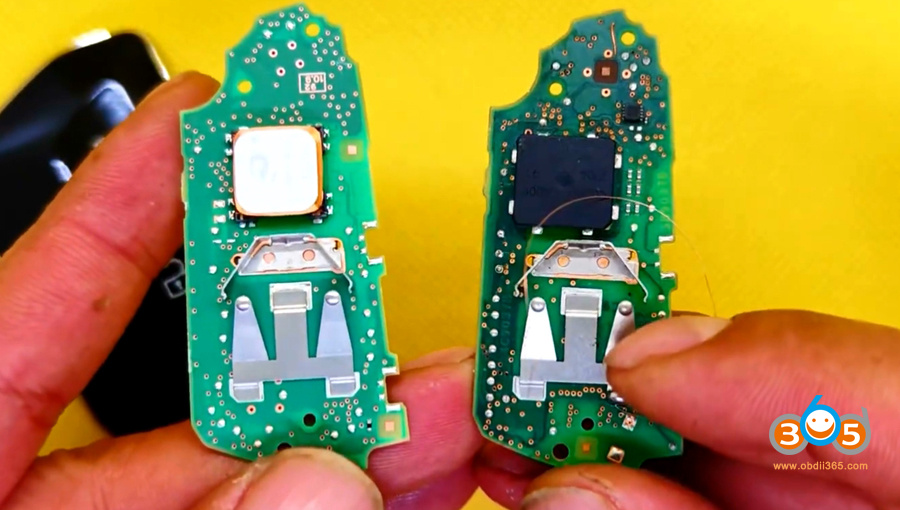
The 5D key PCB has a different chip and also includes an additional acceleration sensor (keyless entry sensor).
5D key is not interchangeable with the 5C key. Commonly used in the VW Golf 8, ID.3, ID.4, and electric vehicle series.

The VW Golf 8 style 5D key board comes with a white coil or a black coil; the two are interchangeable.
The difference is the production date.
The black coil key board (753B) was manufactured earlier.
The white coil (753D) is for vehicles produced after 06.2023.

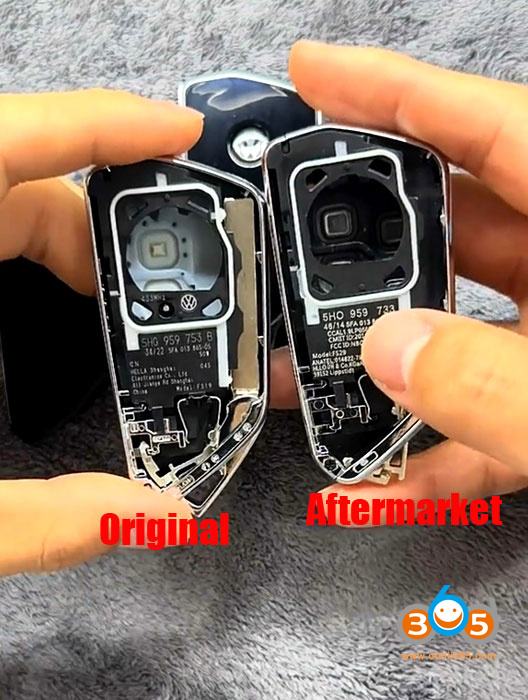
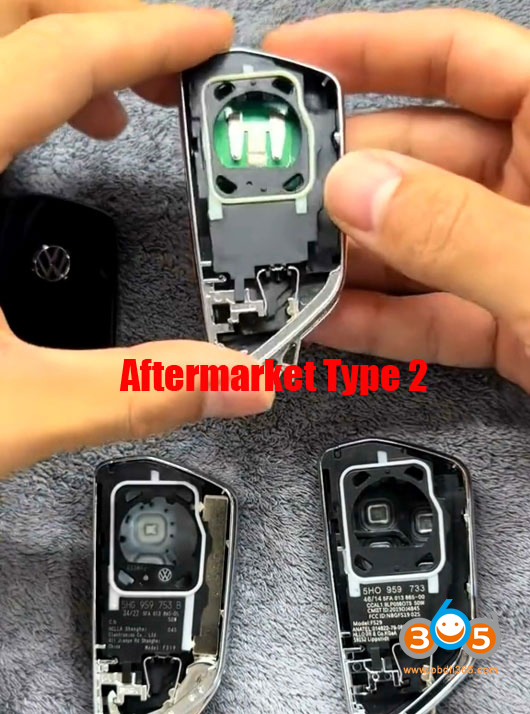
Part II: How to tell VW Golf 8 MQB49 5D Key shell is original or aftermarket?

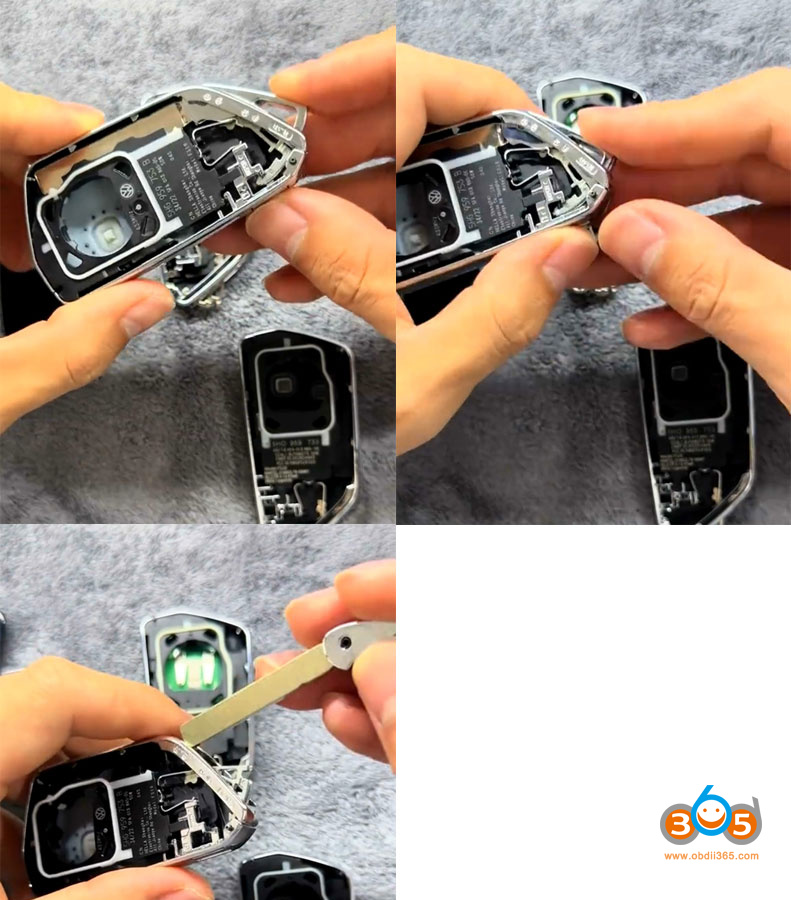
There are currently 3 key shells on the market.
This is the original Golf 8 5D key shell.
It shows the 433 frequency and has the Volkswagen logo, and the font is thinner.

With the original, you press this button, and the mechanical key pops out easily.
Aftermarket key shell type 1
This aftermarket key shell does not have the frequency or the VW logo, and the font is thicker.
Aftermarket key shell type 2
This one has nothing on it at all.
With aftermarket key shells, the mechanical key is much harder to pull out.
Tools to add MQB49 5D key: