2021/09/22

How to Write 2001 Landrover Freelander EWS Key?

 Problem: 2001 Landrover Freelander it’s say unclonable on Xhorse VVDI Key Tool Max ! Any idea please?

vvdi key tool max clone 2001 freelander key 1


Possible reason:

It means you can’t clone it as in uncloneable as opposed to cloneable which means you can clone it.


How to do next?

Rolling code same as bmw, you have to write it to the module. EWS u cant clone the key Id must remove ews if u don’t have programmer or u don’t know how this system works do more research buddy but since I read that u said uncloneable and u don’t know 7935 chip.

means still u r new in this field cheers no offense I recommend you read more here is a push for you to search about Ak90 its your tool to do the job.


How to write 2001 Landrover Freelander key with AK90?


Step 1:Remove the EWS3 Module


Lange Rover Freelander’s EWS3 module is located below the park brake handle.

write 2001 Landrover Freelander key with AK90 1


Open the elbow reset, and remove the cup holder, straight upward. Set aside.Great place to store the screws you are about to be removing next.

write 2001 Landrover Freelander key with AK90 2


Rove these two T20 from under the cup holder.

write 2001 Landrover Freelander key with AK90 3


Under the trim around the base of the shifter,are 4 more T20.The trim around the shifter can be moved to access them all.

write 2001 Landrover Freelander key with AK90 4


Now the larger trim around the top of the center console,can be shifted from side to side,revealing the EWS3 module.

write 2001 Landrover Freelander key with AK90 5


The target module EWS3,is mounted on the drivers side of the shifter gear box.White Box Approx.3”x2”x1”

write 2001 Landrover Freelander key with AK90 6


A single 8mm head bolt secures the box in.Remove it and start working the EWS backwards towards the cup holder.

write 2001 Landrover Freelander key with AK90 7


Typically there is enough wire slack to move the box to the void where the cup holder was removed. Disconnect the single plug and take the EWS to the bench.

write 2001 Landrover Freelander key with AK90 8


This is a standard EWS3.I have seen them replaced with the following generation by the dealer.i.e.an EWS4 where and EWS3 was original.

write 2001 Landrover Freelander key with AK90 9


Here’s the board removed from the box. The target chip we need to remove from PCB is 0D46J,it is a 52 leg Plastic Leaded Chip Carrier(PLCC).Note PIN 1.

write 2001 Landrover Freelander key with AK90 10


It is very important when dealing with these EWS1-3 that you verify that the device is Mark 0D46J. Sporadically throughout its use, EWS can contain 2D47J. If you attempt to read a D47J as a D46J, you will corrupt the file.

write 2001 Landrover Freelander key with AK90 11


Connect the AK90 key programmer hardware and start the software. Verify that the proper device is selected.

write 2001 Landrover Freelander key with AK90 12


Both I,and the makers of the AK90 can not express how important it is not read a 2D47J as a 0D46J.You “Must” do it.

write 2001 Landrover Freelander key with AK90 13


Clean the lacquer off the 53 legs,either use chemicals such as ZipStrip or abrasives like this wire brush.

write 2001 Landrover Freelander key with AK90 14


Make sure the adaptor is oriented properly to Pin 1.I find that you cannot just clip this on.More likely that you must hold it download as you attempt the read.The read takes approx. 20 to30 seconds.If it fails,check for lacquer residue and adjust the adaptor to reestablish the connection.

write 2001 Landrover Freelander key with AK90 15


With all settings and connections established,click the read EWS button.There is both a visual and audio effect(ticking) as the AK90 read.
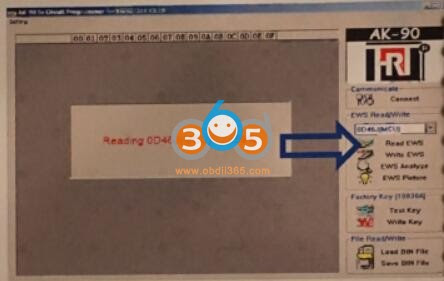
write 2001 Landrover Freelander key with AK90 16


Once the AK90 recognize the BIN file,it will auto open the Save AS Window,and auto name the file based on the info read.

write 2001 Landrover Freelander key with AK90 17


Connect the IKeyClone to the PC and start the SW.UtilitiesàKey GeneratoràKey By DumpàBMWàEWS.

write 2001 Landrover Freelander key with AK90 18


This window gives a few more details and the option to Open the Bin File.Check here.

write 2001 Landrover Freelander key with AK90 19


Select the AK90 save file(I know the file name doesn’t match the previous images,but you are smart enough to follow along,nonetheless.)

write 2001 Landrover Freelander key with AK90 20


We know that the IKC has accepted the file because there were no error messages and the options buttons illuminated.This screen displays useful info such as keys programmed and the sync code.

write 2001 Landrover Freelander key with AK90 21


We can see that 3 of 10 slots are occupled,so I will be selecting a slot a “long distance” from the last existing key,as to not interfere with keys ordered from the manufacturer.You can also overwrite existing transponders.

write 2001 Landrover Freelander key with AK90 22


Verify that an acceptable transponder,here a 7935,is located on top of the IKC hardware as shown on the top.

write 2001 Landrover Freelander key with AK90 23


Then click the write transponder button and then verify that “TP Generated OK!” appears.This can take 20 to 45 seconds.

write 2001 Landrover Freelander key with AK90 24


Note:IKC didn’t require a new bin file to be generated or named.This is our cue that a rewrite of the device is unnecessary.So return everything to the vehicle and test your work.I have provided the following picture of different locations you may find the EWS modules.A vest majority of them are located near the driver’s left foot and are EWS3 generation.

write 2001 Landrover Freelander key with AK90 25

write 2001 Landrover Freelander key with AK90 26

write 2001 Landrover Freelander key with AK90 27


Good to know:

The AK90 in blue and white color (shown as above) is not available now, please choose AK90+ V3.19 instead. It can program EWS key from 1995 to 2009 year.

write 2001 Landrover Freelander key with AK90 28


http://blog.obdii365.com/2021/09/22/2001-landrover-freelander-pcf7935-cannot-be-cloned-only-write-key/

2021/09/16

How to Set up Autel Tools Mail Box?

 The guide here helps those who failed to configure the mailbox on autel tablet diagnostic tools, Autel Maxisys, MaxiCOM, MaxiDAS, MaxiPro, MaxiIM series etc.


You need first configure on your mail box then set up on Autel tablets.


Step 1: Log into your Gmail on PC/laptop and click the Setting icon- See all settings – Forwarding and POP/IMAP

configure-autel-tools-mail-box-1

Step 2: Enable POP and IMAP and save changes.

configure-autel-tools-mail-box-2

Step 3: Click “Manage your Google Account” , then go to Security

configure-autel-tools-mail-box-3

Step 4: Turn on “Less secure app access”

configure-autel-tools-mail-box-4

Step 5: Go back to your Gmail inbox and check the Google alert email and confirm the activity.

configure-autel-tools-mail-box-5

Step 6: Go to the Home page of the Autel scan tool and click “System Settings” – “Add account”-

configure-autel-tools-mail-box-6

configure-autel-tools-mail-box-7

Step 7: Input your Gmail address, password and click next. Or input your Gmail email address, password, and click “Manual Setup”.

configure-autel-tools-mail-box-8

Step 8: Click on “POP3”

configure-autel-tools-mail-box-9

Step 9: Set the Incoming server settings as below:

Server: pop.gmail.com

Security type: SSL/TLS

Port: 995

Press Next

configure-autel-tools-mail-box-10

Step 10: Set the Outgoing server as below:

SMTP server: smtp.gmail.com

Security type: SSL/TLS

Port: 465

configure-autel-tools-mail-box-11

Step 11: Set Inbox Checking frequency as “Every 5 minutes”

configure-autel-tools-mail-box-12

Step 12: Input your Name for your account.

configure-autel-tools-mail-box-13

Step 13: Email account was set up successfully!

configure-autel-tools-mail-box-14

NOTE: Please reboot the autel scanner and reset the wifi connection when it shows “Couldn’t open connection to server” error. Sometimes the server does not respond, please keep trying.

configure-autel-tools-mail-box-15

www.obdii365.com

2021/09/13

Check if JLR Keys Allow ID to be Changed

 Question: 

I need to duplicate a new key to a Land rover sport 2015 with Yanhua Mini ACDP and module 9. It asks for a special key that can change ID correctly on the BAV key adapter.

Where can I find the aftermarket Landrover/ Jaguar keys that allow the ID to be changed/modified?

JLR Keys Allow ID to be Changed 1

Solution:

KeyDIY zb series zb26 5 button clone. Works to change id
How to change if the JLR key ID can be changed?
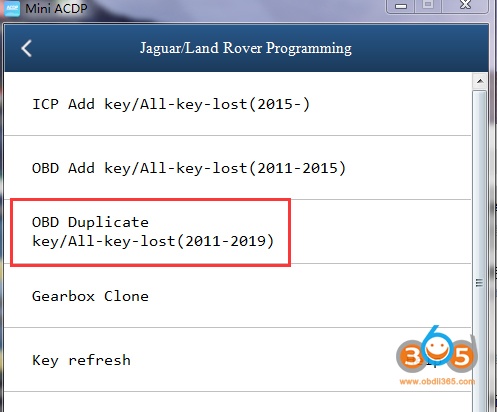
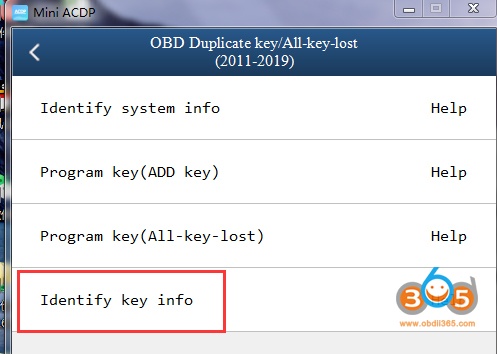
In Yanhua ACDP App, select Jaguar/Land Rover programming – OBBD Duplicate key/All keys lost (2011-2019) – Identify key info
JLR Keys Allow ID to be Changed 2
JLR Keys Allow ID to be Changed 3
It will show you whether the key ID can be modified or not.
Guide:

2021/09/07

Launch XPROG3 BMW CAS4 ECU Not Supported Solution

 Problem:

I got the X-PROG3 immo add-on programmer for Launch X431 PAD VII. Pad 7 failed to add key on my BMW 2013 F30 320D CAS4.

Error: Current ECU software not supported.

Current IMMO type is not supported.

Launch X431 XPROG3 BMW CAS4 ECU Not Supported  1

Launch X431 XPROG3 BMW CAS4 ECU Not Supported 2

Launch X431 XPROG3 BMW CAS4 ECU Not Supported 3

Solution:

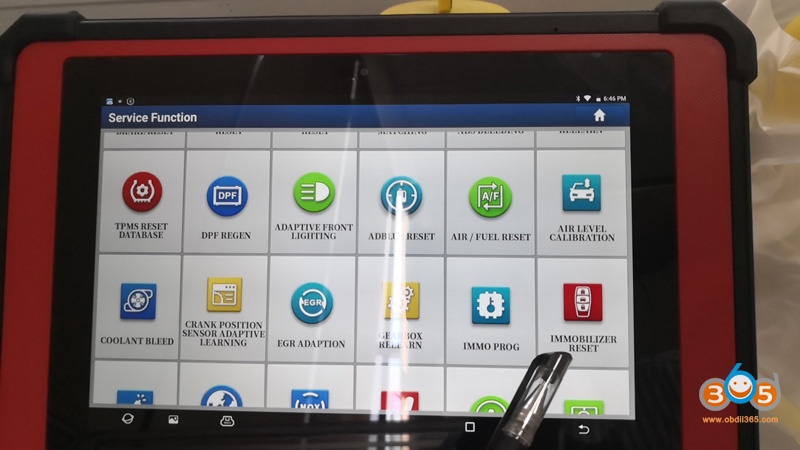
XPROG3 IMMO function is done via Service Function- Immobilizer Reset. 

You have selected the wrong menu. BMW CAS key cannot be programmed via BMW anti-theft system menu.

Launch X431 XPROG3 BMW CAS4 ECU Not Supported 4

www.obdii365.com

http://www.key-programmer.org/2021/09/08/launch-x431-pad-vii-failed-to-add-bmw-f30-cas4-key/

2021/09/06

How to Choose BMW ECU Coding and Programming Tools?

 Launch X431 PAD V/Pad VII, Autel MaxiCOM MK908P/Maxisys Elite and Autel MaxiSys Ultra can perform ECU coding and programming for almost all BMW vehicles.


The Coding function is used to re-flash the vehicle control modules, it allows you to update the computer software on the vehicle to the latest version, as well as to reprogram adaptive data for certain components after making repairs or replacements, providing ways for the issues of Drivability, Fuel Efficiency, Power Loss, Fault Codes, Durability of Mechanical Parts.


The diagnostic tool can reflash the vehicle control modules, to update the in-car computer software and reprogram adaptive data for certain components, fixing issues of drivability, fuel efficiency, power loss, fault codes and durability of mechanical parts.

  • Coding: reprograms adaptive data for vehicle control modules after repairs or replacements of vehicle parts;
  • Reprogramming: downloads newest software version from the online server database and reprograms it to the ECU.


Autel MaxiCOM MK908P Pros:

Online, cloud-based ECU coding and programming in the U.S through its J2534 interface.


The diagnostic tool comes with a J2534 ECU programming tool (also used as a VCI box) that is a SAE J2534-1 & -2 compliant pass-thru reprogramming interface device. Using the updated OEM software, it is capable of helping BMW and Mercedes Benz users replace the existing software/firmware in the Electronic Control Units (ECU), program new ECUs and fix software-controlled drivability issues and emission issues. It supports BT and USB communications and can transmit vehicle data to the MaxiCOM display tablet with or without a physical connection.


Autel MaixSys Ultra and Launch X431 PAD V Pros:

√J2534 protocol

√Online programming/coding,

√Support D-PDU and RP1210 protocols to extend compatibility with more passenger and commercial vehicles globally. The VCMI modules in both devices also support other protocols like CAN FD and DOIP.


Autel MaxiSys Ultra Pros:

Checks all the boxes any mechanic could want from a non-OEM coding and programming tool with its powerful 5-in-1 VCMI paired with extensive protocol support.


BMW programming tool: Autel MaxiSys Ultra Vs. Autel MaxiCOM MK908P Vs. Launch X431 PAD V


 Autel MaxiCOM MK908PAutel MaxiSys UltraLaunch X431 PAD V


Coding /Programming9/1010/1010/10
System diagnostic10/1010/1010/10
Advanced service10/1010/1010/10
Bi-directional10/1010/1010/10
D-PDU/ J2534/ RP1210J2534D-PDU/ J2534/ RP1210D-PDU/ J2534/
VCMIn/aYesYes 
Price$2,199$4,500-$5,000$3499 


Autel MaxiSys Ultra wins in advanced system diagnosis  

Access your ECU to deliver full, intelligent diagnostics on every system in your BMW. They can access the engine body system, navigation system, airbag system, audio system, suspension system, or other systems to do what they do best; perform in-depth diagnoses on your car. The ability to access all modules in all systems is pretty much expected at the price points of these scanners.


Take Autel MaxiSys Ultra for example, it displays the current module status and number of DTC per module, as well as shows the communication structure between the system modules. It also has better specs for faster and smoother diagnostics.


MaxiSys MK908P works in combination with the diagnostic tools to your greatest advantage:

  • The MaxiScope MP408, a PC based automotive oscilloscope, giving you an insight to the inner workings of a vehicle’s electronic circuits;
  • The MaxiVideo MV105/108, digital inspection cameras, allowing you to examine difficult-to-reach areas normally hidden from sight.


Launch X431 PAD V or Pad VII wins in Advanced service function

1). X431 PAD V has the abilities of oil lamp reset, injector reset, EPB reset, steering angle calibration, battery maintenance, ABS bleeding, TPMS reset, DPF regeneration, gear learning, key coding, AFS, gearbox, suspension, sunroof reset, tire change reset, multimedia video reset, cluster reset, immobilizer service, air suspension matching, seat matching, and headlight fitting.

launch x431 pad v special functions 1

launch x431 pad v special functions 2

2). Autel MaxiCOM MK908P special functions

Oil Reset Service, EPB Service, SAS Service, DPF Service, TPMS Service, IMMO Service etc


3). Autel MaxiSys Ultra special functions

ABS bleeding, TPMS, SRS reset, Oil reset, EPB, BMS, IMMO service, DPF regeneration, injector coding, SAS calibration, throttle adaption, sunroof initialization, seats calibration, gear learning, A/F setting, WIN DR roof, headlight matching, odometer, CHG tire size, trans adaption, neutral gear position learning, torque sensor adjustment, clutch pedal position learning, cylinder power balance, signal check, yaw rate sensor (YRS) learning, auto-door lock, component matching, stop/start reset and many more.


Launch X431 PAD V wins in Bidirectional controls

Launch X431 PAD V offers both local diagnostics and remote diagnostics without being physically around the vehicle. So, PAD V is recommended although all of three devices has the ability of bidirectional controls: transmit control commands to the ECU to test the actuators in specific systems or components so you can locate the problem easily. This will save you from spending time and effort to take the vehicle apart. With the bidirectional controls, you can go inside your front wiper, rear wiper, parking, license plate lamps, tail lamps, A/C compressor, door switch, and many more with the three devices.


Besides,  LAUNCH X431 PAD V can perform online programming for also BMW, Mercedes, VW, Audi, Seat, Skoda, Porsche, Nissan, Infiniti, Subaru, it can supports SCN coding until the 2020 model! (PS: Online Programming function has not been authorized in the USA, Canada, and Spain.)

launch x431 pad v feature


Autel MK908P and Launch X431 PAD 5 win in BMW vehicle coverage


Besides, new BMW, MINI, and Rolls Royce vehicles made in the 90s.

Autel MaxiCOM MK908P and Launch X431 PAD V are packed with an adapter for OBD1 BMW vehicles that you can use if you have an older BMW.


BMW vehicleAutel MaxiCOM MK908PAutel MaxiSys UltraLaunch X431 PAD V
1 SeriesE81, E82, E87, E88, F20, F21F40, F20, F21, F52, E81, E82, E87, E88All EU Models
2 SeriesF22, F23, F45, F46, F87F22, F23, F44, F45, F46, F87All EU Models
3 SeriesE30, E34, E36, E46, E90, E91, E92, E93, F30, F34, F80E90, E91, E92, E93, F30, F31, F34, F35, F80, G20, G21, G28All EU Models
4 SeriesF32, F33, F36, F82, F83F32, F33, F36, F82, F83, G22All EU Models
5 SeriesE60, E61, F07, F10, F11, F18, F90E60, E61, F07, F10, F11, F18, F90, G30, G31, G38All EU Models

www.obdii365.com

2021/09/02

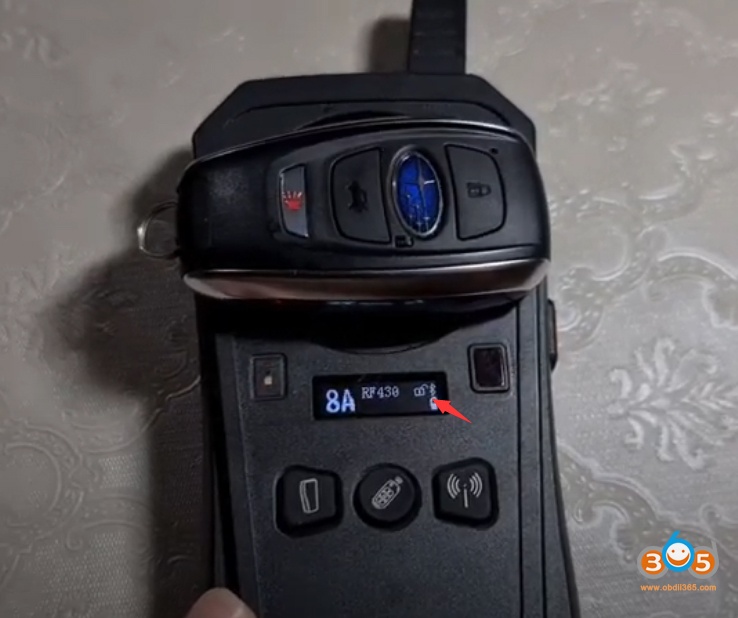
Keydiy KD-X2 Unlock Subaru Smart Key

 Keydiy KD-X2 remote maker is the perfect device for Subaru smart keys unlock/renew.


Keydiy unlock Subaru 8A smart key
433Mhz
Keydiy KD-X2 Unlock Subaru Smart Key 1

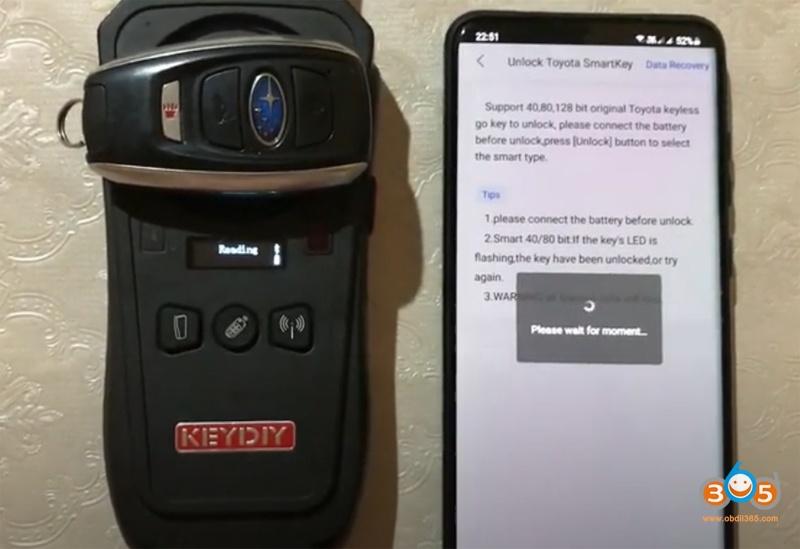
Keydiy KD-X2 Unlock Subaru Smart Key 2

Keydiy KD-X2 Unlock Subaru Smart Key 3

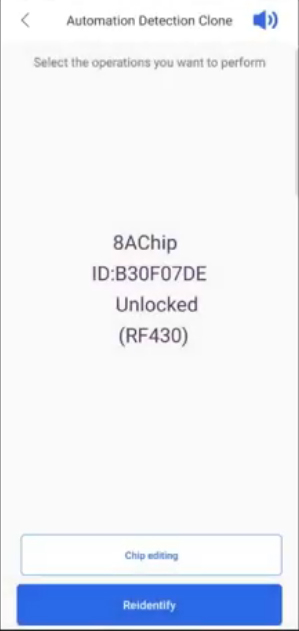
in Keydiy App, select Chip Function- Unlock Toyota Smart Key – Unlock- RF430 128bit- Identifying
Keydiy KD-X2 Unlock Subaru Smart Key 4

Keydiy KD-X2 Unlock Subaru Smart Key 5

Unlock 8A smart key success
Keydiy KD-X2 Unlock Subaru Smart Key 6
Keydiy KD-X2 Unlock Subaru Smart Key 7
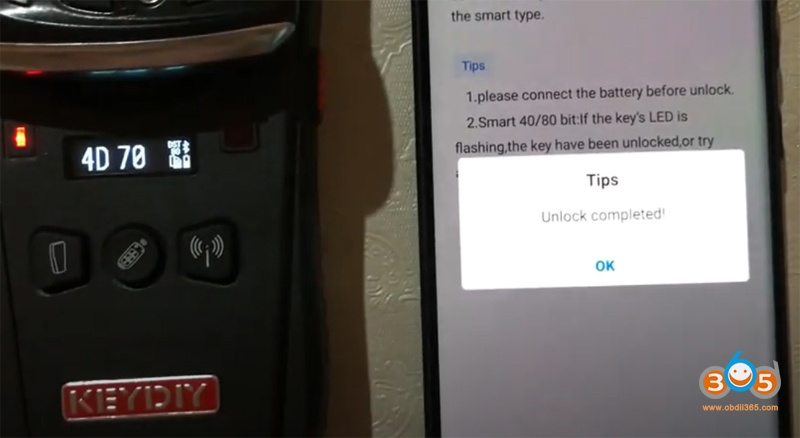
KD-X2 renew Subaru 4D smart key
314Mhz
Keydiy KD-X2 Unlock Subaru Smart Key 8

Keydiy KD-X2 Unlock Subaru Smart Key 9

Same procedure as 8A smart key renew
Keydiy KD-X2 Unlock Subaru Smart Key 10
Keydiy KD-X2 Unlock Subaru Smart Key 11
Renew 4D smart key success.

http://www.key-programmer.org/2021/09/03/unlock-subaru-4d-or-8a-smart-key-with-keydiy-kd-x2/

Disable 2019 Jaguar F Pace Key with Yanhua ACDP

 Question:

Possible to use Yanhua Mini ACDP to disable 2019 Jaguar F Pace KVM key? If yes, only one key or all keys can be disabled?


Answer: 

Yes, requires ACDP Mini host+ Module 9

Follow this way:

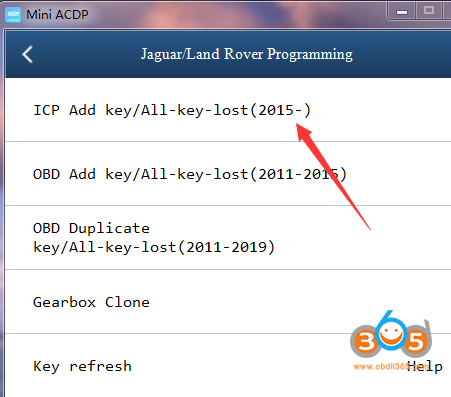
Go to Jaguar/Land rover Programming- ICP Add key/All keys lost (2015-) – KVM ICP(MC9S12XEQ384) – Disable Key and follow screen operation

You can disable all keys with ACDP.

yanhua acdp disable jaguar key 1

yanhua acdp disable jaguar key 2

yanhua acdp disable jaguar key 3