Showing posts with label Orange5. Show all posts

2024/09/06

Tools to Read Nissan SPANSION S6J329 MCU

 Entry question:

2021 Nissan Juke any tools able to correct mileage on these clusters?
Mileage in mcu SPANSION S6J329.
What type of programmer is this to read the s6j329??

2021 Nissan Juke s6j329 1

2021 Nissan Juke s6j329 2

2021 Nissan Juke s6j329 3

2021 Nissan Juke s6j329 4

2021 Nissan Juke s6j329 5

S6j329 MCUa are found in newer Nissan Juke Sentra 2020+ and some Maada models.


What tool to read this MCU?

1. IProgPro original can read and write. You need iprogPro to do this. (Iprog+ not support anymore)

iprog pro nissan s6j329

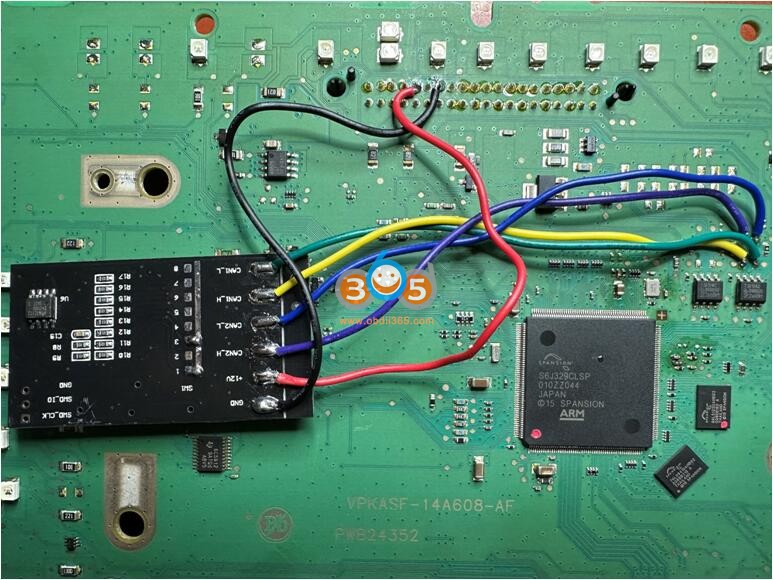
2. This Cluster can be read by Orange5 programmer (16mhz oscillator)

Ornage5 Nissan Juke S6J329C pinout

Ornage5 Nissan Juke S6J329C 1

Ornage5 Nissan Juke S6J329C 2

3. CGDI released update for CG100X
add support chip

S6J329C S6J334B
S6J334C
S6J334D
S6J334E

CG100X will read and write S6J329C is CPU is not secured.

cg100x Nissan Juke S6J329C

4.

Digiprog4. with dp4 you can read and write.
Supports S6J329CLSP – programming/testing by diagnostic way (C22)


5. Use CAN Filter solution.

1). Type 1 Non-full LCD instrument cluster
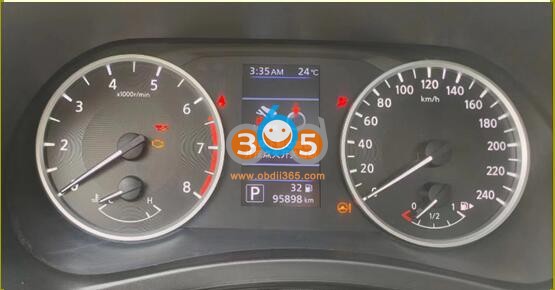
Nissan S6J329C can filter 1

Remember the mileage of the original car, remove the dashboard.

Read the 25640 data and someone to modify data. This guy has CAN Filter and modify data. We are not responsible for the damage. Email 4252106@qq.com.

Nissan S6J329C can filter 2

Write 24c16 data to the filter (24c16) and 25640 data to the dashboard (25640), and short-circuit the can filter switch accordingly.

Nissan S6J329C can filter 3

Nissan S6J329C can filter 4

Solder the filter according to the wiring diagram provided, Install dash on to car after soldering is completed.

When the dashboard is installed on the car, the dashboard shows 0KM, and after driving 1KM on the road, it will be the mileage you want.


2). Type 2: Nissan full LCD instrument cluster

Nissan S6J329C can filter 5

Remember the mileage of the original car, remove the dashboard.

Nissan S6J329C can filter 6

Use programmer to read S6J329 MCU data, change to your desired mileage.

Also contact that guy what value you need to change.

Write 24c16 data to the filter (24c16) , short-circuit the can filter switch accordingly.

Nissan S6J329C can filter 7

Nissan S6J329C can filter 8

Nissan S6J329C can filter 9

Nissan S6J329C can filter 10

Solder the filter according to the wiring diagram provided, Install dash on to car after soldering is completed.

Driving 2 km on the road, everything is normal.

Nissan S6J329C can filter 11

The new Sylvie is also the same as the Mazda3, which requires a filter to handle it.
However, the Mazda3 does not need to read the data of the S6J329, and it can be directly installed to achieve the purpose you want to modify the mileage.

mazda alexa connection


2024/07/19

Orange5 Pinout to Volvo CEM R5F64524KFD

 Reading and writing Volvo CEM R5F64524KFD is possible in two ways with Orange5 programmer via SPI and UART.


Model example:

Volvo XC70 diesel CEM p3


Did it with orange5 programmer. The processor is Renesas R5F64524KFD.


1. We remove and disassemble the CEM.

Orange5 Pinout to Volvo CEM R5F64524KFD 1

2. Here are R5F64524KFD SPI and UART pinouts to orange 5

Orange5 Pinout to Volvo CEM R5F64524KFD 2

Here we chose SPI (no need to lift the 19th leg).

Orange5 Pinout to Volvo CEM R5F64524KFD 3
3. Select the processor and reading method

4. Solder according to the diagram above

Orange5 Pinout to Volvo CEM R5F64524KFD 4

5. Then read, edit the dump and write it back.

For example, if need to activate the webasto control with standard key.

This function is located at the addresses in the photo below (on the left is the original, on the right is the corrected one).

Orange5 Pinout to Volvo CEM R5F64524KFD 5


2024/07/18

Unlock Audi Chorus Radio Code by Orange5 & iProg

 Here is the tutorial on unlocking the Audi Chorus radio Code using Orange5 & iProg programmers. 

Unlock Audi Chorus Radio Code by Orange5 & iProg 1

Car example:
AUDI Audi A3 Sportback 1.6 2010


Radio:
Audi Corus
Blaupunkt


How to:

The radio code unlock was done by Orange5 and Iprog.
You can use online services or programmers).
The process of disassembling the radio is simple.
The Eeprom (95128) itself was read by the Orange 5 programmer via a clip. Save the dump to the computer and open the Iprog program. In the iProg program, click editor and open the saved dump, then open the AUDI eeprom SPI calculator by BLAUPUNKT, click apply and get the PIN. Assemble radio and check.

Unlock Audi Chorus Radio Code by Orange5 & iProg 2

Unlock Audi Chorus Radio Code by Orange5 & iProg 3

Unlock Audi Chorus Radio Code by Orange5 & iProg 4

Unlock Audi Chorus Radio Code by Orange5 & iProg 5

Unlock Audi Chorus Radio Code by Orange5 & iProg 6

Unlock Audi Chorus Radio Code by Orange5 & iProg 7

Unlock Audi Chorus Radio Code by Orange5 & iProg 8

Unlock Audi Chorus Radio Code by Orange5 & iProg 9

Unlock Audi Chorus Radio Code by Orange5 & iProg 10


2024/07/04

Clone Volvo CEM R5F64525 with Orange5

 Need to clone Volvo V60 CEM R5F64525KFD (Part number 31327996 BG9T-14C256-GA).  Which tool will read and write this mcu?


Xhorse VVDI Prog: only supports reading.

Yanhua Mini ACDP: supports reading only.


You have a couple of options:

1). Read pin with VVDI Prog/Yanhua ACDP and input it to I/O Terminal or OBDSTAR DC706 (DC706 will not read pin, it will ask for pin code), then clone it by OBD

2). Original Orange5 or some v1.35 or v1.36 new type of clone or v1.34 clone from 2017 or 2018

3). Original Xprog programmer.


Decided to connect v1.34 Orange5 to read as R5F64524KFD instead of R5F64525KFD. Before attempting, checked memory addressing in datasheets of both MCUs and it clearly showed that everything except the bigger (1024 KB for R5F64525KFD) flash is identical (R5F64524KFD has 768 KB flash).

Decided to first play with actual R5F64524KFD to make sure mthe Orange5 is working with at least correct MCU properly.
Spent quite a bunch of time to figure out connection, but figured it out and connected as follows:

Clone Volvo CEM R5F64525 with Orange5 1

Clone Volvo CEM R5F64525 with Orange5 2

Red, Purple to VCC
Black, Grey to GND
Blue to RXD
Green to TXD
Yellow to RST
Orange to PXD

But, unfortunately, it didnt read it… “RST signal low” or something like that…
Digged further, figured out you have to cut the reset pin here:

Clone Volvo CEM R5F64525 with Orange5 3

After cutting reset on PCB, the orange5 clone read and write every area (D flash, Eeprom, Flash).

Moved onto R5F64525KFD, took the donor unit (same part numbers), tried reading – and it WORKED!
Read original unit Dflash and Eeprom, connect back to donor, confidently press “write”…..
Dflash went smooth, written, but goddamn Eeprom kept on giving me error (cant write block 0x1802)…
After spending couple hours playing with settings and connection, i found out that if i fill 0x1800-0x1802 with FF, it moves further and gives error at 0x1842…
Right! Filled 0x1840-0x1842 with FF too, and it worked, written correctly.

Test on car – starts and drives, previous problems (changed CEM initially) are not present….
There is DTC in CEM about internal EEPROM error, but as soon as you clear it, never comes back.

Good luck, just fill the bytes described above with FF, cut AND SOLDER BACK WHEN FINISHED, and you can read/write Eeprom and Dflash of R5F64525KFD with old Orange 5!
DONT TOUCH FLASH; ITS DIFFERENT SIZE! ONLY DO IT WITH UNITS WITH 100% MATCHING PART NUMBERS!

Hope it ever helps somebody.


2023/06/16

Top Tools to Read Volvo CEM R32C MCU

 Are you searching for a programmer for Volvo CEM Renesas M32C family (R5F64524, R5F64525)  to read and write?

Volvo CEM R32C 1

Volvo CEM R32C 2

Here is the clue.


Xhorse VVDI Prog:

R32C R5F64525/24 option is on the list.

vvdi prog will read (sometimes does not read correctly), but does not write. vvdi prog doesn’t support write on this mcu r32c.
Some others have no problem with vvdi prog on volvo R32C CEM, but can read only.
vvdi prog Volvo CEM R32C

Autel XP400 Pro:

Same as vvdi prog, xp400pro is not good on r32c. People have some problems when reading cem with autel xp400.
Autel and others with this Android platform, can’t rewrite x32c family. You cannot write data flash.  When you use autel IM608/IM508 and try to write it will display message “can’t erase”.


Orange5

Orange5 is the easiest way.

pinout for orange5 to volvo CEM with renesas r32c. same as Ford BCM.

orang5 Volvo CEM R32C 1

orang5 Volvo CEM R32C 2

pin from the dump.

orang5 Volvo CEM R32C 3

orang5 Volvo CEM R32C 4


Xprog: 

Original x-prog works perfectly with this one. It has no problem read/write/clone this ecu.

xprog clone cannot read r32c and m32c.

xprog Volvo CEM R32C 4


i/O Terminal:

do read and write. It works.
io terminal can read/write volvo bcm only if you have pincode.
Ioterminal can read this, but you need to read Dflash (i.e XP400pro) and Ioterminal can extract the pin from the dump and Read/Write.


SMOK Jtag + R32C license:

smok Jtag can help you on that.

Tested work fine for read and write.  About the password, a field for it is filled with FFs and that is ok, click OK and it will begin to read.
A lot of done a couple of CEMs R32C with SMOK JTAG and every time, everything was good. Worked without problems.

also when connect smok jtag first time to cem and read it akes for password in the box already set FFFFFFFFF enterd it and reading no problem did also verify on the files write to cem


FYI:

Here is the customer’s working experience on Volvo CEM R32c mileage correction and key programming. Just for sharing.  You are at your risk.


Add a spare key Volvo R32C: 

For example:

Car model volvo xc60 from 17/7/2017 half keyless system cem r32c r5f64525kfd.

The roblem solved with the cheapest device that can someone could imagine remote was added successfully without need to dissemble.

Believe it or not, car key is programmed with xhorse mini obd tool it just all you need.

You could use it with key tool max or just with an Android cell phone.

I connect the mini obd a go under volvo and the normal key system. i click ok device connected and ask me if i want backup security data and he ask me if i want continue and the procedure will take 8 hours before click ok i add an additional power supply to the car. and click ok a wait kindly. After one hour and 10% of data decryption he prompt me ” recording location and i click ok he enter programming mode read and save security data an ask to click start button once and put original key then remove it and then put the key to be programmed to the slot and all work is done …
For me it worked from the first attemp if you didnt succed don’t panic .. you have to begin from the begining but this time at first when device prompt you to begin you give it the recording location that the device give it to you in the first access attemp.

vvdi mini obd tool Volvo CEM R32C 1

vvdi mini obd tool Volvo CEM R32C 2

vvdi mini obd tool Volvo CEM R32C 3

For odometer correction Volvo CEM R32C:


The odometer of the car was eventually corrected.
There was no need to work with the CEM! because it wouldn’t help to complete the task.

First, the DIM FLASH-memory correction was performed (PATCH FF -> 00).
Only after that the recorded data in the DIM EEPROM-memory did NOT change to the original value.
obdstar X300 DP plus does everything by OBD (about 3 hours).

The result in the photo.

For odometer correction Volvo CEM R32C