Showing posts with label Volvo Tech Tool. Show all posts

2023/05/04

Free Download Volvo Tech Tool PTT 2.8.100

 Volvo Premium Tech Tool PTT 2.8.100 + VISFED 0.3.2 software download free, No password.

Not our work. Credit to Mr.Patrick.


Volvo TECH TOOL 2.8.100+VISFED 0.3.2

Free Download Volvo Tech Tool PTT 2.8.100 1

Free Download Volvo Tech Tool PTT 2.8.100 2


VMware Workstation Pro

KEY VMware Workstation Pro

4A4RR-813DK-M81A9-4U35H-06KND

NZ4RR-FTK5H-H81C1-Q30QH-1V2LA

JU090-6039P-08409-8J0QH-2YR7F

4Y09U-AJK97-089Z0-A3054-83KLA

4C21U-2KK9Q-M8130-4V2QH-CF810


– Version : 2.8.100
– APCI : 2022.01
– Mode : Development
– Supported Diagnostic Interface: VOCOM 1, VOCOM 2, NEXIQ USBLINK2, DLA+2

New Requiremets For Success Installing
– WINDOWS 10 PRO x64
– Free space: 50 GB (in the Main Disk)
– Processor: At least 1.6 GHz
– Ram: At least 8 GB
– Screen resolution: +768 pixels
– OS Language: English
– BIOS DIGITS: Less than 22

Features of the Volvo Premium Tech Tool 2.8.100

– Retained support for the old electrical system 98, Version2, and Version3.
– Added support for the new FH4 and FM4 – VERSION4 models.
– Working with Euro 6 cars
– Volvo buses (Conventional, Multiplexed, Multiplexed v2, Multiplexed v3).
– Volvo construction equipment. Volvo Penta (Version2).
– Customer of Volvo OEM components (Version2, Version3).
– Mack Trucks (V-MAC I / II / III, ITC, IV IV +).
– Renault Trucks (Version2, Version3, Version4).
– UD Trucks (Version2, Version3, Version4).
– Provides intermediate data storage, and accordingly offline programming.
– Developer Tool Plus for editing APCI Plus parameters (VERSION2, VERSION3, VERSION4)

Functional possibilities of the software PTT

– Diagnostics of trucks, buses, special equipment of Volvo
– Programming of all electronic control units
– Adjustment of speed limiters (odometers).
– Calibration of parameters of such systems as: air suspension, electronic control units and other vehicle systems.
– Supports all brands and models that could be supported by Tech Tool (VCADs Pro)


If need newer version 2.8.130, check here

https://www.obdii365.com/wholesale/volvo-88890300-vocom-round-interface.html

Free Download Volvo Tech Tool PTT 2.8.100 3

2022/07/15

Free Download Volvo PTT 2.8.130 with Activation

 The new VOCOM II Mini Bluetooth Volvo truck diagnostic interface requires PTT 2.7.116 and later version support. Obdii365.com here provides two versions of Tech Tool free download- 2.8.130 and 2.7.116.

New Premium Tech Tool Development PTT Diagnostic Software can be used for Volvo trucks, construction equipment, Volvo Buses, Mack trukcs, Renault trukcs and Nissan UD trucls.
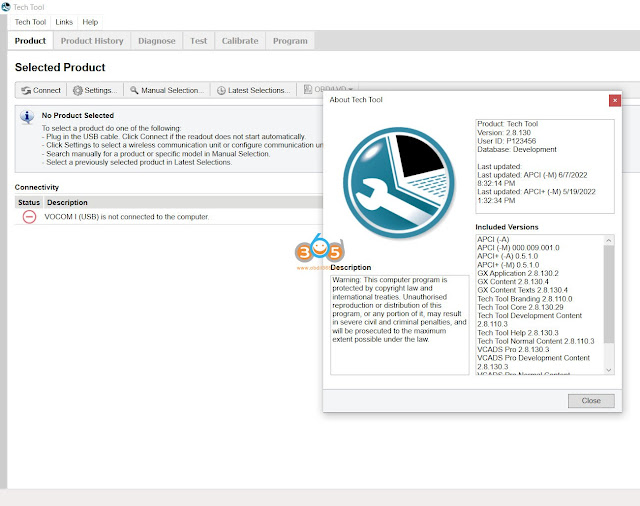


I. Volvo Tech Tool PTT 2.8.130

volvo ptt 2.8.130

Volvo Premium Tech Tool PTT 2.8.130 Development Mode & Dev tool Plus

Note: After your payment, please contact us (Skype: OBDII365.com, Email: Sales@OBDII365.com, Whatsapp : +86 18150118226)to sent download link to you, after then our tech team will install and activate it for you.

$99. Price only for One PC installation and activation, promise 100% Work!!!


Volvo Premium Tech Tool Software Include:

1.Volvo Tech Tool

2.Developer tool Plus (Acpi+ 2022/05)

3. Online Installation and Actvation by Teamviewer

4. Online support in contact with your truck or machine by Teamviewer


What’s new in 2.8.130?

1.2.8 version Only work with original nexiq, Vocom 2/Vocom ii mini, Vocom 1.

2.Premium Tech Tool 2.8.130 work on Windows 10 64bit (it can not support WIN7 and WIN11)

3.Devtool work on Window 7/8/10 (only 64bit)

4. Multi-languages, more than 25 languages

With the Development version of PTT 2.8.130, the user can diagnose, change parameters, clear DTC calibration, test, programming, change Chassis ID, Edit parameter all version v2 v3 v4 and many other features.

Installation on Windows 7 is no longer supported.
With Windows 7, the installation of 2.8.130 will fail, but the last installed version will remain, and the user can continue to use it


Developer Tools Featured options: 
• Chassis ID Change.
• Immobilizer ON/OFF.
• Injector programming.
• Speed Limit programming.
• EUR6 trucks supported.


Recommended laptop requirements for PTT2.8:

Computer/Processor Intel Core i5, i7 or i9 or AMD Ryzen 7, 9 series
Memory RAM 8GB, more memory improved performance
Hard disk type SSD sold state drive with 100GB free space
OS support: Wdinwso 10 64bit professional


Premium Tech Tool (PTT) supports the following brands/models:

Volvo Trucks Older electrical system
Volvo Trucks Vehicle electronics ’98
Volvo Trucks VERSION2
Volvo Trucks VERSION3
Volvo Trucks VERSION4

Volvo Buses Conventional
Volvo Buses Multiplexed
Volvo Buses Multiplexed version 2
Volvo Buses Multiplexed version 3

Volvo Penta

Volvo Construction Equipment

Mack V-MAC I/II/III, ITC
Mack V-MAC IV
Mack VMAC IV+

Renault Version2 ACCESS
Renault Version2 CAESAR
Renault Version2 COMPRT
Renault Version2 EXTRT
Renault Version2 HYBRYS
Renault Version2 KERAX
Renault Version2 KERAXMIL
Renault Version2 MAGNUM
Renault Version2 MIDLUM
Renault Version2 PREMIUM
Renault Version2 SHERPAL
Renault Version2 SHERPAM
Renault Version2 VAB
Renault Version2 VBCI
Renault Version2 VLRA

UD Trucks Version2 UD-HD
UD Trucks Version2 UD-MD


II. Volvo Tech Tool PTT 2.7.116

Version: 2.7.116
User ID: TT112233
Database: Development

Free Download Volvo PTT 2.7.116

Volvo Tech Tool (TT) 2.7.116 [2021] (REAL Development) with Newest APCI+ 2021. database

Includes:

  • 1*Tech tool Program V2.7.116 2021 new programwith Newest APCI+ 2021.04

(full Truck and CE license. offline access)

  • 1*Developer tool plus (APCI+) Plus

Note: After your payment, please contact us (Skype: OBDII365.com, Email: Sales@OBDII365.com, Whatsapp : +86 18150118226)to sent download link to you, after then our tech team will install and activate it for you.

$49.99. Price only for One PC installation and activation, promise 100% Work!!!


What’s new in 2.7?

  • Add Client update notification settings
    Add odometer reading
    Add work order number-0battery status
    New design settings- Radio button style
    Added Session timeout
    Add firmware automatically updated in vocom ii
    New Update VOCOM II new driver and firmware verison
    New design, status tag-firmware update
    New design, add tab. VPCOM II temperature status, vehicle battery status
    New function: Device test located under Test tab

With the Development version of PTT 2.7.116, the user can diagnose, change parameters, clear DTC calibration, test, programming, change Chassis ID, and many other features.


Free Download Volvo PTT 2.7.116 2


Language: English, German, Spanish, French, Italian, Dutch, Polish, Portuguese, Russian, Turkish, Greek, Czech, Danish, Latvian, Lithuanian,  Romanian,  Finnish, Swedish, Korean, Japanese, Thai, Serbian, Montenegrin, Magyar, Chinese Traditional, Chinese Simplified.

Free Download Volvo PTT 2.7.116 3

Recommended laptop requirements for PTT 2.7:

Computer/Processor Intel Core i5 or i7
Memory RAM 8GB, more memory improved performance
Hard disk type SSD sold state drive with 80GB free space
OS support: Windows 10 64bit professional


Feedback: The engineer installed 2.7.116 recently and it works beautifully on newest US trucks, including u.s. units, latest aftertreatment and fuel systems diagnosis and testing. When any problems occured, he responded and fixed any issue fast.


2019/03/20

How to setup VMware for Volvo Tech Tool

A user (@savanadriver) virtualized his recently bought Volvo Tech tool laptop to help other users who cannot afford installation or laptop .
Copy data here and hope it helps.

About the VM:
The vm was set up to work independently from the host drivers , however, it must install the host
processor drivers for it to run (virtual machines don’t have virtual processors, it must use physical)
This PTT vmware image was virtualised from a laptop with i5 3320m processor, so it has these
drivers installed as a default.

So if you are lucky and your laptop (host) has i5 processor , the VM will load ready activated
(tech tool+devtool).

If you are less lucky and your laptop has a different processor family in your pc , it will load but
Tech tool and devtool will be de-activated !

Re-activating techtool is easy using the old activator (instruction will be given if needed) but devtool
can’t be activated unless it was given a new “regkey.dat” file using the new devtool keygen, I don’t
have it myself.

I tried it in 3 different laptops that has 3 different operating systems with 3 different i5 processors
models , it loaded ready activated on all .

I also tried on a laptop with intel core duo L2400 , both techtool and devtool did not work , but
managed to re activate techtool using the old 2.6/2.7 activator (available free on the forum)

Adapter connection
To connect your adapter to the vm , first must be connected and recognised by the host ( usb or
Bluetooth connections )

Once the vm is running:
If usb connection go to menu on top: VM – removal devices – select your adapter—click connect.
If Bluetooth connected, find it and pair with it using Bluetooth on the VM.
RAM allocation

4GB RAM allocated as a default , but this must be reduced if your total host RAM limited, otherwise
the VM will struggle to operate and you may get blue screen or reduced performance.
My laptop had 8 GB RAM , and 6 GB available so I allocated 4Gb .
You can check this from task manager—perfomance—available memory .
Ideally you need to allocate up to 75% from the available RAM memory.
For windows 7 64 bit (this vm), 2 GB is good enough.

Tech Tool VMware downlod:
volvo-tech-tool-create-image-1

” The vmware image has some limitations , but it may be a great help for some .
this virtual image is suitable for i5 processsor based laptops . ” said savanadriver.

Many thanks to savanadriver for his great contribution off https://mhhauto.com/Thread-PTT-2-7-35-DEVELOPMENT-ON-VIRTUAL-MACHINE
For any password required, pls PM savanadriver.
obdii365.com cannot get it for you. Sorry!
If you cannot get the password or work good with Tech tool VM, obdii365.com will provide free remote help for you guys with: http://www.obdii365.com/wholesale/volvo-premium-tech-tool-20486-development-with-apci-update.html
volvo-tech-tool-install
Things to remember
Never install “Vmware Tools” , if prompted by the VM click never remind me.
Don’t install any driver on the vm, when you first start the VM it will automatically install and
change only the processor drivers if the host has different processor model.
It has it’s own hard disk controller , so don’t change it.

2019/01/27

How to solve Not possible to start Tech Tool Error?

Tech Tool Log In:
Not possible to start Tech Tool
It is not possible to start Tech Tool. An update of your user profile is required but connection to central systems is currently unavailable. Please retry later.
not-start-volvo-tech-tool-error

Volvo Tech Tool tech support:
It means your tech tool expires.
You’re advised to get a Volvo tech tool lifetime version
Volvo-ptt-2.7-1

Volvo-ptt-2.7-2

Volvo-ptt-2.7-3


Volvo Tech Tool 2.7.25 is the latest official version
No password required
Never expired!
FREE installation and activation help is ready for you
Longtime use once it’s activated
Tested successfully by real experts working for obdii365.com

Volvo Tech Tool 2.7 released notes:
Tech Tool 2.7.25 test reports and installation help:

VERY VERY VERY IMPORTANT:
Premium Tech Tool version 2.5 will expire March 2019. Please update to the current version to avoid interruption.
Premium Tech Tool 2.7.25 is the latest version confirmed to work perfectly!

Question and answers:

What’s the difference between Tech tool from the official and obdii365.com?
The difference lies in the expiration; that is, time for use.
The official subscription will expire and you need re-activation, while the one from obdii365.com has no expiration issues!
But there is no functional difference between the two.
The official program must be the best solution.
However, if you have a budget limit and look for a decent program for use, it’s good to have Tech Tool from the third-party

Note: you might be able to get Tech tool for free from a forum. But usually, it’s a trial version and the program will expire. and need money for activation or subscription. KEEP AWAY FORM FREE TECH TOOL FROM FORUMS. You never know the issues you will have after subscription and have no tech support.

You option should be: the official, then online shops, then forums


Note: The following questions and answers is for official tech tool:

How often does the Premium Tech Tool login password expire?
The Premium Tech Tool password expires every 180 days.

How do I get the latest version of PTT?
Dealers may contact support at 877.978.6586. Customers should check their subscription data in eMedia center. If the subscription is active, please contact the Support IT for a copy of PTT. If your subscription has expired, please order a PTT sub renewal from the eMedia center

http://blog.obdii365.com/2019/01/28/solved-volvo-ptt-not-possible-to-start-tech-tool/

2018/12/16

Volvo Tech Tool 2.7 and Dev Tool Free Download

(12-2018) Volvo/Renault/Mack Premium Tech Tool PTT is updated to version 2.7. Here are PPT and Dev tool free download links and released notes.


Part 1: Download Volvo Tech Tool 2.7 + Dev Tool

Premium Tech Tool 2.7.0.15 install files from Volvo server.
These are the original files, no activation.
To be able to install these, you need to make your own installer or get one from Fang88 .
Maybe someone with skills can use it to make an activator.
Used Winrar 5.60 Beta x64 to make the archive.
If the first link doesn’t work, try the second one.
Good luck!
Props to Fang88 for directing me to the files
Password: chestertechsucks


DevTool for Tech Tool 2.7
volvo-ptt-tech-tool
IMPORTANT: this is customer share at the mhh forumIt’s personal – No one will hold any risk of what you’ll done!Keygen, activation, installation, security issues and the like might happen to you You’re advised to have a 100% tested version, confirmed with zero issues:
Both versions can be good; you can use them with relief!


Part 2: Volvo Tech Tool 2.7 Released Notes
This news information gives you an overview of new features and changes in Tech Tool. Please take your time to read through this information carefully as it will support you in having full benefit of the tool.
For more information about functions and dialogues in Tech Tool, please see What’s new… and the Help file within the application.
  • – December 5, 2018
The release is available for download in Client Update from week 49, 2018.

Corrections and changes in the release

Corrections and changes in the release are listed below:
DescriptionCompany
Operation 3711-08-03-03 ‘Data Links, Fault Tracing with Oscilloscope’ has been updated to make it easier to evaluate CAN signal disturbance.VTC, RTC, VBC, MACK, UD, EICHER
NOx sensor values added in operation 25920-3/32589-08-03-02 ‘Exhaust aftertreatment system, service regeneration’.

DescriptionCompany
Improvements in operation 25846-3/2589-08-03-05 ‘SCR System, test’.VTC, RTC
The performance of operation 28308-3/2840-08-03-01 ‘Idle shutdown function check’ has been improved with new monitoring, status icons will be updated immediately opposed to a several seconds delay as it was before.

DescriptionCompany
A new symptom has been added; speed dependent driving level.VTC

DescriptionCompany
Updates of calibration operation for LPOS (lane position and object sensor camera) to support new EBS in Renault.RTC

DescriptionCompany
Tech Tool now supports fault tracing for the new 8L engine.UD

DescriptionCompany
Update of wiring in fault tracing for pre-heater relay for MD8L engine.VBC
Improvements and corrections to EU6 diagnostic information in operation 25456- 3/2545-08-03-02 ‘Exhaust Aftertreatment Diagnostics’.
Software download and calibration operations for the Generation 2 electrical bus are now available.
Fault tracing is now available for Generation 2 electrical bus for the following Electric Control Units;
·         Hybrid Powertrain Control Unit (HPCU)
·         Energy Storage Control Module (ESCM)
·         Powertrain Control Module (PCM)
·         Charging Interface Control Unit (CICU)

DescriptionCompany
Support for Motor Grader model: G9260.SDLG

DescriptionCompany
Support for Crawl Excavator model: EC200E.VCE
76001-3 ‘Extended axle locking function, check’ applicable for Wheel Excavator models: EW220E and EW240E MH
38335-3 ‘Displayed Machine hours, correction’ is now also applicable for Wheel Paver model: P4370B
D4J EU Stage V/US Tier 4 final support has been added for following models:
·         Compact Wheel Loader models: L45H and L50H.
·         Wheel Excavator models: EW140E, EWR150E and EWR170E
·         Soil Compactor models: SD115B, SD135B and SD160B
·         Asphalt Compactor models: DD110C, DD120C and DD140C
·         Track Paver models: P4820D
·         Crawl Excavator models: EC140E EC160E, EC180E, EC200E and ECR145E
D6J EU Stage V/US Tier 4 final support has been added for following models:
·         Wheel Loader models: L60H, L70H and L90H.
·         Wheel Excavator models: EW160E, EW180E, EW205E, EW220E and EW240E MH
·         Track Paver models: P5110B and P6820D
·         Wheel Paver model: P5170B
·         Crawl Excavator models: EC220E and ECR235E

DescriptionCompany
D8J EU Stage V/US Tier 4 final support has been added for following models:
·         Wheel Loader models: L110H and L120H
·         Track Paver models: P7110B and P7820D
·         Wheel Paver model: P7170B
·         Crawl Pipe Layer model: PL3005E
·         Crawl Excavator models: EC250E, EC300E & ECR355E
D13J EU Stage V/US Tier 4 final support has been added for following models:
·         Wheel Loader models: L150H, L180H, L220H and L260H
·         Articulated Hauler models: A35G and A40G
·         Crawl Excavator models: EC350E, EC380E and EC480E
·         Crawl Pipe Layer model: PL4809E
D16J EU Stage V/US Tier 4 final support has been added for following models:
·         Wheel Loader model: L350H
·         Articulated Hauler models: A45G and A60H
·         Crawl Excavator model: EC750E
D3.8H EU Stage V/US Tier 4 final support has been added for following model:
·         Soil Compactor model: SD75B
D3.3H EU Stage V/US Tier 4 final support has been added for following models:
·         Compact Wheel Loader models: L30G and L35G
·         Soil Compactor model: SD45B
D2.6H EU Stage V/US Tier 4 final support has been added for following models:
·         Compact Wheel Excavator model: EW60E
·         Compact Crawl Excavator model: EC60E
25402-3 ‘Particulate Control Diagnostics’ applicable for all models with
·         D2.6H, D3.3H and D3.8H EU Stage V/Tier 4 final engines.
·         D4J, D6J, D8J, D13J and D16J EU Stage V/US Tier 4 final engines.
Diagnostics support is added for Articulated Hauler model: A60H
Diagnostics support is added for Crawl Pipe Layer model: PL3005E

Important Information

Known issue
In Tech Tool 2.7.25, there is a known issue for operation 36652-3/3665-07-03-04 ‘Forward looking sensor, calibration’, selection B on road calibration. This issue affects the following products;
Products updated to comply with AEBS step 2 regulation.

  • Renault & Volvo Trucks Bridge
  • Renault Trucks HD
  • Volvo Trucks HD
  • UD Trucks HD

When the calibration has been completed and the progress bar has reached 100%, the operation does not proceed to the result view.
The calibration works, but it is not possible to display the result view. Work around
When the calibration is done;
  1. In Tech Tool: Verify that there is a green check tick for the
  2. In Tech Tool: Verify that progress bar has reached 100%.
  3. In Instrument Cluster: Verify that the driver assistant system is now available again in the instrument
  4. In Tech Tool: Click
  5. In the truck: Do Key Off, Key On
volvo-ptt-v27-truck
Volvo tech tool tech support: http://www.obdii365.com/


2018/05/13

Free Download Visfed 0.3.1 and 0.2.1 for Volvo ECU Reprogramming

Free download Volvo Intermediate Storage File Encryptor/Decryptor (Editor) 0.3.1 or Visfed 0.2.1 software and learn how to use Visfed for Volvo, Renault, Mack trucks ECU reprogramming.

Something I put together with the help of fellows in mhhauto.com.

Free download Visfed 0.2.1 visfed 0.3.1: unknown risk
visfed 0.3.1.rar
visfeed + keygen
VISFED 0.2.1.rar
visfed-021-download
Download Visfed for truck ECU reprogramming: with relief
volvo-visfed-0-3-1-download
It includes Volvo Premium Tech Tool, Dev2tool, Visfed – all tested without any issue and confirmed to work perfect!
volvo-visfed-0-3-1-download-2
What is VISFED:
VISFED stands for Volvo Intermediate Storage File Encryptor/Decryptor (Editor)
Volvo ISFile ED – is a special software tool todecrypt, edit, encrypt ECU reload (also called intermediate storage) files for Volvo, Renault, Mack trucks. Tool is made to make all file rebuilding processes simple and easy as possible. It also allows to view ECU file and other information of part and sub part numbers, parameters, PID, PPID, SID, PSID,FMI. Checksum calculation possible of Intel HEX line and whole CSW file.

Language: English, Spanish, French, Italian, Russian, German, Denish, Polish, Finnish, Dutch, Norwegian, Portuguese, Japanese, Swedish, Turkish, Hungarian, Korean
OS: WinXP, Vista, Windows7,Windows 8, Windows 10

Volvo Tech Tool vs. Dev2tool vs. Visfed:
Volvo PTT Premium tech tool: for diagnosis
dev2tool: for programming
Visfeed: for reprogramming
In detail…

Whats new in visfed 0.3.1:
-Adding language
-ECU reload with original software
-Remove SCR and increase HP on: Volvo trucks (D9B,D11C, D13A, D13B, D13C, D16C, D16Eengines)
-Remove SCR and increase HP on: Renault trucks (D11A,D11B, D11C, DXi13A engines).
License for 1 PC
volvo-visfed-0-3-1-download-3
Visfed 0.2.1 user manual:

Import original Techtool file into visfed using TMP file button

Put orignal client id and dealer id in boxes

Press Decrypt

CHANGE ON VISFED CLIENT ID AND DEALER ID to the client id and dealer id of your PC AND TIME/DATE to (2018 01 01)  TOUCH CLICK ON ENCRYPT

Open file with XML and check all is correct and save

Open intersto, mdb file with Intersto Editor. Change dealer Id Client Id and User Id to whats on your own Pc and save

Install files to folder and program with Premium Tech Tool

Hope this helps for members.


http://blog.obdii365.com/2018/05/13/volvo-visfed-0-3-1-0-2-1-download-install-user-manual/