Showing posts with label UCANDAS VDM II. Show all posts

2017/06/30

UCANDAS VDM2 vs. VPECKER Easydiag which one to choose?

There comes a new generation of VDM UCANDAS diagnostic system called UCANDAS VDM2 WIFI OBDII diagnostic tool! Similar functions as VPECKER Easydiag.


So choose which one? What's the same and what's the different?


Similarity between UCANDAS VDM 2 and VPECKER Easydiag

Both software 2 year free update.

Both support OBDII diagnostics for worldwide cars.


Both have similar diagnostic functions like read& clear DTC codes, Data Stream and many special reset& maintenance functions.
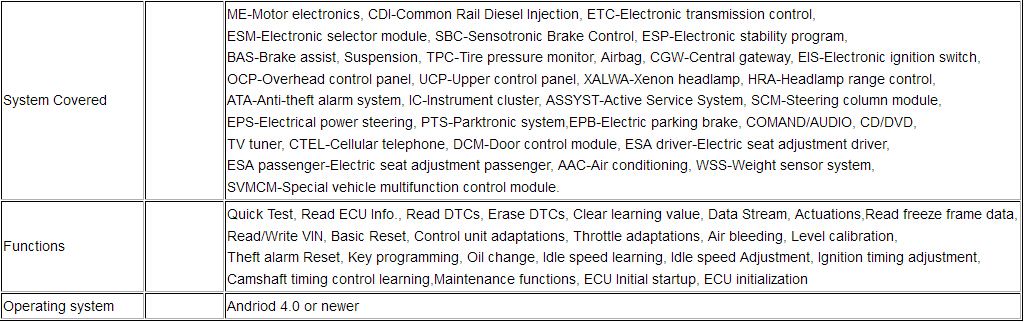


Compare UCANDAS VDM 2 with VPECKER Easydiag

Reasons why choose UCANDAS VDM 2?


1. More cost effective: New UCANDAS VDM 2 $119 is cheaper than VPECKER Easydiag $149. And VDM 2 has almost same function as VPECKER!

2. Support WIFI connection.

3. Support Android operating system, Android 4.0 and above OK.

4. Software updated: UCANDAS VDM II V3.9 software version is newer than UCANDAS VDM V3.84.

5. Support Multilanguage 20 kinds:

English, German, French, Spanish, Portuguese, Russian, Italian, Finnish, Hungarian, Japanese, Korean, Dutch, Polish, Romanian, Swedish, Turkish, Czech, Arabic, Chinese Simplified, Chinese Traditional

6. Support protocols: ISO 9141-2, K/L line, SAE-J1850 VPW, SAE-J1850 PWM, CAN ISO 11898, ISO15765-4


Reasons why choose VPECKER Easydiag wireless OBDII diagnostic scanner?


1. Support more languages than UCANDAS VDM 2, such as Indonesian, Persian, Thai, Vietnamese and Bosnian.

2. Support additional UDS protocol than UCANDAS VDM 2.

3. Has more connection options to choose: VPECKER Easydiag has both WIFI, Bluetooth version.

4. Support DPF Reset: Replace Diesel Particulate Filter; Regeneration Diesel Particulate Filter

5. Support to diagnose HYUNDAI KIA 2017 vehicles.

2017/06/26

How to set up and Update UCANDAS VDM2 on Android system

UCANDAS VDM2 VDM II software runs on Android 4.0 above tablets and phones with WIFI and 720P above screen resolution.
 
Multi-language: English,German,Finnish, French, Hungarian, Italian, Japanese, Korean, Dutch, Polish, Portuguese, Portugal, Romanian, Russian, Swedish, Spanish, Turkish, Chinese Simplified, Chinese Traditional, Czech, Arabic

VDM II  Product features:

1.Supports ISO 9141-2, K/L line, SAE-J1850 VPW, SAE-J1850 PWM, CAN ISO 11898, ISO15765-4 protocols
2.Can run at a high speed, medium speed and low speed CAN-BUS (Single CAN-BUS diagnosis protocols is supported)
3.Check out the year and model of the vehicles automatically and quickly
4.Includes all software: European, American, Asian and Australian prevalent vehicles
5.The OBDII diagnostic connector has a wide compatibility, which doesn't need to replace other connectors during the test
6.The new hardware is designed with multiple protection, interference and stability. And it is built with a overvoltage protection module,
in order to protect the scanner and vehicle against accidental damage during checking
7.Works well and stably in the extremely cold and hot environment

Ucandas VDM II Functions & Makes:

VDM II-1
VDM II-2

Step –by –step procedure:

Step 1: Download APP and install

Step 2: Connect VDM to the car, go to ‘Settings’ to search WIFI and find the SSID is UCANDAS, connect it successfully, shown as below.
set-up-UCANDAS-VDM2-on-android-1
Step 3: Run UCANDAS, click the icon ‘Register’, input your basic information
set-up-UCANDAS-VDM2-on-android-2
set-up-UCANDAS-VDM2-on-android-3
Please be informed: after register, the diagnostic program downloaded via the APP only runs with this VDM, not with other VDM.

Step 4: Unplug Ucandas VDM II from the car and connect network connection, choose ‘Update’, then ‘Language’, download the diagnostic program you want shown as below.
set-up-UCANDAS-VDM2-on-android-4
Step 5: Now you are able to test your car
set-up-UCANDAS-VDM2-on-android-5

http://obd365.over-blog.com/how-to-ucandas-vdm2-wifi-automotive-scanner.html