Showing posts with label Scania VCI3. Show all posts

2023/07/05

Free Download Scania SDP3 v2.56.1 Loader

 Scania Diagnos & Programmer 3 (SDP3) new software loader V2.56.1 download free.


Software Version: 2.56.1

Year/Release Date: 07.2023

O/S Support Windows 7/10/11 (32/64)

Supported diagnostic interface: SCANIA VCI 3
Languages: German, English, Spanish, Chezh, Finnish, French, Italian, Japanese, Korean, Dutch, Polish, Arabic, Portuguese, Russian, Swedish, Turkish, Chinese, Romania

Download Link

Password: brenocimi

Loader only, without activation.


If need a stable version with activation, check here

https://www.obdii365.com/wholesale/scania-sdp3-diagnosis-programmer.html

Free Download Scania SDP3 v2.56.1 Loader 1

Free Download Scania SDP3 v2.56.1 Loader 2

Free Download Scania SDP3 v2.56.1 Loader 3

Scania Diagnos & Programmer 3 (SDP3) communicates with Scania vehicles and industrial and marine engines Scania. The program is designed to ensure that the electrical system in the CAN network. The program is used for Troubleshooting, setting the parameters preferred by the client, performing calibrations, performing upgrades affecting the electrical system, and updating the software of the control units. To use the program requires a PC, USB dongle and VCI. SCANIA VCI2/ VCI3 adapter.

The program supports the following vehicles:
L, P, G, R and S series (2016-)
P, G, R and T series (2003-)
F, K and N series

2023/04/27

Will Scania VCI3 with Kvaser CANKing Software?

 Question:

If Scania VCI3 adapter will work with Kvaser CANKing software (Kvaser lib API)?

Scania VCI3 with Kvaser CANKing Software 1

Kvaser is the producer of VCI3 and VCI2.  When you install SDP3 you install Kvaser drivers and libraries.

Some tested working.

Scania VCI3 with Kvaser CANKing Software 2

The VCI 3 adapter works with King CAN software.


Bus 004 Device 017: ID 0bfd:0101 Kvaser AB Scania VCI3
I recompiled and installed Linux drivers.
A little bit about Full Chip Scania VCI3 :

Serial Number 7041
73-30130-00634-8
Firmware 3.21.486
BlackBird V2 <— reports
82C251 CAN Bus Transceiver
PCB 634-640 V 5.1

Original BlackBird V2 comes with TJA1051T which will support CAN FD protocol.


Log:

Scania VCI3 with Kvaser CANKing Software 3

One of our customers used Scania VCI 3 with Kvaser CANking over WIFI.


There are many versions of VCI3 clones, the most expensive version- Full chip VCI3 is the best.

FYI
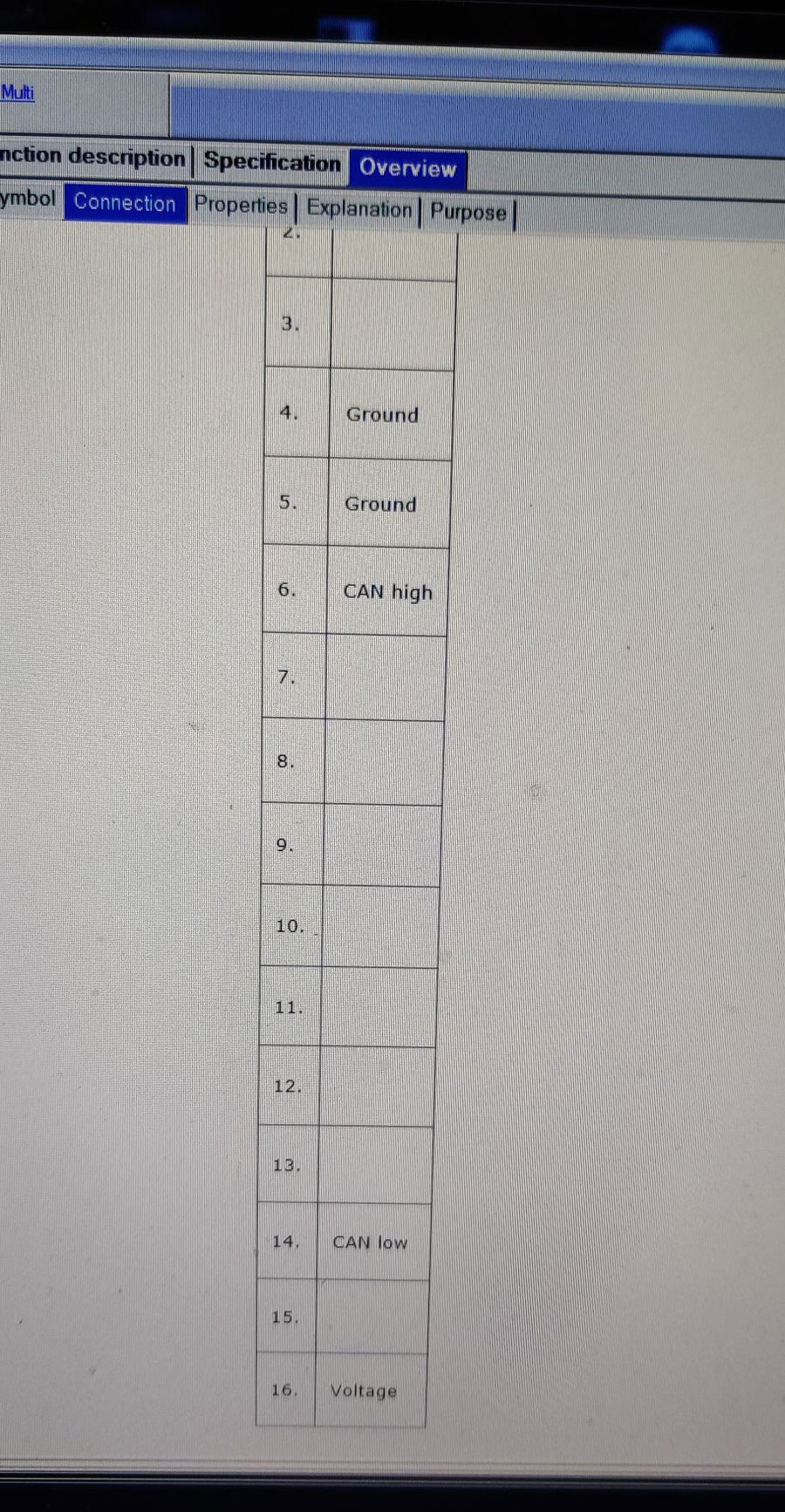
Scania OBD pinout. Its standard OBD II port: 4 pin Chassis ground, 5 pin Signal ground.

Scania VCI3 with Kvaser CANKing Software 4

Scania VCI3 with Kvaser CANKing Software 5

2023/02/23

Free Download Scania SDP3 2.54.1

 New Scania SDP3 (Diagnos & Programmer) diagnostic software 2.54.1 download free.


Software version: 2.54.1

Release date: 02/2023

Compatible device: SCANIA VCI3

Operating system: Windows 10 64bit (other systems test by yourside)

Languages:English, German, Spanish, French, Japanese, Dutch, Polish, Portuguese, Swedish, Norwegian, Suomi, Turkish, Italian, Czech, Russian

Free Download Scania SDP3 2.54.1

Free download

Scania SDP3 (Diagnos & Programmer) 2.54.1 

Password protected. Contact us for password.


Activator keygen is not included. Try activator for previous sdp3 2.53.5. You are at your risk.

Free Download Scania SDP3 2.53.5 with Activator

2023/02/20

Free Download Scania SDP3 2.53.5 Software

 [February 2023] Scania Diagnos & Programmer 3 SDP3 newer software 2.53.5 with activator download free here. Free activation is locked to one PC.


Resource 1: Mega Download

V2.53.5 Scania SDP3 Software Download

Resource 2: with 1 time free activation

Free download Scania SDP3 2.51.3

Type: Software application
Language: Multi Language
Title: Scania Diagnos & Programmer 3
Release: 2.53.5
Language: English, Dutch, Spanish, Italian, German, French, Persian, Finnish, Russian, Thai, Turkish, Swedish, Chinese, Czech, Japanese, Korean, Polish, Portuguese

Operating system: Win10 pro (Windows 10 HOME EDITION, NOT RECOMMENDED.) Other systems test by your side.

This version requires Net framework 4.8 or higher.

Free Download Scania SDP3 2.53.5 Software 1

Compatible diagnostic interface:  SCANIA VCI3

Free Download Scania SDP3 2.53.5 Software 2

How to Activate SDP3 2.53.5?

Once get software installed, run Hardware ID reader, generate hardware ID, and put ID into the activator to get the activation file. Then Merge the registration file.

You can also send ID to sales@obdii365.com to get the activation file. Then Merge the registration file.

Free Download Scania SDP3 2.53.5 Software 3 Free Download Scania SDP3 2.53.5 Software 4

Review of SDP3 2.53.5:

Today change scania S-series year 2022 ICL3 3086790 with this SDP3 and there was no problem.

Recognize all Ecus (no unknown ecus) , test, calibrations, dtc codes read/erase and sops file save work also.

My old version 2.51.1 didin’t work anymore in this truck , it was not recognize COO8 and ICL3.

2022/12/06

How to Connect Scania VCI3 via WiFi in windows 10 x64?

 Is there anyway to connect with Scania SDP3 VCI3 diagnostic interface with WIFI on Windows 10 64bit? Because WiFi works fine on Win7, but win10 64bit not (wifi sees vci3 but if i try to connect it says: unable to connect to this network).


Here is a customer solution to get vci3 wifi work on windows 10 64bit.

Connect Scania VCI3 via WiFi in windows 10 x64 1

At the command prompt, enter the following command:
netshwlanshowdrivers

Connect Scania VCI3 via WiFi in windows 10 x64 2

Pay attention to the item “Hosted network support”. If “Yes” is indicated there, then you can create a wireless computer-to-computer network, if not, I recommend downloading the latest drivers for the Wi-Fi adapter from the official website of the laptop manufacturer or the adapter itself and try again.

At the command prompt, enter the following command:

control.exe /nameMicrosoft.NetworkAndSharingCenter

Connect Scania VCI3 via WiFi in windows 10 x64 3

Connect Scania VCI3 via WiFi in windows 10 x64 4

Enter the name of the network “VCI3_SN7041_Network”

Connect Scania VCI3 via WiFi in windows 10 x64 5

Connect Scania VCI3 via WiFi in windows 10 x64 6

Network creation is done only once.

To start the network, enter the following commands at the command line (you can create a bat file and run it):

netsh wlan connect VCI3_SN7041_Network

netsh wlan set profileparameter VCI3_SN7041_Network connectiontype=ibss

netsh wlan connect VCI3_SN7041_Network

Connect Scania VCI3 via WiFi in windows 10 x64 7

Connect Scania VCI3 via WiFi in windows 10 x64 8

Scania VCI3 will connect with WiFi
Connect Scania VCI3 via WiFi in windows 10 x64 9

Connect Scania VCI3 via WiFi in windows 10 x64 10


Keep updating if there is an easier solution.

2022/09/04

Scania SDP3 VCI2 2.52.3 Free Download

 We have Scania Diagnos Programmer SDP3 2.52.3 + keygen v2.50.5 download links for free.

Scania Diagnos Programmer 3 (SDP3) communicates with Scania vehicles and Scania industrial and marine engines. The program is designed to ensure the operation of the electrical system in the CAN network. The program is used for troubleshooting, setting parameters preferred by the client, performing calibrations, performing upgrades that affect the electrical system, and updating the software of the control unit

scania sdp3 2.52.3 download 1
 

Version: 2.52.3

Date: 07/2022

Operating system:  Win 7, Win 8.1 , Win 10, Win11 professional ALL Simple Use !!!

Multi-language: English, German, Spanish, French, Japanese, Dutch, Persian, Polish, Portuguese, Swedish, Norwegian, Suomi, Turkish, Italian, Czech, Russian, Chinese.


Free download SDP3 2.52.3

Scania SDP3 2.52.3.exe
Keygen 2.50.5


 In case the activator file doesn’t work with this new version, you can install an older version. The keygen works with an older version (2.51.1, 2.51.3 etc) perfectly.

https://www.obdii365.com/wholesale/scania-sdp3-diagnosis-programmer.html

New Fix will be uploaded once it is available.


Who need new version?

1. need newest release sdp3 use (new truck model diagnostic,new function request test)

2. meeting error when run sdp3 (when use sdp3,show error or request update for use)

scania sdp3 2.52.3 download 2

scania sdp3 2.52.3 download 3


Interface is used: VCI2/VCI3

  • Check and adjustments
  • Conversion
  • Maintenance
  • Campaign
  • Bodywork
  • Fault Codes
  • Fault Delete
  • Fault Reporting

Programming of Control units:

  • EMS – Engine management system.
  • GMS – Gearbox management system.
  • RET – Retarder system.
  • AWD – All wheel drive system.
  • CLS – Clutch Control.
  • EEC – Exhaust Emission Control.
  • COO (COO6, COO7, COO8) – Coordinator.
  • BWS (BCI1) – Bodywork system.
  • EMS (S6, S7, S8, EMD).
  • GMS (OPC4, OPC5).
  • RET (RET1, RET2).
  • AWD (AWD1).
  • EEC (SCR1, EEC3).
  • COO (COO6, COO7, COO8).
  • HMS (HMS1).

2022/07/29

Download and Install Scania SDP3 2.51.3

 Obdii365.com provides Scania Diagnos & Programmer 3 SDP3 newer software 2.51.3 downloaded free.  Free activation is locked to one PC.


Resource 1: Mega Download

V2.51.3 Scania SDP3 Software Download

Resource 2: with 1 time free activation

Free download Scania SDP3 2.51.3

Download and Install Scania SDP3 2.51.3 software 1

Type: Software application
Language: Multi Language
Title: Scania Diagnos & Programmer 3
Release: 2.51.3
Release date: 2022-06-28

Compatible diagnostic interface:  SCANIA VCI3

Download and Install Scania SDP3 2.51.3 software 2

Language: English, Dutch, Spanish, Italian, German, French, Persian, Finnish, Russian, Thai, Turkish, Swedish, Chinese, Czech, Japanese, Korean, Polish, Portuguese
Download and Install Scania SDP3 2.51.3 software 3

Download and Install Scania SDP3 2.51.3 software 4

Operating system:
Win7 sp1 ultimate edition 32 or 64
Win7 pro sp1 just 32 bit
Win10 pro (Windows 10 HOME EDITION, NOT RECOMMENDED.)
5 GB of Free HDD space 3 GB of RAM

How to Install Scania SDP3 2.51.3?

1- Execute Administrator “_prereqset64v3”
2- Restart computer
3- Execute _install.cmd in “x64” folder
4- Execute “Hardware ID Reader.exe” and copy HWID
5- Execute “Protection REG.exe”, paste your HWID
6- Decode Fingerprint
7- Change date to 2025
8- Press Generate…
9- Execute .reg
10- Execute “Time.exe” and click crack.
11- Go to x64 and execute _restart.cmd
12- Replace all files in root folder SDP3


How to Activate SDP3 2.51.3?

Activation by providing us Hardware ID.

Get hardware ID and send ID to sales@obdii365.com to get the activation file. Then Merge the registration file.

Download and Install Scania SDP3 2.51.3 software 5

Download and Install Scania SDP3 2.51.3 software 6


2022/03/29

Scania SDP3 2.51.1 Free Download

 [March 2022] Scania VCI 3 SDP3 2.51.1 has been tested by an obdii365.com engineer. We provide software download and 1 time activation service.


Type: Software application
Language: Multi Language
Title: Scania Diagnos & Programmer 3
Release: 2.51.1
Release date: 2022-03-28

Supported diagnostic interface:  SCANIA VCI3

Language: English, Dutch, Spanish, Italian, German, French, Persian, Finnish, Russian, Thai, Turkish, Swedish, Chinese, Czech, Japanese, Korean, Polish, Portuguese
Scania SDP3 2.51.1 Free Download 1

Scania SDP3 2.51.1 Free Download 2

Operating system:
Win7 sp1 ultimate edition 32 or 64
Win7 pro sp1 just 32 bit
Win10 pro
Activation by providing us Hardware ID.


Resource 1:

Free download Scania SDP3 2.51.1

https://mega.nz/file/fRUWGBYZ#ewe66SiRFGX5fE_8h0KgmcOrEx4_n8NKq2frf0Lj_7M

PM for password

Skype: OBDII365.com
Email: Sales@OBDII365.com
Whatsapp : +86 18150118226

Resource 2: stable, 100% working with 1 time free activation

Free download Scania SDP3 2.50.2

Scania SDP3 2.51.1 Free Download 3

Scania SDP3 2.51.1 Free Download 4

2022/02/12

Free Download 2.50.2 Scania SDP3 for VCI3

 The latest version Scania VCI 3 Diagnos Programmer SDP3 2.50.2 has been tested by an obdii365.com engineer. We provide software download and 1 time activation service.


Software Version: V2.50.2
Year/Release Date: 02.2022

Sdp3 2.50.2 Truck (included)

Industry /Marine 2021 –PAY $69.99

Supported diagnostic interface:  SCANIA VCI3

Language: English, Dutch, Spanish, Italian, German, French, Persian, Finnish, Russian, Thai, Turkish, Swedish, Chinese, Czech, Japanese, Korean, Polish, Portuguese
Operating system:
Win7 sp1 ultimate edition 32 or 64
Win7 pro sp1 just 32 bit
Win10 pro

Resource 1: Mega Link

Free Download Scania SDP3 2.50.2 for VCI3

https://mega.nz/folder/vpJQBZSS#WHxdSAdgPJ01xAV6eqznpA


Resource 2: stable, 100% working with 1 time free activation

Free download Scania SDP3 2.49.3
Without keygen. Activation by providing us Hardware ID.

Scania was able to update most of the trucks with a secret update by sdp3 in 2.49 and 2.50 programs, and with the applied change.
scania-sdp3-vci3-software-v250-update-1

scania-sdp3-vci3-software-v250-update-2


SDP3 Function List:

The adapter with that new software does not work with trucks and engines manufactured before 2004.6. The main feature of VCI-3 – Work through a high-speed WI-FI connection. Also in the device has a USB port.


The program supports the following vehicles:
L, P, G, R and S series (2016-)
P, G, R and T series (2003-)
F, K and N series
The program supports the following engines:
P96
E2011


SDP3 2.50 New Features

  • Check wizard for fuel level measurement for the sensor from bodybuilder now also applies to trucks.
  • Correction of Checking the EGR circuit to verify rectified faults
  • Scania XCOM is a diagnostic program for reading, saving and changing ECU data, such as error codes, statistical data parameters, etc., using the Scania VCI3 interface, which is used to connect to the ECU via the CAN protocol.
  • Scania SOPS are files that are used to store information about the parameters of all units and modules of a truck or bus.
  • The working principle of Scania SOPS file Encryptor/Decryptor Editor
  • The Scania SOPS software works as a SOPS file encoder-decryptor
  • Working with Scania SOPS editor is extremely easy even for a beginner:
  • 1. Download the SOPS file of any Scania model to your computer using SDP3.
    2. SOPS to convert the file to XML format.
    3. Edit an XML file using any XML editor (for example, Excel).
    4. Change more than 300 parameters, such as AdBlue, EGR, NOx Control, etc.
    5. Convert the XML file to SOPS.
    6. Upload the SOPS file to the car using SDP3.

Some interesting options:

AdBlue ON/OFF.
EGR ON/OFF.
Chassis ID/VIN Change.
Immobilizer ON/OFF.
Truck Power INCREASE.
ECU Recovery.
ECU Reset.
ECU Unlock.

2021/12/28

Scania SDP3 2.49.3 Software Free Download

 Latest Scania Diagnos & Programmer 3 SDP3 software application download free for Scania VCI3 heavy duty diagnostic scanner.


Version: V2.49.3
Language: English, Dutch, Spanish, Italian, German, French, Persian, Finnish, Russian, Thai, Turkish, Swedish, Chinese, Czech, Japanese, Korean, Polish, Portuguese
Operating system:
Win7 sp1 ultimate edition 32 or 64
Win7 pro sp1 just 32 bit
Win10 pro
sdp3-vci3-2-49-3

We recommend 2.48.x for stability.
*2.49 does not work with activator from 2.48.x (SCOMM file issue).
Free download Scania SDP3 2.48.2 (stable, 100% working with free activation)
SDP3 Update Log

2.49.2:
> Correction
– Coordinator: Previous problems with the odometer reading not being reset correctly in connection with COO8 software updates on vehicles without


2.49.1:

> New system-specific features
– Engine management system: The Installation test for industrial engine wizard has been extended with a test of periodic hydrocarbon evaporation.
– Gearbox management system: The Checking the air pressure in the powertrain circuit wizard now also supports more gearboxes: G25CM/R and G33CM/R and for electrified vehicles. The wizard verifies that the air pressure in the accessory circuit is OK.
– Electric drive system: A new Overview of voltage class B – State of charge wizard has been added to facilitate troubleshooting in the event of charging issues.


2.48.6:
> New system-specific features
–  Gearbox management system: New check wizards have been added for vehicles with TMS3

  • Checking the gearbox assembly
  • Basic check of the planetary gear clutch
  • Operational testing of input shaft brake or layshaft brake
  • Mainshaft check
  • Layshaft check
  • Input shaft check
  • Test of retarder performance

> System-specific change
– Engine management system: To reduce wear, Reducing the fuel pressure has been changed so that the reduction normally takes place with the engine running