Showing posts with label CGDI Prog key programmer. Show all posts

2018/06/03

BMW FEM BDC Add key and All Keys Lost with CGDI BMW

Here’s the tutorial on BMW FEM/BDC key programming (add key & all keys lost) by using CGDI Prog BMW key programmer.

1.Read and Backup eeprom 
2.Add a key (copy key with key)
3. Program all keys lost (copy key without key)

1.Read & Backup Data

Connect CGDI BMW with vehicle via OBD diagnostic socket
maintains voltage above 12v , do not turn off the computer screen during operation.
bmw-fem-bdc-backup-1
Open CGDI BMW software
Select “FEM/BDC key match” and click enter
bmw-fem-bdc-backup-2

Connect successfully, maintain enough voltage, click “yes”
bmw-fem-bdc-backup-3

Need to disassemble the module, read EEPROM data, FEM is 95128
bmw-fem-bdc-backup-4
FEM module installation location
bmw-fem-bdc-backup-5
Use CG100 Prog to read out 95128 IC data and save the data
bmw-fem-bdc-backup-5
Remove the 95128 chip, wash it, and clip it to the ATMEGA adapter
bmw-fem-bdc-backup-6

Open the CG-100 to read the data and save it
bmw-fem-bdc-backup-7
Go back to cgdi and load the data
bmw-fem-bdc-backup-8

Load successfully, save the new data generated by the system
bmw-fem-bdc-backup-9
Write back new data with cg-100, weld back to module, and click next
bmw-fem-bdc-backup-10
bmw-fem-bdc-backup-11

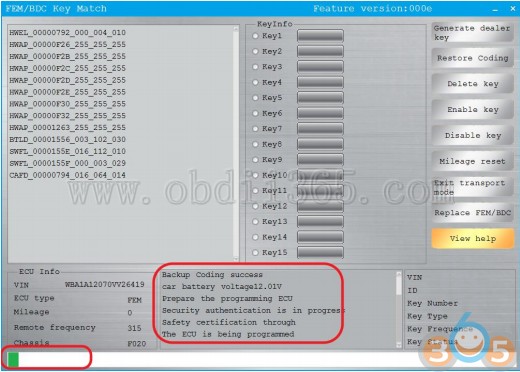
Waiting for programming
bmw-fem-bdc-backup-12
After programming, write back 95128 original data,
put FEM into the car again, and click next
bmw-fem-bdc-backup-13
Use CG100 to write back 95128 original data
bmw-fem-bdc-backup-14

When finished, click “next”
bmw-fem-bdc-backup-15
Set code successfully, customers can do any operation.

2. Add FEM/BDC key with CGDI BMW

Copy key with key
cgdi-add-bmw-fem-bdc-key-1

choose the unused key, and click “generate the dealer key”
cgdi-add-bmw-fem-bdc-key-2

Read working key,click Next
cgdi-add-bmw-fem-bdc-key-3

Read successfully and display information
cgdi-add-bmw-fem-bdc-key-4

Program the new key
cgdi-add-bmw-fem-bdc-key-5

The new key matched successfully.


3. CGDI BMW Program FEM/BDC All Keys Lost

Copy key without key
Using CG100 to read the engine data
cgdi-bmw-fem-all-key-lost-1

Click to enter “ECU
cgdi-bmw-fem-all-key-lost-2

Click on the engine model option to enter the current vehicle
cgdi-bmw-fem-all-key-lost-3
According to the software physical wiring diagram wiring
cgdi-bmw-fem-all-key-lost-4

Physical connection
cgdi-bmw-fem-all-key-lost-5
Read successfully and save the data
cgdi-bmw-fem-all-key-lost-6
cgdi-bmw-fem-all-key-lost-7

Show ISN and VIN
cgdi-bmw-fem-all-key-lost-8
Return to cg-di, select unused key bits, and click “generate dealer keys”
cgdi-bmw-fem-all-key-lost-9
Click on the next item that you select and click next
(Manually input known ISN)
cgdi-bmw-fem-all-key-lost-10
Check the information and click ok
cgdi-bmw-fem-all-key-lost-11
Place new key
cgdi-bmw-fem-all-key-lost-11
New key programming success.


http://blog.obdii365.com/2018/06/03/bmw-fem-bdc-add-key-and-all-keys-lost-with-cgdi-bmw/

CGDI BMW FEM Body Coding and Programming Guide

CGDI Prog BMW is not only able to program keys, read ISN code, but also do ECU coding and programming. Here’s the factory guide to code/program F-series module, i.e FEM Body as an example.

CGDI BMW FEM Body Coding:

Connect CGDI MB with vehicle via OBD socket through main test cable
cgdi-bmw-f-series-coding-1
Open CGDI BMW software, select “BMW F series coding”
cgdi-bmw-f-series-coding-2
This function needs connecting to network, please ensure that the network is stable,
click “read ecu info”
cgdi-bmw-f-series-coding-3
After read ecu info successfully, click 3.FEM_BODY
cgdi-bmw-f-series-coding-4
Select Backup coding
cgdi-bmw-f-series-coding-5
Confirm
cgdi-bmw-f-series-coding-6
Backup coding succeed. This is the save route.
cgdi-bmw-f-series-coding-7
Select Coding
cgdi-bmw-f-series-coding-8
Coding is successful.


CGDI BMW F-series FEM Body programming:

cgdi-bmw-f-series-programming-1
Select “BMW F Series Program”
cgdi-bmw-f-series-programming-2
Data was read successfully, display relevant module information
cgdi-bmw-f-series-programming-3
To program FEM-BODY as example, click “program”
cgdi-bmw-f-series-programming-4
Please ensure that the battery has enough power and click ‘yes’
cgdi-bmw-f-series-programming-5
1. Make sure the VIN is correct.
2. Support modification
cgdi-bmw-f-series-programming-6
Programming, please be patient
cgdi-bmw-f-series-programming-7
Verify FLASH correctly and program successfully.

2018/04/19

BMW F-series key enable and disable with CGDI Prog

How to: Enable/Disable BMW F-series key using CGDI Prog BMW key programmer.

1. CGDI BMW enables F-series key

Select BMW Enable Key
cgdi-bmw-enable-f-series-key-1


Display key information
cgdi-bmw-enable-f-series-key-2
cgdi-bmw-enable-f-series-key-3

Select key position to be enabled
cgdi-bmw-enable-f-series-key-4


Enable the key
cgdi-bmw-enable-f-series-key-5

Put the key vertically in the key induction area of the direction column
cgdi-bmw-enable-f-series-key-6
cgdi-bmw-enable-f-series-key-7


Enable the key successfully, the re-enabled remote key may not immediately take effect on the vehicle, in this case through the manual key to open the vehicle, if necessary, through the emergency start function start the vehicle. To do this, keep the master key in the mark position and manipulate the start/stop button according to the instructions. Then the ignition key should be properly functioning again.
cgdi-bmw-enable-f-series-key-8

2. CGDI BMW disables F-series key

Select BMW Disable Key
cgdi-bmw-disable-f-series-key-1


Display key information
cgdi-bmw-disable-f-series-key-2
cgdi-bmw-disable-f-series-key-3


Select key position to be disabled
cgdi-bmw-disable-f-series-key-4


Disable the key
cgdi-bmw-disable-f-series-key-5


Disable key success
cgdi-bmw-disable-f-series-key-6