Showing posts with label xprog. Show all posts

2024/09/08

Citroen C5 Sagem BSI pinout to VVDI Prog Carprog UPA Xprog

Question: I need working pinout for clone this BSI from C5, I tried different pinouts with UPA and none worked. What should I read for clone this BSI? Only 9S12 or 95040 also? Please share working pinout and what tool to read.

Citroen C5 Sagem BSI  1

Citroen C5 Sagem BSI  2

 Citroen C5 Sagem BSI pinout

MC68HC912DG128 pinout Carprog, Xprog, vvdi prog, upa and others.

Citroen C5 Sagem BSI pinout 1

Citroen C5 Sagem BSI pinout 2

Citroen C5 Sagem BSI pinout 3


2023/06/16

Top Tools to Read Volvo CEM R32C MCU

 Are you searching for a programmer for Volvo CEM Renesas M32C family (R5F64524, R5F64525)  to read and write?
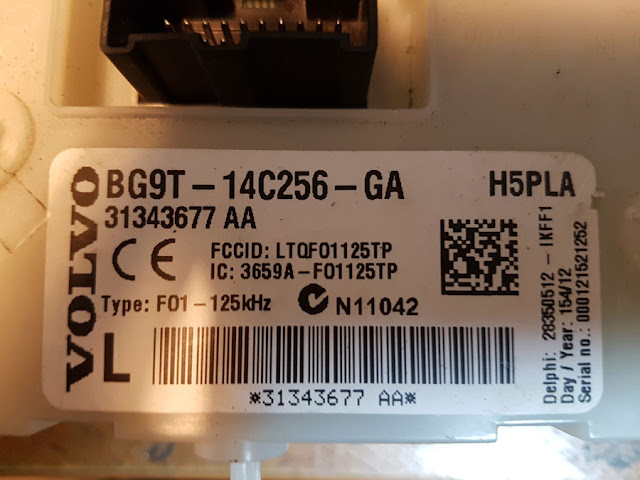
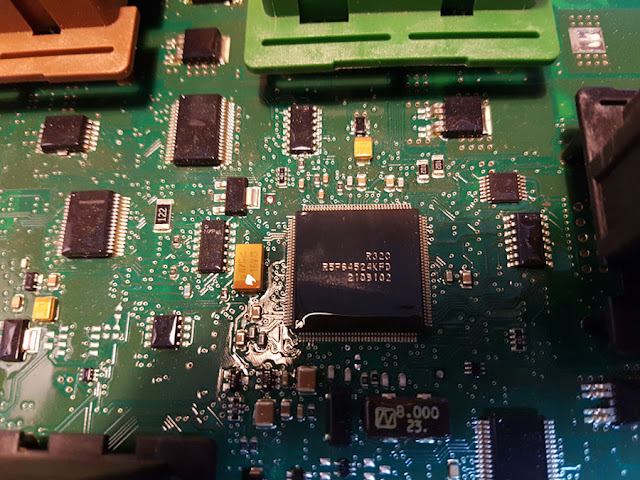
Volvo CEM R32C 1

Volvo CEM R32C 2

Here is the clue.


Xhorse VVDI Prog:

R32C R5F64525/24 option is on the list.

vvdi prog will read (sometimes does not read correctly), but does not write. vvdi prog doesn’t support write on this mcu r32c.
Some others have no problem with vvdi prog on volvo R32C CEM, but can read only.
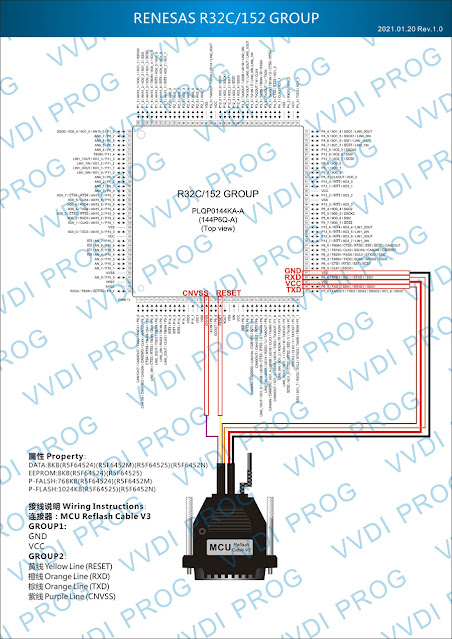
vvdi prog Volvo CEM R32C

Autel XP400 Pro:

Same as vvdi prog, xp400pro is not good on r32c. People have some problems when reading cem with autel xp400.
Autel and others with this Android platform, can’t rewrite x32c family. You cannot write data flash.  When you use autel IM608/IM508 and try to write it will display message “can’t erase”.


Orange5

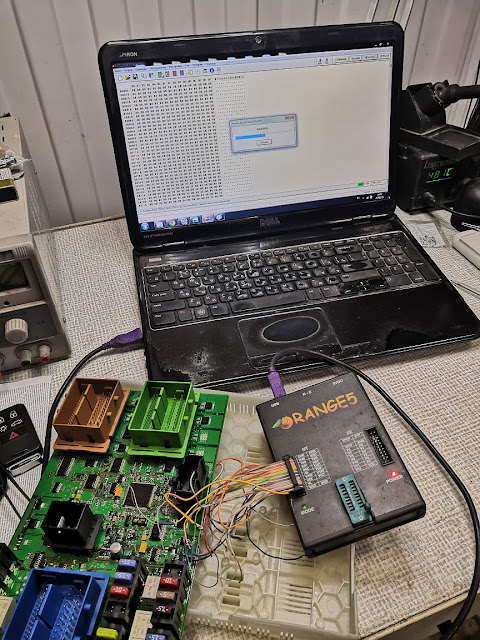
Orange5 is the easiest way.

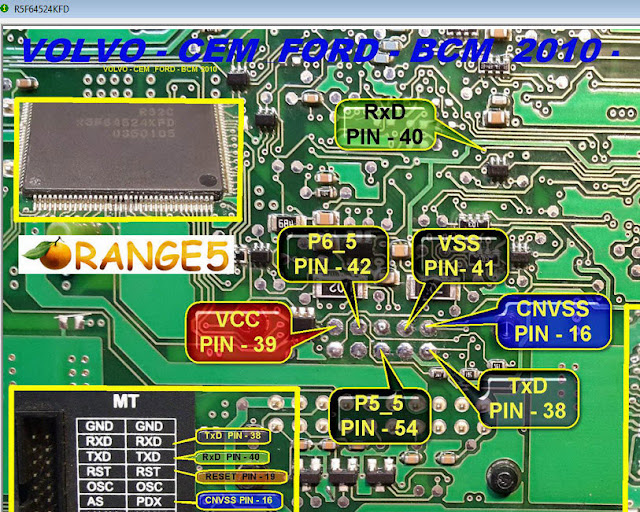
pinout for orange5 to volvo CEM with renesas r32c. same as Ford BCM.
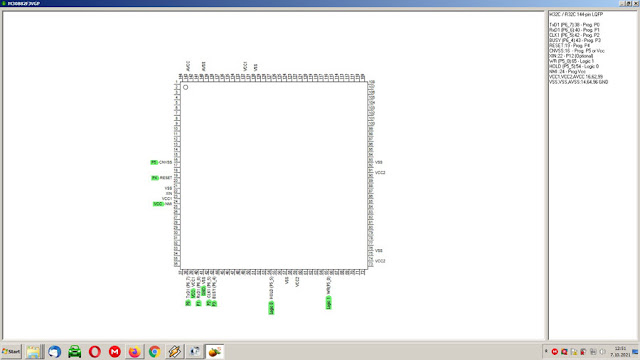
orang5 Volvo CEM R32C 1

orang5 Volvo CEM R32C 2

pin from the dump.

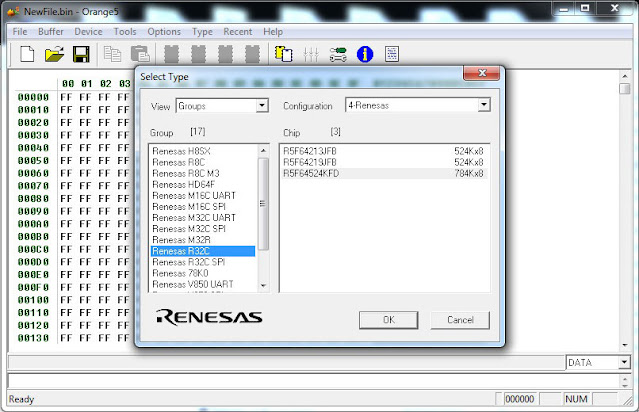
orang5 Volvo CEM R32C 3

orang5 Volvo CEM R32C 4


Xprog: 

Original x-prog works perfectly with this one. It has no problem read/write/clone this ecu.

xprog clone cannot read r32c and m32c.

xprog Volvo CEM R32C 4


i/O Terminal:

do read and write. It works.
io terminal can read/write volvo bcm only if you have pincode.
Ioterminal can read this, but you need to read Dflash (i.e XP400pro) and Ioterminal can extract the pin from the dump and Read/Write.


SMOK Jtag + R32C license:

smok Jtag can help you on that.

Tested work fine for read and write.  About the password, a field for it is filled with FFs and that is ok, click OK and it will begin to read.
A lot of done a couple of CEMs R32C with SMOK JTAG and every time, everything was good. Worked without problems.

also when connect smok jtag first time to cem and read it akes for password in the box already set FFFFFFFFF enterd it and reading no problem did also verify on the files write to cem


FYI:

Here is the customer’s working experience on Volvo CEM R32c mileage correction and key programming. Just for sharing.  You are at your risk.


Add a spare key Volvo R32C: 

For example:

Car model volvo xc60 from 17/7/2017 half keyless system cem r32c r5f64525kfd.

The roblem solved with the cheapest device that can someone could imagine remote was added successfully without need to dissemble.

Believe it or not, car key is programmed with xhorse mini obd tool it just all you need.

You could use it with key tool max or just with an Android cell phone.

I connect the mini obd a go under volvo and the normal key system. i click ok device connected and ask me if i want backup security data and he ask me if i want continue and the procedure will take 8 hours before click ok i add an additional power supply to the car. and click ok a wait kindly. After one hour and 10% of data decryption he prompt me ” recording location and i click ok he enter programming mode read and save security data an ask to click start button once and put original key then remove it and then put the key to be programmed to the slot and all work is done …
For me it worked from the first attemp if you didnt succed don’t panic .. you have to begin from the begining but this time at first when device prompt you to begin you give it the recording location that the device give it to you in the first access attemp.

vvdi mini obd tool Volvo CEM R32C 1

vvdi mini obd tool Volvo CEM R32C 2

vvdi mini obd tool Volvo CEM R32C 3

For odometer correction Volvo CEM R32C:


The odometer of the car was eventually corrected.
There was no need to work with the CEM! because it wouldn’t help to complete the task.

First, the DIM FLASH-memory correction was performed (PATCH FF -> 00).
Only after that the recorded data in the DIM EEPROM-memory did NOT change to the original value.
obdstar X300 DP plus does everything by OBD (about 3 hours).

The result in the photo.
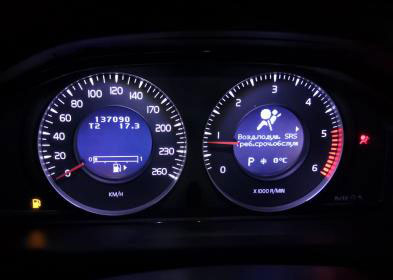
For odometer correction Volvo CEM R32C

2021/01/04

Which Tool to Change Mileage for BMW X5 E53 LCM3?

 Question:

I have a BMW X5 E53 2006 (should be CAS3). Anyone has a pinout for this LCM3 and how to read using digiprog3 or other device that can read? any suggestions which tool can do the mileage correction of all BMW model 2006 below?
*this LCM MCU is motorola (XC528647CFN4 0H30R)

bmw-x5-e53-lcm3-1

bmw-x5-e53-lcm3-2

bmw-x5-e53-lcm3-3

Suggestion:

This version work via OBDII.

MC68HC11PH8(0H30R ), use XProgUPA, BMW scan ect.

xprog-bmw-x5-e53-2

xprog-bmw-x5-e53-1


digiprog3 will correct mileage on this model via OBDII using standard OBD-16 Plug

digiprog3-bmw-x5-e53-3

digiprog3-bmw-x5-e53-2

digiprog3-bmw-x5-e53-1

E53 goes easly with bmw scanner PAsoft.

Requirements

  • BMW Scanner
  • Cluster made in 09/2001 or newer (edit: not 100% sure about this date cutoff after looking at some NCS Expert files. Might even be as late as 03.5)
  • Some common sense

After studying M and non-M EEPROM files, here’s what I found — there is a function deliberately designed to increase the speed by a certain ratio. In the non-M, the displayed speed is the real speed + 5.7%.

So here’s what you do.

  1. Start up the PASoft software and load your IKE. Read off the EEPROM.
  2. Now, in the built in hex editor, look for the following hex string (pick the appropriate one for your model). In my cluster, it was located at offset 0x339
    Code:
    M:     03 00 2D C8 00 31 D6
    Non-M:      03 00 23 C8 00 25 CC
  3. Change it to the following
    Code:
    All models: 03 00 01 C8 00 01 CA
  4. Save the file, and flash the EEPROM back to your cluster.

Done. If you have stock diameter tires, your speedometer should be almost 100% accurate

If you’re curious as to how the change works, the bytes I change are used as a ratio. 0x25 = 37; 0x23 = 35. 37/35 = 1.057, or a 5.7% error. I am not sure what the 0xC8 (200) value represents; I think it might be an upper limit to the allowed error (5.7% until the error reaches 20 km/h). That last byte is simply a checksum (XOR all the values together, and then XOR with 1)

If you have a 99-01 cluster, please send me your EEPROM. I can’t promise I’ll figure out how to do the change there, but I’ll try. Also, if there are any Japanese fanatics here, please send me a dump of your cluster. In the E39, the Japanese values for the cluster are 100% accurate; I suspect the same holds true for the E46. It would be interesting to see how BMW configured the cluster.


FYI:

E53: Dash,EWS,LCM,DDE,EGS and VTG.
XprogM and BMW Scanner 1.40 pasoft will do the trick.

EWS by xprog-m k-line adapter,
DASH by xprog-m by back point in circuit,
KEYs take km from EWS,
LCM, EGS, DTC… by PA Soft (BMW Scanner 1.40).


FYI, if BMW X5 E53 2007 CAS and dash, you need r270 programmer, it will erase eeprom and write new data (dashboard done) the R270 will also do the Cas3 module it will supply wires and show you where to solder them and the software will help you complete the CAS part of this adjustment.


http://blog.obdii365.com/2021/01/04/correct-bmw-x5-e53-lcm3-mileage-by-xprog-upa-or-digiprog3/

2020/03/09

Cheapest Programmer for BMW CAS4 F10 All Keys Lost

Car model and year: 2010 bmw f10 cas4 15ly1, car has keyless entry.

Symptom: I lost my all key but before lost the key, I get dump file of one working key by fvdi 2014 key interface.

I want to do: write this dump file of working key to blank key. Does the keyless entry car work again with aftermarket key. as I know only two key works for keyless entry so do I need delete or remove this lost 2 keys from cas before make new keyless entry key.

Tools and experience:
  1. CG-PRO programmer:
Cheapest tool will be CG-PRO. For like $300 it can read the dump from the CAS4 and make a key. Since your car is almost certainly the normal CAS4 and not the encrypted CAS4+, you shouldn’t need ISN.
Also that whole comfort access only working with 2 keys only applies to E-series. F10 can have many working keys, all with comfort access.
 
Related article: CG Pro Program BMW 525Li CAS4+ 5M48H Key (No Need Other Device)
cg-pro-cas4-1

cg-pro-cas4-2

cg-pro-cas4-3
CGDI BMW makes CAS4 key 100%. It costs twice as much as cg-pro.


  1. Yanhua Mini ACDP + Module 1: $459
If you don’t need to get the ISN code,  one Yanhua mini acdp plus one module 1 are enough.
yanhua-mini-acdp-cas4-1

Please refer to Yanhua Mini ACDP Program BMW CAS4+ All keys lost no soldering:
***For CAS4+, it needs ISN code and need one extra module 3 ($199), with it acdp can read ISN code without soldering)

  1. R270 key programmer: $44.99
@yuko review: R270 read 1L15Y without problem tested many times

@rs@chip review: If your cas is early one with 1L15Y than you are good to go already.. read with your r270 it works perfect on this mcu must use F01/F07 under menu for pinout.. than load your dump to key programmer chose location and write of course its better to use more professional tools but can be done like this also so you no need to spend extra money for one yob

@rus-bmw review: Read cas eeprom with r270 and I can learn new key to your car with remote access. No need any key programmer, only r270, enet cable and blank key.
r270-cas4-1
Xprog is an another cheap option (less than $100) to read CAS4 1515Y/5M48H dump.

  1. Hextag ($495 )+ one extra key programmer:
Most tools require removing a few soldered components to read CAS4. You need to have decent soldering skills to avoid damage.
Hextag can read without removing components, but does not make keys.
Google and you will see some youtube videos.
hextag-cas4-1

hextag-cas4-2
Enjoy!

2018/07/02

Tango Adds Porsche Cayane Macan 2014 up for Free

Good new!!!TANGO transponder key programmer now can do newer Porsche Cayane/ Macan 2014 up free of charge.

No payable add on S/W activation needed what so ever.
This means that all you need is a programmer Xhorse VVDI Prog/xprog to read Porsche BCM.

Upload BCM data to Tango to generate new key file.
Write key file back to VVDI Prog.

tango-porsche-macan-2014-up-1

tango-porsche-macan-2014-up-2

tango-porsche-macan-2014-up-3

tango-porsche-macan-2014-up-4

Reference:
Porsche BCM 5M48H /1N35H (MC9S12XEP100) pinout to VVDI Prog programmer
porsche-bcm-5m48h-pinout-to-vvdi-prog

www.obdii365.com

2018/03/28

How to update XPROG V5.0 to XPROG-M V5.74?

Since I worked xprog 5.0 version a little bit, then compare with 5.74, xprog 5.74 added more features judging by the menu, that's not just authorization, everything. Here's a little modification tutorial provided. You are at your risk. 

old xprog 5.00
xprog-v50

You also need: ATMEGA64 Repair Chip update XPROG-M 
ATMEGA64-repair-chip

Free download XPROG Box V5.7.4 software:

https://mega.nz/#!PQUzGAKI!LuBfkREVI9vnjPtPKlhdjbv6welC8GkHoZM4Bm9wois

Free download XPROG M V5.7.4 setup exe:

https://mega.nz/#!vUknWAaZ!VwXXnaREXg4oRFRUYkvmPpkdEyj6ILX4hiEL3obYhMg


How to update XPROG-M V5.0 software to XPROG-M V5.74:

Unzip the XPROG 5.7.4.zip contents to a folder on your desktop.

Open the folder AVRDUDESS and run avrdudess.exe program.

The following procedure will flash the version 5.0 firmware on your XPROG device.

Select your programmer.

Click on “Detect” at the top right corner. It will detect ATMEGA64.

Select your flash file which is in the Firmware folder.

Select your EEPROM file which is in the Firmware folder.

Enable the “Erase flash and EEPROM (-e)” option.

Set the following in the “Fuses & lock bits”

L: 0x2F

H: 0xCA

E: 0xFF

LB: 0x3C

And enable the “Set fuses” and “Set lock” options.

Finally click on “Program” and wait till it finishes and verify all the data are flashed correctly.

If not then try again.

Now that the Xprog has version 5.0 firmware, go to the “XprogDesktop” folder and run “XprogDesktop.exe” file.

Click on “Help->Hardware info…” and once it opens it will ask to upgrade the firmware.

If not, then click on the “Upgrade” button. Once this procedure is finished you can try and read a processor. It will ask for a certificate. If it fails try again.

When it is finished the XPROG will run the latest firmware and you will be able to work with the latest XPROG V5.74 software!


Again note that this is not a 100% successful guide, some work and some may not.

If you need 100% tested working latest XPROG-M Programmer that will work almost the same as XPROG-M V5.74, get this one: 
xprog-v574-1
xprog-v574-2
xprog-v574-3
xprog-v574-4
xprog-v574-5
xprog-v574-6

2018/02/16

How to use Xprog to Repair BMW E46 AUC Sensor ZKE unit

Not long ago I bought a device called XProg-M with software v5.55. The xprog 5.55 comes with a set of adapters for various blocks \ processors.
xprog-Repair-BMW-E46-AUC-1
(Note: Credit to Pifon077 &)
I’ve tried it on a BMW. It’s an EWS 3 immo system with the mask of the 0D46J processor, and on the ZKE low block from the pre-style bmw e46.
xprog-Repair-BMW-E46-AUC-2
Adapter for the k-line

Who in the subject, he easily calls one very known to many device, which it looks like …
xprog-Repair-BMW-E46-AUC-3
Result
xprog-Repair-BMW-E46-AUC-4
There are quite interesting opportunities. With this device, you can edit the ISN code in the EWS immo. Chips to the immobilizer can be tied “hands”, but not xprog.
Now go to the ZKE unit, very often there are cases people having a K+DCAN cable for diagnosing bmw cars, suddenly believes that he can easily reflash \ update the software in the modules of his car.  The battery could not stand it, forgot to pick up the battery, the USB port became wet, the cable itself turned out to be of a disgusting quality, and when it worked for a long time it overheated and turned off, the laptop did not have enough charge, the owner sitting in the car and doing this thing was nervous and jiggled about sitting thereby drizzling the already severed USB port, and well, it turned out that the firmware failed, the unit does not work, does not respond to diagnostics, and immediately posts on all forums – HELP! 1 I do not know what to do. Well, with this xprog programmer some ecus can still be revived.
xprog-Repair-BMW-E46-AUC-5
What we have is a motor scroll with a processor mask 1E53M
This is what a typical connection scheme looks like, but it’s often more difficult.
xprog-Repair-BMW-E46-AUC-6
But that’s how it looks directly on the board
xprog-Repair-BMW-E46-AUC-7
Please note that this photo lacks one element, “quartz”, responsible for the frequency. I specially dropped it out for the convenience of soldering, and before I read the immo I soldered it back, otherwise the immo will not be read.
xprog-Repair-BMW-E46-AUC-8
Now let’s move on to the AUC sensor, an element has already arrived for a long time, for reshaping.
Having looked at the pinout from other reports did, it is terrible, but it should work. A little later I’ll go to the analysis, I’ll buy a normal case there, and I’ll re-solder the sensor to a new one, and until the photo of what happened, for the comments)), Who will be able to identify the element that turned out to be mine?
xprog-Repair-BMW-E46-AUC-9
xprog-Repair-BMW-E46-AUC-10
xprog-Repair-BMW-E46-AUC-11
xprog-Repair-BMW-E46-AUC-12
I would like to express my gratitude to Pifon077 & Alexander Basov for the free ZKE unlock provided.