Showing posts with label AT200 ecu programmer. Show all posts

2019/12/03

Which Tool to Read Mercedes Benz SIM271 ECU?

Question: Need to swap a Mercedes SIM271 ECU. Any idea which tool can do it?


Option 1:  BitBox Mercedes SIM271 Module
BitBox is the module for reading and writing on the bench by CAN-bus for petrol Mercedes-Benz W204/W212 vehicles with Siemens/Continental SIM271 ECUs.
The J2534 Tactrix Openport 2.0 interface, BitSoftware Senselock USB dongle and Universal Bench Cable are required to work with BitBox software.
The price cost will be  £159+£30+£70+£180= £439
bitbox-benz-sim271

Continental SIM271DE2.0 (FID: 209)
ECU is based on MCU Infineon Tricore TC1796 with internal flash memory 2Mb.
Allows reading of calibration area and writing with checksum correction by CANbus on the BENCH. No need to open ECU.

Siemens SIM271KE2.0 (FID: 213)
ECU is based on MCU Infineon Tricore TC1796 with internal flash memory 2Mb.
Allows reading of calibration area and writing with checksum correction by CANbus on the BENCH. No need to open ECU.


To activate AT-200 Mercedes SIM271 Module, you need to pay for the software license.
The Benz SIM271 Read/Write license takes US$275
at-200-benz-sim271
The total cost will be at-200 unit $510 + software $275 = $785.
Apart from Mercedes SIM271, AT200 will read/write over 1280 ECUs for free.


Option 3: MAGPro2 X17
xt17-benz-sim271
ver 12.2.10 software brings with it some very important promised protocols (such as clone/restore of MSD8x and SIM271)
  • Mercedes Continental SIM271DE: Clone/Restore Full Read/Full Write
  • Mercedes Siemens SIM271KE: Clone/Restore Full Read/Full Write
Price:  €4,690.00
Feedback:
X17 magic works perfect on sim271.
Done a few already with X17… all smooth.  No need to open ecu.


Option 4: Fgtech Galletto Original
fgtech-benz-sim271
April – September 2018 software upgrade adds Tool password Tricore SIM271 MERCEDES
in Boot Mode Tricore
Yes, works well
ecu’s needed when you want to replace your cars engine ecu  with a used  unit.
Your original ECU will have to be ”alive” ( ecu that will still communicate via diagnostics) and the replacement will be compatible (ideally the same part number).
(Fgtech clone won’t do it.)


Option 5: Ktag Original
Ktag read/write Mercedes SIM271 in boot mode
ktag-benz-sim271-1

ktag-benz-sim271-2
Ktag clone need luck.

Option 6:  VF2 Flasher
Reading the password for a Mercedes SIM271 ECU for full access (reading/writing/backup)
TRICORE (BSL):
  • MERCEDES SIM271 ( TC1796 ) – PWD READ [Via OBD protocol] / Int. Flash+ Int. Eeprom + External Eeprom ST95128 – Read/Write/Recovery/Checksum
  • MERCEDES SIM271 Automatic cloning function added!
v2-flasher-benz-sim271-1

v2-flasher-benz-sim271-2
Option 7: Dimsport
Dimsport New Trasdata can do the Job as well.

2019/04/15

Free Download and Install AT-200 ECU Programmer Software?

AT-200 ecu programmer software download and installation guide is provided below by obdii365.com. 

AT-200 software download free:

Operating system: Windows 7 (other systems free to test)
Language: English/Chinese 

Download AT200 software
Copy software to dekstop 
at200-software-install-1

Extract zip file to desktop then delete the zip file.
Connect AT-200 ecu programmer with computer 
at200-software-install-2

Go to Device Manager to check well connection is built 
Open AT200 software folder
at200-software-install-3

Run AT200 software
at200-software-install-4

Right click to select language 
AT200 software is ready to use
at200-software-install-5

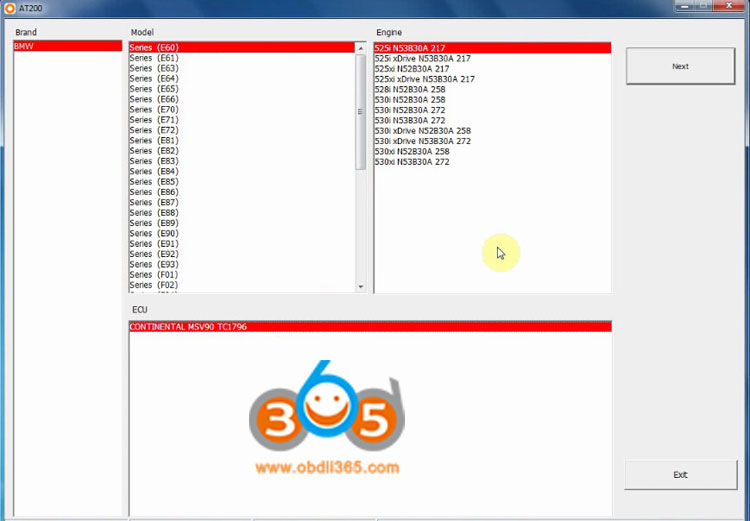
For example: BMW E60 525i MSV90 
at200-software-install-6

Check wiring connection and read ISN

2019/04/14

MSD85 MSD87 MSV90 read ISN with AT200 Programmer!

AT200 programmer is confirmed to work good with BMW MSD85 MSD87 MSV90 – able to read isn without any issue!

Purpose: To check if the AT200 programmer is working or not
at-200-ecu-programmer

Function for the test: Read ISN

BMW DMEs for the test: MSD85 MSD87 MSV90

Steps:
Step 1: install and run AT-200 programming software
Step 2: connect the AT-200 with the DME and the laptop
Step 3: select the model
Step 4: read the wiring and check if the connection is correct or not
Step 5: CGDI AT-200 identifies the DME and then reads out the ISN
Step 6: AT-200 is verified to works good!

The test: (images)
AT200 and MSD85
AT200 and MSD87
AT200 and MSV90

Time to use: less than 2 minutes for each test

Note: each part covers the programmer and DME connection (wiring), the instructions…

in detail…

Part 1: AT200 reads ISN from MSD85
BMW F02 750i SIEMENS MSD85
at200-read-bmw-msd85-ecu-1

at200-read-bmw-msd85-ecu-2

at200-read-bmw-msd85-ecu-3

at200-read-bmw-msd85-ecu-4

at200-read-bmw-msd85-ecu-5

at200-read-bmw-msd85-ecu-6

at200-read-bmw-msd85-ecu-7

at200-read-bmw-msd85-ecu-8

Part 2: AT200 reads ISN from MSD87
BMW F02 760i SIEMENS MSD87
at200-read-bmw-msd87-ecu-1

at200-read-bmw-msd87-ecu-2

at200-read-bmw-msd87-ecu-3

at200-read-bmw-msd87-ecu-4

at200-read-bmw-msd87-ecu-5

at200-read-bmw-msd87-ecu-6

at200-read-bmw-msd87-ecu-7

Part 3: AT200 reads ISN from MSV90
Model and ECU: BMW F02 730Li SIEMENS MSV90
at200-read-bmw-msd90-ecu-1

at200-read-bmw-msd90-ecu-2

at200-read-bmw-msv90-ecu-3

at200-read-bmw-msv90-ecu-4

at200-read-bmw-msv90-ecu-5

at200-read-bmw-msv90-ecu-6

at200-read-bmw-msv90-ecu-7

at200-read-bmw-msv90-ecu-8

at200-read-bmw-msv90-ecu-9

at200-read-bmw-msv90-ecu-10

Result: All success!
AT-200 ecu programmer can read out Siemens MSD85, MSD87 , MSV90 and other ecus N55, N20.