2026/10/09

Tips to Unlock DAF Delphi ETC3 UDS ECU by Flex Korhex

MMS Flex Korhex DAF Delphi ETC3 UDS locked ECU unlocking review:

With the new Flex + Korhex solution, ETC3 UDS units can now be unlocked and programmed directly in our workshop, eliminating the need to ship the control unit elsewhere.

Supported DAF models with Delphi ETC3 UDS:

  • DAF CF (IV)
  • DAF XF 106 (II) 2017–2024
  • PACCAR MX-11 10.8L / MX-13 12.9L


“It’s a hard job to open the ECU. Took more than 1 hour to open the ECU.

Tips to open the case: Use a hydraulic press with wooden blocks to secure the connectors and prevent them from moving. Then, use a large pry bar to remove them.

You connect your 12v starter (or the one provided by flex on the tool) but the ECU you connect directly in 24V.
The only pins you use from FLEX are CAN L / H and PW 1/2.
You need 2 power supply one 12v for flex box only!
And one for powering ecu ( so put +24v on pin 1 and 60 and ground on pin 57 ).
Start boot glitch unlocking.

After unlocking, no need to use KorHex.

Read and write with Flex, all done.”

Unlock DAF Delphi ETC3 UDS ECU by Flex Korhex 1

Unlock DAF Delphi ETC3 UDS ECU by Flex Korhex 2

Unlock DAF Delphi ETC3 UDS ECU by Flex Korhex 3

Unlock DAF Delphi ETC3 UDS ECU by Flex Korhex 4

Unlock DAF Delphi ETC3 UDS ECU by Flex Korhex 5


2026/10/08

Autotuner BMW Locked MDG1 ECU Unlocking Guide

Autotuner first released support for BMW DME8 ECUs back in 2019. However, in 2020, Bosch and BMW released an update that effectively locked everybody back out, meaning technicians could no longer read and write to these ECUs in the field.

Now, that access has been restored. All you need is an Autotuner tool.

Now, any shop around the world with an AutoTuner Tool can perform supported BMW DME8 unlocks in-house.

For an experienced tuner, the process is quick and straightforward. And best of all? AutoTuner doesn’t charge you to perform the unlock.

Once you own the AutoTuner Tool, you can unlock as many supported ECUs as you want, with no subscriptions, no per-unlock charges, and no additional fees from AutoTuner.


Supported Lineup (Bosch MD1CP002 / MD1CS001 / MG1CS003):
BMW (Petrol & Diesel):
1 Series to 8 Series & Z4: 116d up to M40i / 50i
X Range (X1, X2, X3, X4, X5, X6, X7): 18d up to M50d / M40i / 50i
Mini: Clubman, Cooper, Countryman (16d, 18d, 2.0 sd, 20d)
Alpina: D3 S, D5 S, XD3, XD4 (3.0d / 40d)


Two Ways to Flash

There are two methods for flashing the ECU:

  • Bench flashing – Connect to the harness on the bench.
  • OBD flashing – Apply an OBD patch, then flash through the OBD port in the vehicle using either the Autotuner tool or many of the popular handheld flashers on the market today.

The entire process can be done with all of the parts that come with the Autotuner tool: the tool itself, a power supply, a USB cable, and a universal harness used to connect to the ECU.


Step-by-Step Process

1. Connect the tool to the PC. Plug the Autotuner tool into the computer.

2. Load the Autotuner program and find the protocol. With the program open, click “ECU operations,” then click “vehicle.” Scroll down to BMW. In the example shown, the vehicle is believed to be a BMW M3, G80 series. Among the available options, select “MG1CS049.”

autotuner bmw locked mdg1 unlocking 1

3. Choose bench mode. After selecting the ECU, choose “Bench.”

autotuner bmw locked mdg1 unlocking 2

4. Review the instructions. Clicking on the instructions will tell you how difficult everything is, show you where the ECU is located in the vehicle, list the accessories you need, and explain how to connect to the ECU.

autotuner bmw locked mdg1 unlocking 3

autotuner bmw locked mdg1 unlocking 4

5. Pin out the ECU. Pinning out the ECU is described as “not that difficult.” However, for those who want to save time, Autotuner also makes a plug-and-play harness—you simply plug it in and go.

autotuner bmw locked mdg1 unlocking 5

6. Identify the ECU. Once connected, the next step is to identify the ECU. Now everything is identified correctly.

autotuner bmw locked mdg1 unlocking 6

7. Back up the ECU. Normally, the next step would be to back up the ECU before doing anything. In this case, however, the process is to do an OBD patch—and the Autotuner tool will automatically back up the ECU before applying the patch.

8. Write the ECU. Go down to “write ECU,” select “OBD unlock patch,” and let it start working.

autotuner bmw locked mdg1 unlocking 7

autotuner bmw locked mdg1 unlocking 8

The entire unlock process in the Autotuner tool takes a couple of minutes. It will run through, you’ll see some sectors being written, and it will chime when it’s all finished.


Both the slave and master versions of the Autotuner tool work for this procedure.

bFLASH Adds Ford EMS2910 EMS2916 ECUs by OBD

 bFlash programmer released new OBD protocols on October 8th, 2026.

Two new Vitesco EMS2910 & EMS2916 ECUs for Ford are now available via OBD, in both VR and NR. You can now work on recent Ford models with EcoBoost engines:
EMS2916: 1.0 EcoBoost
EMS2910: 1.5 / 2.0 / 3.5 EcoBoost


Normal Read: ~20 min
Write (calibration only): ~5 min
Write (full flash): ~15 min
Update your bFlash and get started today.

bFLASH Adds Ford EMS2910 EMS2916 ECUs by OBD


Ford Transit S6J334CJEE Cluster Mileage Correction

For Ford Transit models from 2024 onward, when correcting the odometer, you need to adjust the mileage in both the instrument cluster and the engine computer (ECU).

Set the instrument cluster to 0 km.
Set the engine ECU to the desired mileage.
Then synchronize them, and it’s done.


Cluster: Spansion S6J334CJEE ARM chip

Engine ECU: Locked Bosch MD1CS089


Reset mileage in cluster:

Use CG100X or similar programmers to reset S6J334CJEE cluster mileage to 0.

Ford Transit S6J334CJEE Cluster Mileage Correction 1

Here is the S6J334CJEE cluster pinout to CG100X programmer.

Ford Transit S6J334CJEE Cluster Mileage Correction 2 Ford Transit S6J334CJEE Cluster Mileage Correction 3

Correct mileage in engine ECU:

Read/back up locked MD1CS089 ECU eeprom & flash data with OBDSTAR DC706 + C4 06 adapter or other programmers (Flex, KESS3 etc).

Ford Transit S6J334CJEE Cluster Mileage Correction 4

Ford Transit S6J334CJEE Cluster Mileage Correction 5

Manually modify the mileage data inside.

Then write the modified data into the ECU.


Connect the engine ECU and the instrument cluster to synchronize the data. Now we can see that the mileage data has been synchronized to the instrument cluster.

Ford Transit S6J334CJEE Cluster Mileage Correction 6

2026/09/29

How to Detect Benz Key Type with Keydiy KD-X4?

Keydiy KD-X4 and KD-X6 key programmers released a new software update in September 2026.

Free update Benz key chip type identification function.


What’s the benefit of Benz key chip identification?

1). FBS3 and FBS4 are not interchangeable. It is important to know which immobilizer system you are dealing with before programming keys

2). For key repair, it can test whether the Mercedes key chip is functioning properly.

How to Identify Benz Key Type with Keydiy KD-X4 or KD-X6?

detect benz key type with keydiy kd-x4 1

Place MB key into KD induction coil.

Go to Chip Clone function- Automation Detection Clone.

detect benz key type with keydiy kd-x4 2

Hit Automatic recognition and click the down arrow.

detect benz key type with keydiy kd-x4 3

Choose Mercedes Benz recognition.

Start identifying.

detect benz key type with keydiy kd-x4 4

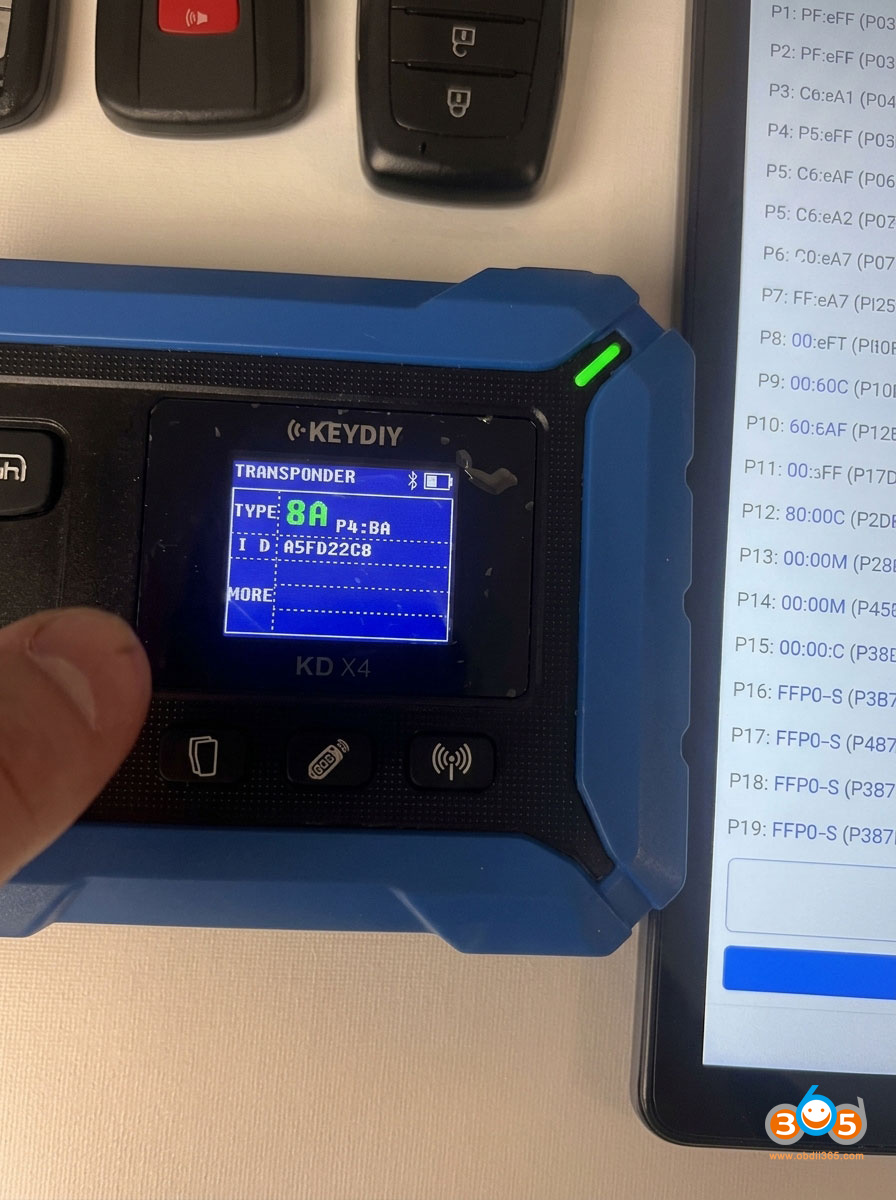
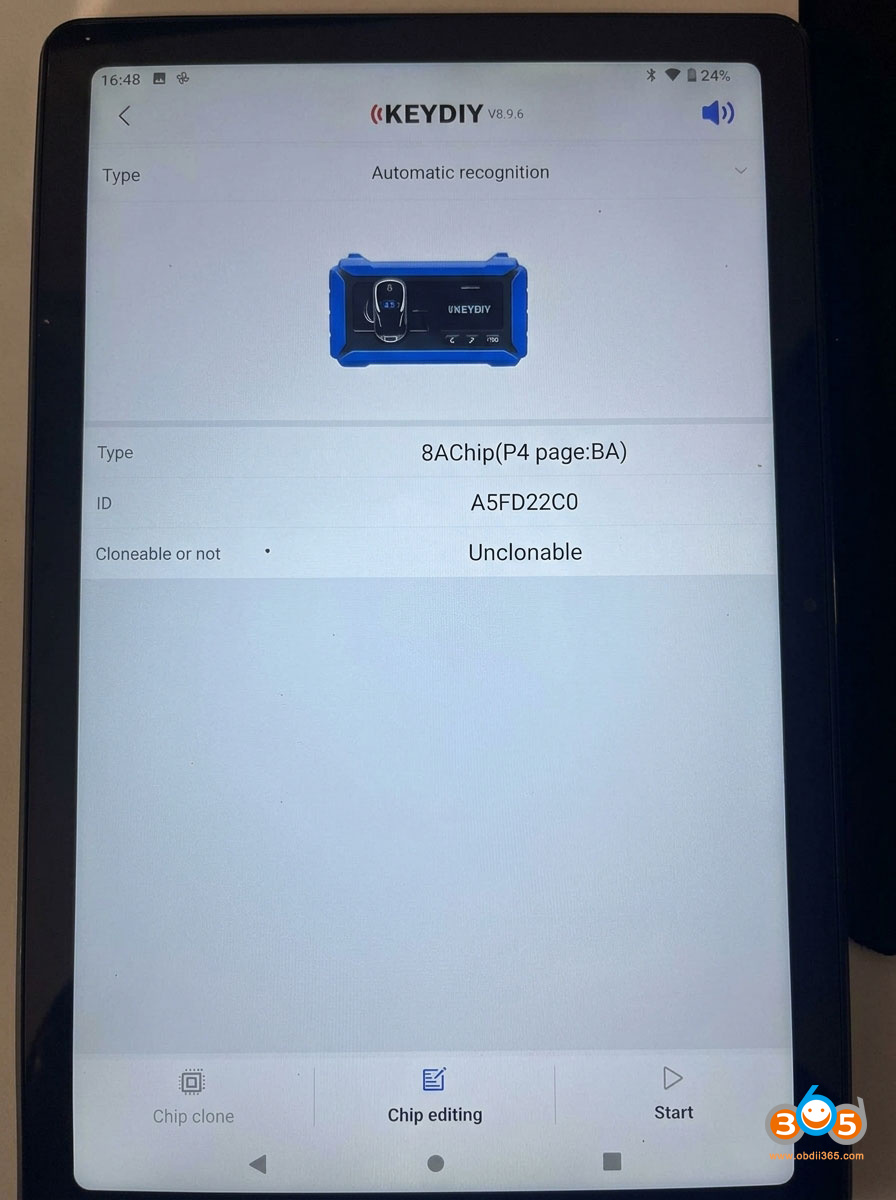
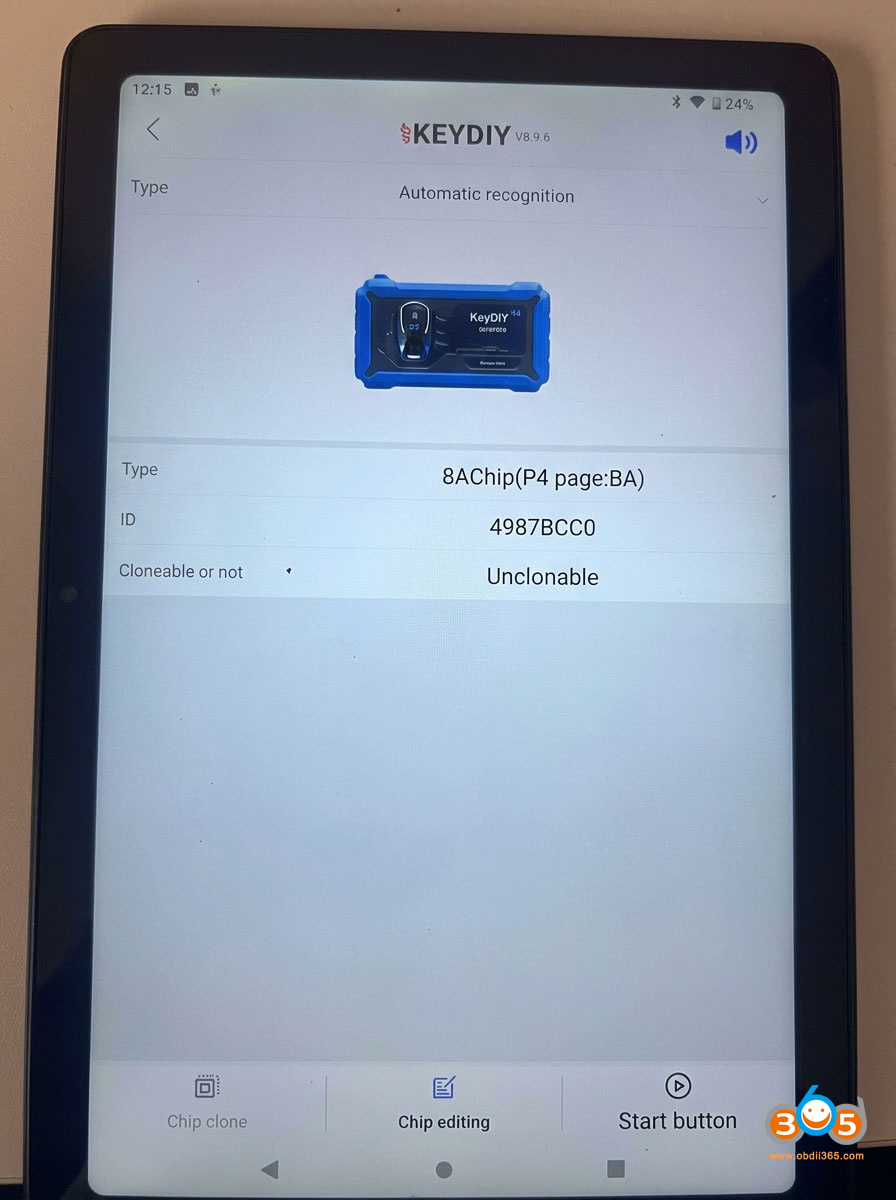
Then KD will identify key chip information.

5F type= FBS4/4.5 key

detect benz key type with keydiy kd-x4 5

NOTE:

KD-X4 will detect MB key chip type only. It cannot program MB keys.

KD-X6 will identify Benz key chip and program FBS3 keys.

Topdon ONE and Mucar 892BT Which is Better?

Both Topdon ONE (ONE Lite) and Mucar 892BT diagnostic scanners deliver full-system diagnostics, bidirectional (active) tests, ECU coding, modern protocol support (CAN-FD and DoIP), and AI-assisted help. They target serious DIYers, mobile mechanics, and smaller shops that want more capability than basic code readers without jumping to multi-thousand-dollar platforms.

Which is better?

Topdon ONE vs Mucar 892BT

Here’s a clear, side-by-side look at the real differences so you can decide which fits your needs and budget.

Feature
Topdon ONE (ONE LITE)
Screen
10.1-inch (1280×800)
8-inch (1280×800)
OS / Processor
Android 12 / 8-core
Android 10 / Quad-core
RAM / Storage
4 GB / 128 GB
4 GB / 64 GB
Battery
10,000 mAh (all-day use)
~4,150 mAh
Connection
Dual Wi-Fi (claimed 3× faster than Bluetooth) + Bluetooth
Bluetooth 5.0
Service Functions
50+
35+
Bidirectional Tests
Yes (extensive)
3,000+
ECU Coding
Yes (multiple brands; depth varies by model)
Yes
Topology Mapping
Yes (OE-level visual network map)
No (available on 892BT Pro version)
J2534 Pass-Thru
Yes (included VCI)
No (Pro version may add related features)
AI Assistance
TopFix AI
Built-in AI diagnostics + chatbot
Protocols
CAN-FD, DoIP, SGW access
CAN-FD, DoIP, FCA AutoAuth
Updates
1 year free, then ~$299/year
Lifetime free update
Internet Required
Often yes (even for some live data/topology)
Works offline
Typical Price
~$750
~$500
Best For
Pros & serious users who value screen, speed, topology & programming path
DIYers & budget-conscious users who want no ongoing fees

Key differentiators:

Topology mapping — The Topdon ONE includes a visual map of the vehicle’s ECU network. This is extremely useful for tracking communication faults on modern cars. The standard Mucar 892BT lacks it (the Pro version adds it).

J2534 pass-through — The Topdon’s VCI can act as a J2534 adapter when paired with a laptop and OEM software, opening the door to deeper dealer-level programming. The Mucar does not offer this on the base 892BT.

AI help — Both include AI features that analyze codes and suggest next steps. The Mucar’s implementation is frequently highlighted as practical for DIYers; the Topdon’s TopFix AI is similarly useful.

Speed — The Topdon One uses a newer Bluetooth interface that is “three times faster” than standard interfaces.

Battery — The Topdon One vastly outperforms the MUCAR in battery life.

Coverage is broad on both (120–140+ brands). Real-world performance is strong, though exact depth of coding and special functions always varies by vehicle make and year.


Updates, Online Requirements & Long-Term Cost
This is one of the biggest practical differences.Mucar 892BT: Lifetime free updates. No subscription. It works offline once software is loaded.

Topdon ONE: One year of updates included. After that, renewal is about $299 per year (or a two-year option for savings).

Core functions (read/clear codes, live data, active tests, many service resets) continue working without a subscription. Advanced features such as topology, full ECU coding depth, TopFix AI, and the newest vehicle coverage require an active plan. The tool also often needs an internet connection for topology and some operations.

Connectivity: The MUCAR has an advantage in that it does not always require an internet connection for live data, whereas the Topdon One requires internet for live data sessions.

For professionals who bill out diagnostics, the annual fee is usually easy to absorb. For occasional or budget-focused users, the Mucar’s zero ongoing cost is a major advantage.

The Mucar delivers excellent capability per dollar with no future fees. The Topdon costs more upfront and ongoing but offers a bigger screen, longer battery life, topology, faster wireless link, and a path toward J2534 programming.


Who Should Buy Which?
Choose the Topdon ONE/ONE Lite if you:

  • Work in a shop or as a mobile tech and value a large screen + all-day battery.
  • Need topology mapping for complex network diagnostics.
  • Want J2534 pass-through capability for future expansion.
  • Don’t mind (or can pass on) the ~$299 yearly update cost.
  • Prefer the faster dual Wi-Fi connection.

Choose the Mucar 892BT if you:

  • Are a DIYer, enthusiast, or budget-conscious technician
  • Want strong bidirectional control, coding, and AI help without any subscription.
  • Prefer a tool that works fully offline.
  • Value lower upfront cost and no recurring fees.
  • Don’t need topology mapping or J2534 right now (consider the 892BT Pro if topology is important).

www.obdii365.com