Showing posts with label Ford IDS. Show all posts

2022/12/22

Ford and Mazda IDS V128 Software Free Download

 Ford and Mazda diagnostic software IDS was released to V128 on Nov. 2022.


Software version:

Ford IDS V128.01

Mazda IDS V128.00

Ford and Mazda IDS V128 Software Free Download

Compatible device:

VXDIAG VCX NANO Ford Mazda USBWiFiFord VCM2 clone with vx manager, other VXDIAG Ford VCI scanners.

NOTE: The free driver and patch are used for vxdiag devices. Free to try it on other devices.


Free Download

Ford_IDS_128:

https://disk.yandex.com/d/dN2AQzBpQ2zhng

Incl.

IDS-128.01_full.exe
VCI_Software_1.0.0.10.exe

MZD_IDS_128:

https://disk.yandex.com/d/W13LJjMKxOP9LQ

IDS-128.00_full.exe

Ford_Mzd patch:

https://disk.yandex.com/d/721IaUrRmilL9A


How to Install Ford IDS Software?

1. Install Ford IDS-1**
2. Wait for the installation of Ford IDS – 1**, and restart the computer
3. Install the Ford original VCI software_ 1.0.0.10.exe
4. Install VX manager and Ford IDS driver
5. Wait for VX manager and Ford IDS driver installation to complete
6. Connect VCX device and install idspatch
7. Use idspatch to open IDs and start diagnosis.


How to Install Mazda IDS Software?

1. Install mazdaids-1**
2. Wait for mazdaids – 1** installation to complete and restart the computer
3. Install VX manager and Ford IDS driver
4. Wait for VX manager and Ford IDS driver installation to complete
5. Connect VCX device and install idspatch
6. Use idspatch to open IDs and start diagnosis.


NOTE:

For Ford IDS you will need to install VCI driver, Mazda IDS does not.

Don’t install Ford IDS and Mazda IDS software on the same computer.

2022/08/01

Calibrate Ford F150 F250 Speedmeter with Forscan

 If FORscan will allow calibrate a 2005 F150 speedometer for larger tires or should I use Ford IDS?

Customer’s working experience:
I have done this but FORScan is not able to access the FEPS PCMs (Flash electronically erasable and programmable EEPROM signal, Power Train Control Module) in these older vehicles with the FORScan 2.4.x branch (only from 2009 and up so far) as yet and that is where this calibration is stored!

It requires IDS version 86 (It is what I used) or newer and a Ford VCM 2 or a J2534 PassThru adapter with the 18 volt FEPS signal capability on DLC pin 13 and Ford FDRS! (i.e vxdiag vcx nano ford & fdrs)

What you need will be in a programmable section that has the programable VIN ID block and programmable block for gear ratio and several tire size options! In my case the size I was looking for was in the list of available options!

The F150 is different breed all by itself! The F150 has a different ABS and the AsBuilt address (760-01-01) shown being programmed in the F250/F350, contains the VIN ID block hex coding in the 2005 F150! Go Change any thing in there and then all you will get is multiple DTC,s and a Headache!

The only known configurable parameters in my 05 F150 ABS are in the 760-03-01-4E(4 Adaptive Cruse is Unknown Vehicle_ my current setting) and all that changes is Adaptive cruise control and Hill Decent control (E equals Hill Decent enabled_my current setting).

In the 2005 F150 the tire size is in the Programmable parameters(PCM) in IDS and looks like the below image (This is is what is in my 05 F150 just checked)! There are two sizes listed (the 660 * indicates the current setting in Revs Per mile) and the “other” selection field opens the Rev per mile calculator!

Calibrate Ford F150 F250 Speedmeter ford ids

My wife’s 2010 Fusion PCM (Appears as “VIN Block ID” under the PCM in Configuration and Programming) has very similar programmable parameters to the image above but is accessible in FORScan version 2.4.5! FORScan has told me they are working on this for the older Pre 2009 FEPS PCM’s.

Tutorial: How to use FORScan to recalibrate speedometer for bigger tires?

You’ll be able to calibrate it with the free FORscan software, a portable Windows device, and an appropriate ODB II adapter (ELS27, Vgate vLinker etc).

Change the size of the tire also changes the circumference of the tire which changes the speedmeter measurements of the tire.

Before scan we are gonna fix that where is the whole spreadsheet that kind of tells you what size what codes to enter for whatever size tires you have.
It is gonna be in the BCM driver control module, click on
it’s gonna load all right
it is gonna be 726 one right here 726-12-01 and it’s that middle section of numbers needs to be changed.

Input numbers 0A3B and hit Write.

Then test it and make sure it worked.


Pay close attention to the need to do a PCM and TCM relearn in order to clear DTC’s.

Also, for the 2021+ F150 the address location has changed. Instead of:

726-12-01 xxxx ABCD xxxx

It is now split between two lines:

726-15-01 xxxx xxxx ABxx
726-15-02 CDxx xxx xxxx

Calibrate Ford F150 speedmeter with forscan 1

Calibrate Ford F150 speedmeter with forscan 2

Calibrate Ford F150 speedmeter with forscan 3

Calibrate Ford F150 speedmeter with forscan 4

Calibrate Ford F150 speedmeter with forscan 5

Calibrate Ford F150 speedmeter with forscan 6

Calibrate Ford F150 speedmeter with forscan 7

Calibrate Ford F150 speedmeter with forscan 8

Calibrate Ford F150 speedmeter with forscan 9

   
For older F250 F350 you can calibrate Speedmeter with Forscan.
I.e 2005 Ford F250 The tire size is 35×12.5×1
Calibrate Ford F250 speedmeter with forscan 1

Calibrate Ford F250 speedmeter with forscan 2

Calibrate Ford F250 speedmeter with forscan 3

Calibrate Ford F250 speedmeter with forscan 4


2022/03/31

Free Download Ford IDS V125 for SVCI J2534

 STIC SVCI J2534 Ford IDS software V125 has been tested and verified working without problem  Obdii365.com shares free download resources.


Software Operation System: Win7 64bit, Win 8, Win 10


SVCI J2534 ford QuickLoader V1.2.5 patch
https://mega.nz/file/fvpkxQAR#7Drt3vyEPSRGpbe4Tum5PzKvTH-5zbPJj6p4EFOLr2A

Free download Ford IDS 125
https://mega.nz/file/2ng0FajQ#n9Zf600-CvQtv48W2BToBaNqf9RK2KemJjHo63ZV4mI

SVCI J2534 VCI V1.0.0.0
https://mega.nz/#!anBG3CZa!SyersJzW3BA_FLFuBBK-hFU2JwGNvuPuWhxrT6QZWsk

No password!

Free Download Ford IDS V125 for SVCI J2534

SVCI J2534 Ford vs VCM II vs Other Ford J2534

FunctionSVCI J2534Genuine VCM IIOther Ford J2534NOTE
Automatically startup without licenseYesNeed license
Support online module programmingYesYes
Support online PATS/RKE learningYesYes
Support SAE J1850 PWM 83.3K baud rateYesPartly
Support FEPS 18V programming voltageYesYesPartly
Support FEPS 5-20V adjustable voltageYesPartly
Support reading programming voltageYesPartly
Support EEC-V multiple items data loggerYesPartly
Support PTEC multiple items data loggerPartlyPartlyYesMY 1994-2000 Ford
Support SAE J1850 module programmingPartlyMY 2000-2006 Ford
Support power balance performance testPartlyPartlyMY 1995-2006 Ford
Support CANBUS module programmingPartlyPartlyPartlyMY1995-2006 Ford
Support online software updateYes
Calculate incode pre-2010 for freeYes


SVCI has been tested working with FJDS, FDRS programs for new Fords.

SVCI has fixed J1850 PWM protocol module programming bugs in Feb. 2021. Users can set reprogramming voltage to 18V on PIN 13 and do reprogramming for Ford J1850 PWM vehicle.

SVCI J2534 Ford J1850 PWM Module Reprogramming Guide


Guide to install SVCI J2534 ford software:
Step 1: Download IDSFord software
Step 2: Download SVCI-J2534-for-ford patch software
Step 3: Download IDS-VCI (Ford) software
Step 4: install software directly that downloads


Windows 7 Installation Guide:

Windows 10 64bit Installation guide

STIC SVCI J2534 Windows 10 Pro 64bit Installation Review

Mazda IDS remains V124.

2021/12/22

Can SVCI J2534 Ford IDS Replace immo parts?

 Question:

STIC SVCI J2534 Ford IDS cannot work with replacing immo parts? I think I did replaced engine ecu with this device (ford ids app downloaded something online and after all configuration car started) or it was only bricked ecu online programming i cannot remember now… also saw on youtube online pats programming with this device.

Can SVCI J2534 Ford IDS Replace immo parts

Test Report:

I bought the STIC SVCI J2534 Ford IDS, Works really well.

I use the STIC SVCI J2534 Ford IDS to restore flash data, ecus and other modules. up to 2017.
And program immo parts and keys on older, within out coding. before 2011.
For this, it works really well.

To replace immo parts, you will need a OEM account.
And 2018 FDRS


If you asked ” fdrs can work with svci j2534?”

I only use it, with ford ids.

I guess it will work, with fdrs, if you have an FDRS account.


The new device will do the same.

It will run ids with activation.

And will run fdrs, if you have your own account.


They offer a fdrs activation. I guess for 24hours, or so.


Someone confirmed that “SVCI j2534 works with fdrs. You have to change path in regedit with cardaq.”

VXDIAG VCX NANO for Ford is more stable on ecu/immo programming and it is confirmed working with IDS/FJDS/FDRS 100%.


To own a working STIC SVCI J2534 Ford IDS here:

https://www.obdii365.com/wholesale/fvdi-j2534-diagnostic-interface.html

2021/06/09

Free Download Ford IDS 122 + FJDS 121+ FDRS 27.6.8

 Free download Ford IDS 122.01 + FJDS 121+ Mazda IDS 122.01+ FDRS 27.6.8

https://mega.nz/folder/DhhwgDRL#UChUYICfuiaE-5_7UrnFTw

No password

Works with VCM2 / Vxdiag vcx nano Ford/ other J2534


Question: Where to download the patch for IDS & FJDS?

Answer: The patch you’re using comes from an old version of the software.

Ford has changed its way of getting file from the server since ( i think ) v114 or v115. That means you won’t be able to access all the “online” functions with a patched software. You need the real license.
You can still put files directly into the calibration folder manually and use it offline.


Here is the IDS patch free download, you can try it at your own risk:

https://mega.nz/folder/OV4RRC6B#seCWP6UCzOPWEDYlQxZ1iQ


Question: Does this version work with VCMII clone? VCMII version SP177-C.

Answer: Yes, with an official license.


Question: All of them can be installed on the same OS? Ford with Mazda…

Answer: No, need to use a different Windows.


IDS. IDS provides complete dealership level vehicle diagnostic coverage for all 1996 to select 2018 Ford, Lincoln, Mercury vehicles. IDS requires the use of Ford diagnostic hardware including VCM, VCM II, and VCMM devices. The IDS software license includes time-based access to the IDS software, software updates, calibration files.


ford-ids

FJDS provides module reprogramming software that covers 1996 to select 2018 Ford, Lincoln, and Mercury module reprogramming functions, plus complete dealership level diagnostic software for all 2018 to present Ford and Lincoln vehicles. FJDS is designed for use with J2534 compatible Vehicle Communications Interfaces (VCI) including Ford diagnostic hardware (VCM II, or VCMM). The FJDS software license includes time-based access to the FJDS software, software updates, and calibration files.
ford-fjds

FDRS – next-generation factory Ford Motor Company vehicle diagnostic Software designed for use with VCM II, VCMM, and J2534 compatible VCI. FDRS provides complete dealership-level vehicle diagnostic coverage for some 2018 and forward vehicles. FDRS provides superior capabilities, is more user-friendly, and provides more diagnostic tools than IDS. The cloud-based system ensures the technician is provided the latest software every time FDRS logs into the Ford network.

ford-fdrs

Hope it helps!

2021/05/30

Ford VCM2 IDS Unable to Connect to Ford Mondeo Solution

 Problem:

I bought a VCM2 china clone, it works with ids 101.01 in VMware 10 with XP SP3.

But, although it connects well to ids and VCI Manager (V101.01), it can’t detect or connect to my ford mondeo PCM.

vcm2-clone-connect-ford-mondeo-1


Finally Fixed!

Well, managed to downgrade the firmware using ids V86 (version 2.1.1.5) and now the VCM2 can connect to the car.
For the first time I listen the relay clicking.
VIN and the characteristics of the car was read by ids V86.
The clone vcm2 is working well with ids V86.
It is sufficient to me, it covers my 2011 mondeo.

A bonus is that this VCM2 also work with forscan, nice!


A new problem: unable to do Modules programming
But It was unable to do Modules programming (I want to setup the SASM module, the mondeo pull to the right although it visit some 10 or more 4 wheel alignment shops, it has almost 2º to the right when steering wheel is centred).


How to do?

The padlock symbol means you do not currently have full communication with vehicle yet it doesn’t mean blacklisted You need to activate module programming with extender software which lasts for just 120 days but can be renewed as often as you wish


Please downloaded “Ford Extending Programming.rar file, it is used to solve ” error selection not available after entering module programming”

https://mega.nz/file/gREkDChZ#7Yo8_ks39I0Wr6-k8nspZauR6qMqvdfcqeHlR60GMxc

vcm2-clone-connect-ford-mondeo-2

Hope it helps!

2021/05/11

Mismatch between VCMII IDS Software Versions

 Hello. I am installing a Ford vcm2 and connecting it to IDS V121.01, I get this error “ Falta de concordancia entre las versiones de software VCMII IDS (Mismatch between VCMII IDS software versions)”, does anyone know how to solve it?

ford-vcm2-mismatch-error-1

obdii365.com engineer solution:

PS: both VCMII (SP177-C3 and SP177) share the same solution

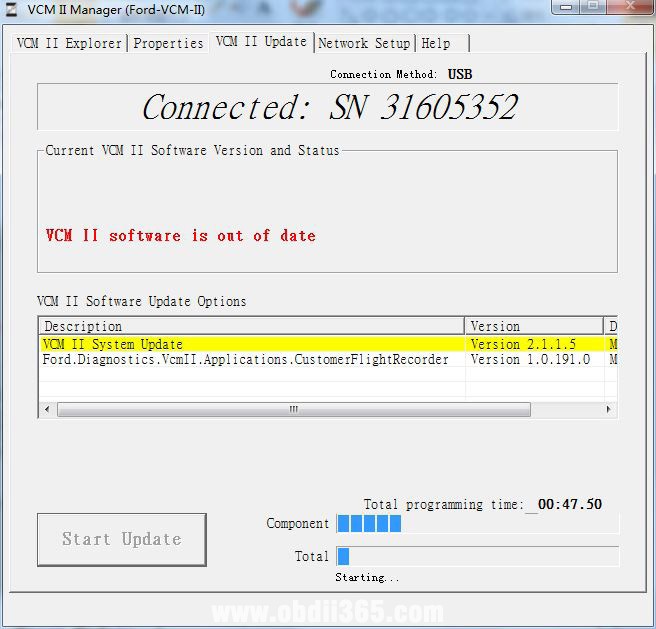
Click “√” to upgrade VCM2 firmware.

Refer to this instruction, you first press the reset button, and then open the bosch vci manager to update the firmware.

  1. Take apart the fiber case.

ford-vcm2-mismatch-error-2


  1. Use the USB cable to connect VCM2, hold the “Reset” button, don’t release.

ford-vcm2-mismatch-error-3


  1. Connect the other end of USB cable to the computer with IDS V86 installed, until you hear a beep, release Reset button.

ford-vcm2-mismatch-error-3


  1. Run Bosch\VCI Software(Ford-VCM-II)\VCI Manger(Ford-VCM-II)

ford-vcm2-mismatch-error-4


  1. When the following page appears, it means it enter recovery mode.

ford-vcm2-mismatch-error-5


  1. Click on “Recover” button and the program will switch to VCMII update page.

ford-vcm2-mismatch-error-6


  1. Click on “Start Update” to start firmware update and you will see the following window message.

ford-vcm2-mismatch-error-7


  1. Click on “OK” and it will start to write into the newest firmware.

ford-vcm2-mismatch-error-8


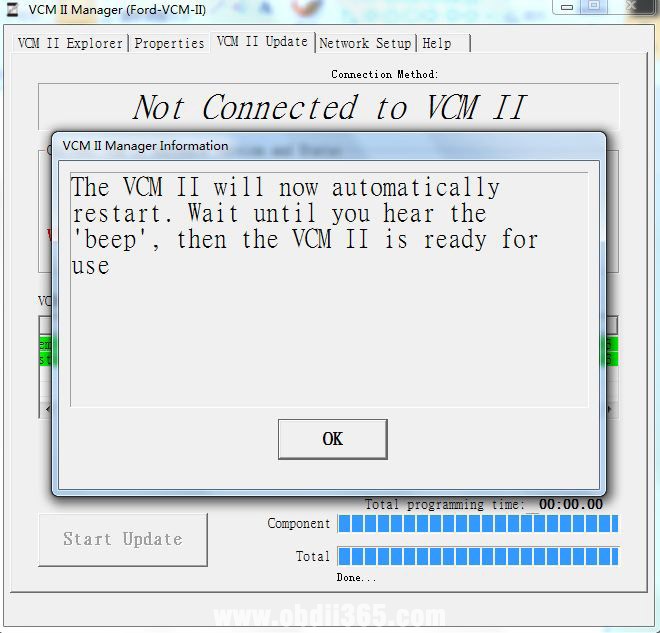
  1. When VCMII firmware update successfully, it shows the following window message, and VCM IIdevice system will reboot automatically, when you hear one beep it means reboot completely, now you can exit VCM II Manager.


ford-vcm2-mismatch-error-9


  1. Run IDS. when it shows the following window message, it means VCMII firmware update completely.

ford-vcm2-mismatch-error-10


Finally! everything is fine!

Okay. I have restored it according to your instructions and everything is correct. Thank you very much for your support.


Q: Would it be possible to program keys online?

A: Yes.


Q: What would be the process and cost?

A: You need to have an online account


Q: ok, and the cost of the online account?

A: I’m sorry, we can’t provide it, you can go to ford official website to buy, or other channels


Enjoy!


http://blog.obdii365.com/2021/05/11/fix-mismatch-between-vcmii-ids-software-versions/

2021/02/19

SVCI J2534 Program Ford J1850 PWM PCM Module

 Obdii365.com received new feedback from customer:  ” I can set reprogramming voltage to 18V on PIN 13 and do reprogramming for a Ford J1850 PWM vehicle using the SVCI J2534 passthru adapter.  This is just as expected. ”


So is it worth buying the j2534 cable?

What’s good of svci j2534?

  • Works with bunch of manufacturer’s software, like Ford’s IDS, Mazda IDS, FDRS, Toyota TIS, JLR SDD, ELMconfig, Forscan etc.
  •  Works with official latest ids software
  • Online software & firmware update
  •  Installation is very easy with the included loader
  • Cheap


What’s bad of svci j2534?

  • Sometimes it is instable and sometimes disconnect from car.
  •  It will not program older vehicles (seemed has been fixed in new upgrade).  for the older ones you need the vcm2.

In sum, this device pays for itself.


FLY Technician has solved the J1850 PWM protocol module programming bugs. So it will reprogram J1850 modules without issue.


What you need: 

SVCI J2534 diagnostic interface

Ford IDS software and QuickLoader

PCM  module to be installed


Free download Ford IDS V120.01 and IDS QuickLoader


Tips on software installation:

1. Install latest ids 120
2. Install ids_vci
3. Install SVCI-J2534-Ford-Quickloader
4. Insert svci2534 to your car obd2 port
5. Run icon SVCI-J2534-Ford-Quickloader (internet connection should be ON)

All of those installer packages you can find in download section from flyobd website (check download link above.)


Here is a demo guide on SVCI J2534 J1850 PWM module programming:

Test module information
Part number: F8CF-12A650-CE
Year: 1998
Module: ECU
Protocol: J1850 PWM
Test target: Module programming


Note:  Must update firmware to 001.031 version or above version.

Connect svci j2534 interface with vehicle

Make sure the communication indicator of svci flashes

svci-j2534-ford-j1850-module-programming-1


Start Ford IDS QuickLoader on desktop, it will ask for Firmware Update
Update upgrade firmware to 001.031

svci-j2534-ford-j1850-module-programming-2


Run IDSQuickLoader again, you will see current software and firmware version
Run IDS V120.01

svci-j2534-ford-j1850-module-programming-3


Start New Session->All other, press Tick icon

svci-j2534-ford-j1850-module-programming-4


Identify vehicle information and confirm by press YES

svci-j2534-ford-j1850-module-programming-5


Read VIN
Select Module Programming->Programmable Module Installation->PCM

svci-j2534-ford-j1850-module-programming-6

svci-j2534-ford-j1850-module-programming-7


Set ignition switch to OFF (Position 0)

svci-j2534-ford-j1850-module-programming-8


Install a new module in vehicle
Note: Do not start a reprogramming session with a low battery in the vehicle and programming tool.
The fuel pump and the engine cooling fan(s) may run during the following procedure.
If you are programming a 6.0L diesel, the FICM relay must be removed before programming
Set ignition switch to ON

Downloading data for PCM reprogramming until complete

svci-j2534-ford-j1850-module-programming-9

svci-j2534-ford-j1850-module-programming-10


Set ignition switch to OFF
Turn ON ignition switch again
Turn OFF ignition switch

svci-j2534-ford-j1850-module-programming-11

Calibration has been loaded and checked

svci-j2534-ford-j1850-module-programming-12


If required, obtain a PCM reprogramming label and complete with the following data.
Place the completed label in the appropriate position. It is not required on vehicles served in North American.
Start engine but do not depress the throttle pedal.
Turn OFF ignition switch
Turn ON ignition switch
J1850 PWM protocol PCM reprogramming completed.

svci-j2534-ford-j1850-module-programming-13


Clear existing fault codes
Turn OFF ignition switch

Done.


Other unbiased reviews on SVCI J2534:

1.I just did a PCM/TCM Module programming on a 2014 fiesta with the svci j2534 today. Honestly I was surprised how well it worked. I would suggest a usb Y cable. I was having issues before because my laptop USB port did not supply enough current.

2. svci j2534 work good i tested many times program keys, sync immo , remove speedlimiter etc. and work OK

3. For me it works well with newer vehicles. It does freeze and disconnect sometimes. But I’ve never had it brick a computer. I only use it for module programming.  So it might be annoying if you use it to diagnose and it keeps freezing and you have to restart IDS. It will not program older vehicles. Installation is very easy with the included loader. But if you can find a good quality clone I would rather go for that. But comparing this to the cheap quality clones around the same price I think this is better.
4.  Its a very good tool. Svci j2534 works fine. Have been using it for a year now.
5. I’ve done PCM/TCM on Kuga 2015 2.0L Tdci with IDS 116 no problem.
6. i use this daily with no problem at all .but it is slower than vcm2. but it does some things better than vcm.
7. I have this tool and it’s working very well. Very fast on programming and diagnosis. I recommend!