2023/10/16

Top 7 Tools to Read and Write ACDelco E98 ECU

 Are you looking for a reading tool for GM Opel ACDelco E98? Here’s the clue.

1).

Foxflash/KT200: OBD & Bench

Both Foxflash and KT200 read/write Delco E98 without problem. Bench mode is recommended and it is faster. Some users also tested working in OBD mode. OBD works but takes longer. The network is very important.

Better read it full system on bench.

foxflash acdelco e98

check pinout and instruction here

KT200/Foxflash Read and Write GM Opel Delco E98 ECU

If failed to write by OBD, try solution here:

How to Solve Foxflash Bricks GM ACDelco E98 ECU After OBD Write?

2). 

CG FC200: Bench Mode

FC200 just released new software update 1.1.6.0- adding GM ACDelco E98 ECU bench mode

cg fc200 acdelco e98

3).

OBDSTAR DC706:

Yes, ACDELCO E98 MPC5674 is supported by DC706- bench mode.

obdstar dc706 acdelco e98

DC706 recent update:

Add ECU reset function for

CHEVROLETACDELCO E78/E83/E87/E92/E98,
GMC ACDELCO E78/E83/E92/E98,
HOLDEN ACDELCO E78/E83/E98,
OPEL ACDELCO E78/E83/E87/E98,
VAUXHALL ACDELCO E78/E83/E87/E98

also can do mileage reset for

CHEVROLET ACDELCO E80/E84/E78/E83/E87/E92/E98,
GMC ACDELCO E80/E78/E83/E92/E98,
HOLDEN ACDELCO E80/E78/E83/E98,
OPEL ACDELCO E80/E84/E78/E83/E87/E98,
VAUXHALL  ACDELCO E80/E78/E83/E87/E98,


4).

Flex: OBD and Bench OK

Flex from magic motor sport work perfect on Delco E98!

OBD is Safe, Min 13 volt. Many people have done via OBD no problems. but you have to disconnect the battery after write is finished.
Better do it on bench. The difficult part will be after read. Take out put on bench 5 mins all read OK.

flex acdelco e98

5)

Kess V3: OBD and Bench Mode

Both OBD and Bench mode works.

For example:
Opel astra k 2018  cc 2.0 Diesel ecu AcDelco E98 read and write by OBD

kess v3 acdelco e98

6).

I/O Terminal: OBD or wired on bench
MULTITOOL OPEL/GM ECUReading/writing of OPEL/GM ECUs by CAN (OBD or wired on the bench) . Also software has bootpin recovery mode.
Supported OPEL/GM ECU types:
* ACDELCO E83 MPC5565 FLASH R/W. CAN (OBD) /BOOTPIN RECOVERY;
* ACDELCO E78 MPC5566 FLASH R/W. CAN (OBD) /BOOTPIN RECOVERY;
* ACDELCO E87 MPC5565 FLASH R/W. CAN (OBD) /BOOTPIN RECOVERY;
* ACDELCO E39 MPC5566 FLASH R/W. CAN (OBD) /BOOTPIN RECOVERY;
* ACDELCO E39A MPC5566 FLASH R/W.CAN (OBD) / BOOTPIN RECOVERY;
* ACDELCO E98 MPC5674 FLASH R/W.CAN (OBD) / BOOTPIN RECOVERY;

io terminal acdelco e98 1

io terminal acdelco e98 2

io terminal acdelco e98 3


7). bFlash

bFlash Update V2006A – AC Delco for GM vehicles.

Buick – Cadillac – Chevrolet – GMC – Holden – Opel !

🔹 GM AcDelco E39A
🔸 GM AcDelco E78
🔹 GM AcDelco E80
🔸 GM AcDelco E83
🔹 GM AcDelco E92
🔸 GM AcDelco E98


Hextag, Bitbox JokerFlash also supports read/write full flash and eeprom for GM Acdelco E98.

*When you can’t read the passowrd by obd you have to open the ecu and boot.

Download and Install ODIS-E V17 on Win11

 How to: install and activate VAG VW Audi Skoda Seat ODIS Engineering software V17.01?


Where to get ODIS-E V17.01?

ODIS E V17.01 can be downloaded free here.

You can also get a U disk containing both ODIS-E V17 and ODIS-S V23:

https://www.obdii365.com/wholesale/vw-audi-v11-software-u-disk.html


Does it require activation?

Yes, we provide 1 time free activation by keygen.


What device does it work with?

• VAS6154 genuine devices
• Multi J2534 Passthru (SVCI 6154, Openport 2.0, Godiag J2534Xhorse MVCI ProVNCI 6154AVXDIAG VCX SE 6154Autel MaxiFlash JVCIJVCI+MaxiFlash EliteMaxiVCI V200 etc)


What’s the operating system requirement?

Win10 (ODIS-E V17 works only on Windows 10 or more)

RAM>4GB


How to Install ODIS E V17?

Step 1: Install ODIS-E V17 Setup
Open ODIS-E 17.0.1 folder
Open ODIS-Engineering_17_0_1 folder
Run OffboardDiagSetup-Engineering-17_0_1
Select Setup language

Install ODIS-E V17 1

Press Next
Select diagnostic interface as VAS 6154 and press Next

Install ODIS-E V17 2

Then software will ask license for activation
Open license.dat from ODIS-E 17.0.1/Patch & License folder

Install ODIS-E V17 3

Install ODIS-E V17 4

Select Create a folder in the start menu and create shortcuts for all users
Installing Setup until finished

Install ODIS-E V17 5

Step 2: Activate ODIS-E
Run Patch & License folder, open 17.0.1 patch folder
Copy all three files from 17.0.1 patch folder and paste to Win11ProW X64/Program Files/OE folder

Install ODIS-E V17 6

Install ODIS-E V17 7

Send OffboardDiagLauncher_protected from Win11ProW X64/Program Files/OE to desktop

Install ODIS-E V17 8

Rename OffboardDiagLauncher_protected desktop shortcut as ODIS E 17.01 and run it

Install ODIS-E V17 9

ODIS-E will ask for an activation key
Send the hardware ID to obdii365.com engineer and we will send you back the activation key
Input activation key and press Register

Install ODIS-E V17 10

Step 3: Install PostSetup
Open PostSetup_202300619.iso on ODIS-E 17.0.1 folder as Winrar file
Extract PostSetup 202300619 file to Disk E

Install ODIS-E V17 11

In ODIS-E 17.01 if we select file location to E:/ODIS_Engineering, it says no valid software configuration.

Install ODIS-E V17 12

We do this.
Create a new ODIS Engineer 17.01 folder on disk E, copy ODIS Engineering folder to this new folder.

Select local directory as file:E:/ODIS_Engineering 17.01/, it should be fine.

Install ODIS-E V17 13

Install ODIS-E V17 14
Select PostSetup language
Wait until postsetup installation finished

Install ODIS-E V17 16

Step 4: Exyatct VWMCD

Unzip VWMCD file in 4.VWMCD folder
and extract to C:/ProgramData/OE/MCD-projects-E/VWMCD folder

Install ODIS-E V17 17

Step 5: Install Driver.

The U disk contains both ODIS-S and ODIS-E software. Drivers are in the ODIS-S 23.0.1 folder.

Install ODIS-E V17 18

Install the corresponding driver like Step5 here.

How to Install and Activate ODIS-S V23?

If already installed driver for ODIS-S, don’t need to install same driver for ODIS-E again.


Step 6: Run ODIS-E 17

Run ODIS-E 17.01 on desktop
Software is ready to use.

Install ODIS-E V17 19

Download and Install ODIS-S V23 on Win11

 How to: install and activate VAG VW Audi Skoda Seat ODIS Offboard Diagnostic Service software V23.01?


Where to get ODIS-S?

Download free here (does not include activation)

http://blog.obdii365.com/2023/10/11/free-download-odis-v23-software/

Here you also can get a U disk containing both ODIS-E V17 and ODIS-S V23:

https://www.obdii365.com/wholesale/vw-audi-v11-software-u-disk.html


Does it require activation?

Yes, we provide 1 time free activation by keygen.


What device does it work with?

• VAS6154 genuine devices
• Multi J2534 Passthru (SVCI 6154, Openport 2.0, Godiag J2534Xhorse MVCI ProVNCI 6154AVXDIAG VCX SE 6154Autel MaxiFlash JVCIJVCI+MaxiFlash EliteMaxiVCI V200 etc)


What’s the operating system requirement?

• Windows 10 (ODIS Service 23.0.1 works only on Windows 10 or more)
• Installed libraries (DLL) for Microsoft Visual Studio 2010: vcredist_x86.exe
• Installed Visual C++ Redistributable x86 for Microsoft Visual Studio 2010: vcredist_x86.exe
Internet Explorer 11.0
• Adobe Acrobat Reader Version 11 or Adobe Acrobat Reader DC
• Font „Arial Unicode MS Regular
• CPU minimum 2GHz recommended
• RAM >= 4 GB
• Free hard disk storage > 40 GB, standard file system NTFS
• The software uses standard windows installation paths


How to Install ODIS-S V23 software?

Step 1: Install ODIS-S V23 Setup
Open ODIS-S 23.01 folder
Open OffboardDiagSetup-Service-23_0_1 folder
Extract OffboardDiagSetup-Service_VWMCD_23_0_1.rar
Install ODIS-S setup
Select setup language
Wait until the setup installation is completed

Install ODIS-S V23 1

Install ODIS-S V23 2

Step 2: Activate ODIS-S 23

Open 2.Patch& License folder
Copy all files from patch folder and paste them to Win11ProW X64/Program Files/OS folder

Install ODIS-S V23 3

Install ODIS-S V23 4

Run OffboardDiagnostic on desktop as administrator
It will ask for an activation key
Send the hardware ID to obdii365.com, we will send you back the activation key, press Register

Install ODIS-S V23 5

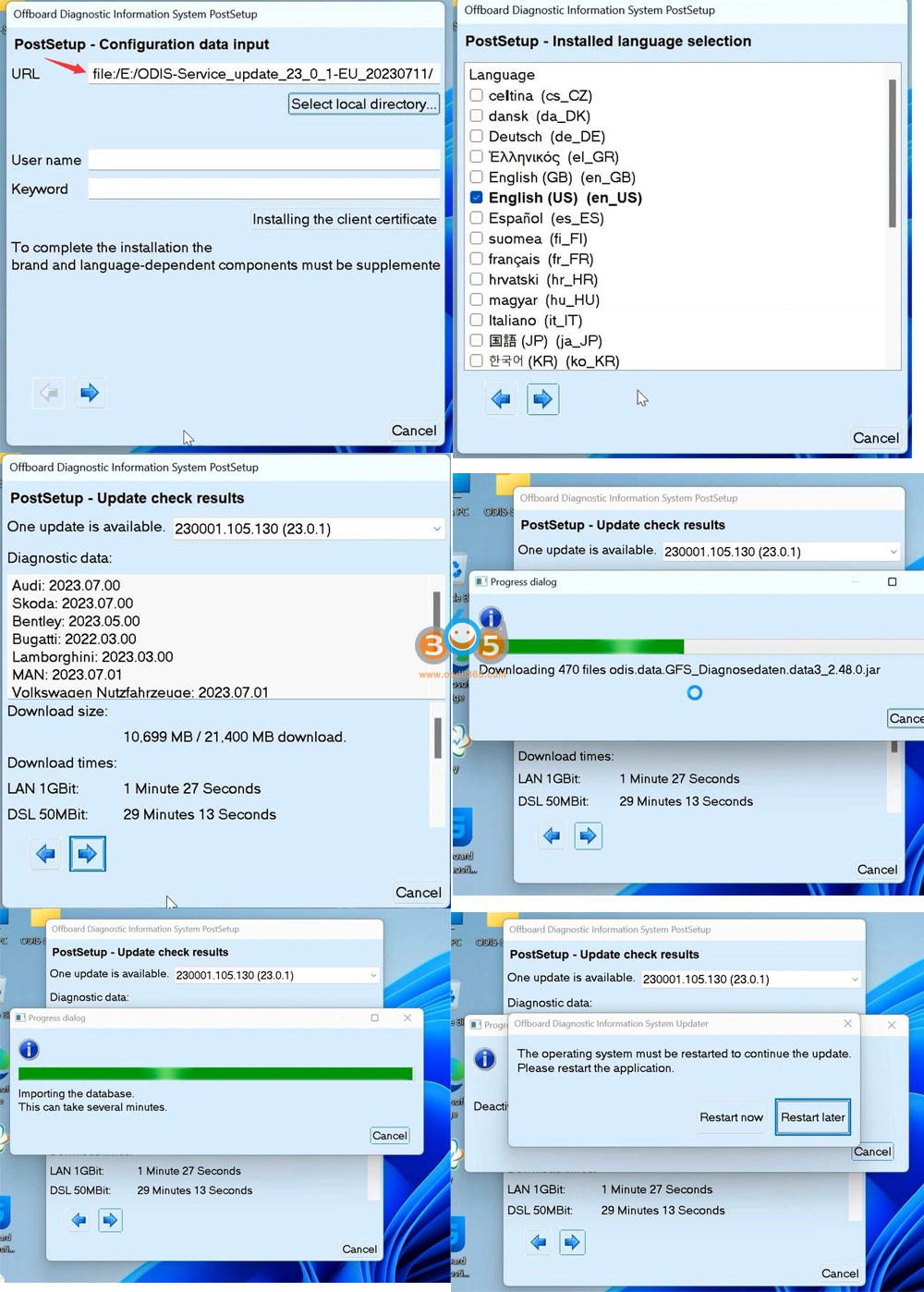
Step 3: Install PostSetup

Open 2.ODIS-Service_update_23_0_1 folder
Open ODIS-Service_update-23_0_1-EU_20230711 file with Winrar
Create a new folder to E and extract file to disk E

Install ODIS-S V23 6

In PostSetup select from file:/E:/ODIS-Service_update_23_0_1_EU_20230711 folder
press Next (don’t need to input user name and password)

Install ODIS-S V23 7

Select PostSetup language
Wait until postsetup installation finished

Install ODIS-S V23 8

Step 4: Copy license
Copy the “license Standalone” folder to C:/ProgramData/OS

Install ODIS-S V23 9

Install ODIS-S V23 10

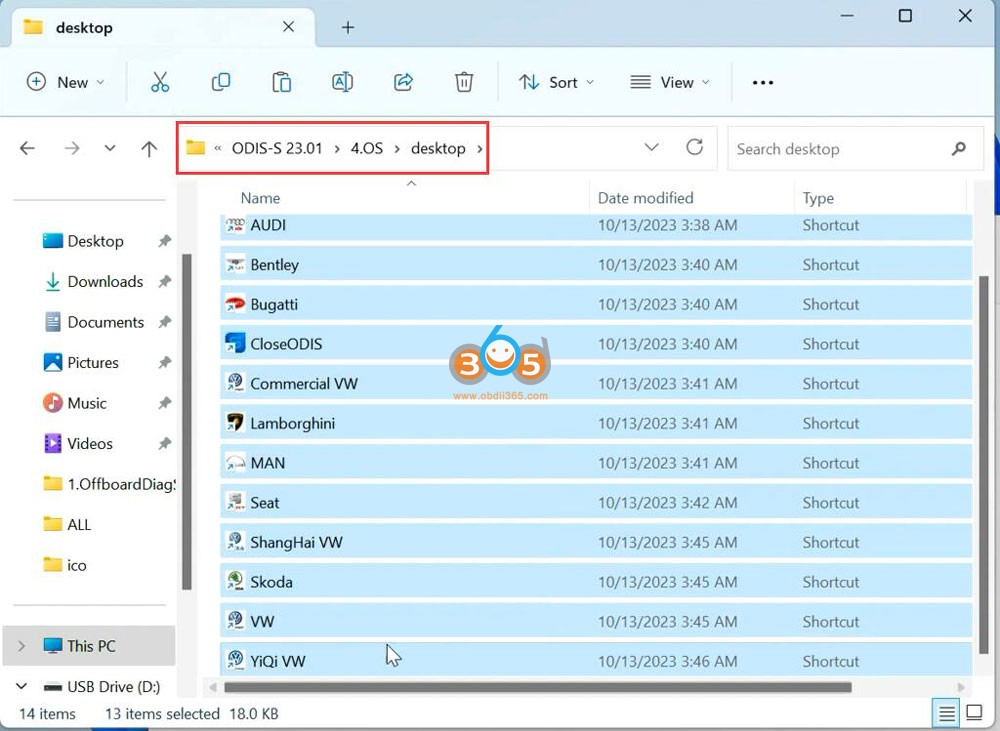
Copy shortcut icon in the “Desktop” folder to desktop

Install ODIS-S V23 11

Install ODIS-S V23 12

Step 5: Install Driver
Open 5.Driver folder
Install driver for the corresponding device.

Install ODIS-S V23 13

For example, install VX Manager driver for VXDIAG VCX SE 6154
Connect the device with the laptop via USB

Install ODIS-S V23 14

Install ODIS-S V23 15

Check if the device is well connected in the Device Manager
Run VX Manager, check device is detected
Install or update 6154 driver

Install ODIS-S V23 16

Install ODIS-S V23 17

Step 6:
Run the corresponding software icon on desktop, i.e VW ODIS-S V23

Install ODIS-S V23 18


2023/10/12

Which Tool to Program 2023 Subaru Forester All Keys Lost?

 As titled, which tool to program 2022/2023 models like forester and outback G & H type keys when all keys lost?

Here is the clue.


Autel IM608:

didn't work as it was unable to read eeprom data


OBDSTAR X300 DP Plus:

tried obdstar x300 which didn't even have the correct car on there.


Subaru SSM4 clone:

with ssm4 it requires server authentication and when i use a bypass patch to activate ssm4 that process doesn't work.


Subaru SSM4 with subscription:

Yes, Need a legit SSM4 and current authentication key. (The authentication key that changes every 6 months)


2023/10/11

OTOFIX D1 Series Scanners Comparison

 Here comes the OTOFIX D1 series universal diagnostic scanners comparison.


OTOFIX D1 Lite vs D1 vs D1 Pro vs D1 Plus vs D1 Max vs EvoScan Ultra

OTOFIX D1 Series Scanners Comparison 1

OTOFIX D1 Series Scanners Comparison 2

OTOFIX D1 Series Scanners Comparison 3

OTOFIX D1 Series Scanners Comparison 4


Click on images to enlarge or download PDF here.

ODIS V23 Software Free Download

 The latest ODIS (Offboard Diagnostic Information System Service) Service 23 software can be downloaded here for free.


Free download ODIS V23 (Installation files only)
Just for sharing purpose. License & keygen are not included. Need to find keygen by yourself (or buy keygen from text link above).

File including:

odis v23 software 1

Information software:

• Release name: Offboard Diagnostic Information System Service v23
• Type of Software: Diagnostic
• Capacity: about 18.1 GB
• Version: ODIS-S 230001.105.130
• Vehicle Connection:
+ Version of ECF: 57.6.2
+ Version of VW-MCD: 20.0.0
+ Version of VW D-PDU API: 3.0.0
• PostSetup: 0105_9-20230612
• License: Included License Standalone and License for all brand
 Brand: VAG (Audi, Bentley, Bugati, FAW-Volkswagen, Lamborghini, MAN, Seatm Volkswagen, Skoda)
• Region: All regions
• Language: English

odis v23 software 2

Hardware Support:
• VAS6154 genuine devices
• Multi J2534 Passthru (SVCI 6154, Openport 2.0, VNCI 6154AVXDIAG VCX SE 6154Autel MaxiFlash JVCIJVCI+MaxiFlash EliteMaxiVCI V200 etc)

odis v23 software 3
Computer Requirements:
• Windows 10 (ODIS Service 23.0.1 works only on Windows 10 or more)
• Installed libraries (DLL) for Microsoft Visual Studio 2010: vcredist_x86.exe
• Installed Visual C++ Redistributable x86 for Microsoft Visual Studio 2010: vcredist_x86.exe
Internet Explorer 11.0
• Adobe Acrobat Reader Version 11 or Adobe Acrobat Reader DC
• Font „Arial Unicode MS Regular
• CPU minimum 2GHz recommended
• RAM >= 4 GB
• Free hard disk storage > 40 GB, standard file system NTFS
• The software uses standard windows installation paths

Note: End of support Windows 7: Please note that support for Windows 7 ended on 14.01.2020. This version does not support Windows 7 installation

2023/10/08

Autel MK908 II Jeep 2020 Unlock Failed Solution

 Here comes a similar problem:

One of our customers failed to reset oil on a Jeep Renegade 2020 with Autel MaxiCOM MK908 II diagnostic scanner.

Error message “Unlock failed. The tool did not allow.”

Autel MK908 II Jeep 2020 Unlock Failed 1

Autel MK908 II Jeep 2020 Unlock Failed 2

Solution:

For 2018+ FCA Chrysler Jeep Dodge you need to unlock or bypass gateway to access functions.


2 Ways:

1. use Chrysler 12+8 gateway adapter, Start Connector to unlock gateway

Chrysler 12+8 Bypass Cable, Star Connector?

2. purchase AutoAuth license

How to Purchase, Activate and Use FCA AutoAuth for Autel Scanners?

This can be applied to all Autel MaxiSys and MaxiCOM scanners.

Where to Get Yanhua Mini ACDP Authorization A501?

 Problem:

I was trying to add a new spare key to BMW F series BDC by OBD, but Yanhua mini acdp2 said i don’t have authorization for A501 module?

Yanhua Mini ACDP Authorization A501

A501 authorization comes with module 31.

To program BMW BDC key or reset mileage via OBD, need to purchase module 31 A501 license.