2023/11/06

Yanhua Mini ACDP “EGS Version does not Support” Solution

 Problem:

BMW F10 trying to clear ISN with Yanhua mini acdp, but had an error “EGS version does not support”. Any solution?

Yanhua Mini ACDP “EGS Version does not Support”

Solution:

1.EGS version is not supported. Program/Update EGS version then clear ISN with ACDP mini.

2. Direct clone DME so don’t need to clear ISN.

Yanhua Mini ACDP BMW MSD81.2 No ExtFlash Found Solution

 Problem:

I was trying to clone BMW MSD81.2 DME with Yanhua Mini ACDP, but it said no ExtFlash found. Does it support MSD81.2 cloning?

Yanhua Mini ACDP BMW MSD81.2 No ExtFlash Found

Solution:

BMW MSD81.2 DME has no ext flash, just press OK to continue cloning DME.

2023/11/02

What Tool to Program 2023 Ford F-150 Key?

 What tool to program 2023 Ford F-150 key with active alarm?


Autel IM608 and smart pro cannot do 21+ F150. Only with dealer software. Got to have a NASTF subscription and a Ford tech license.

You can program all the new Ford models with NASTF and annual Ford License FDRS. It costs you $50 for 3 days. $50 is easily built into the key price.

You’ll need a laptop, a J2534 pass thru device, I use my Jbox from my Autel. And you’ll need nastf and a subscription to fdjs/fdrs.  You also need a NASTF ID and will need paperwork and ID of customer.

You can also use AE Tools jbox, cardiaq, vxdiag vcx nano Ford etc j2534 devices.


For example:

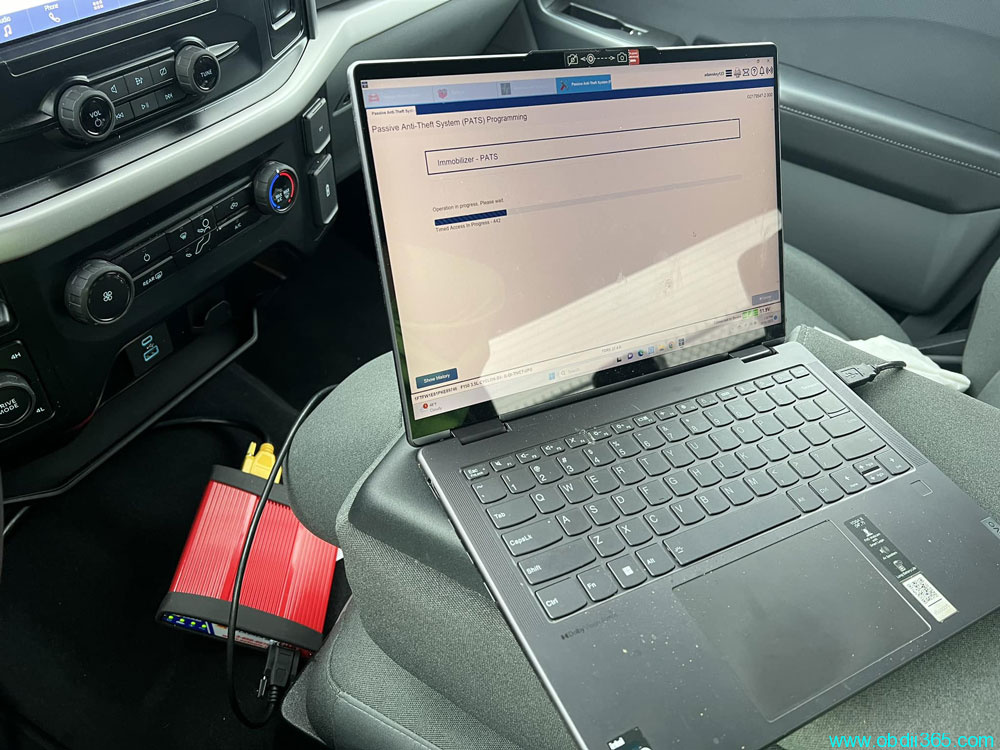
2023 Ford F-150. With J2534 and FDRS dealership software. Was a little nervous about this one with an active alarm. But all well. Programmed 2 keys no problem.


Program 2023 Ford F-150 Key J2534 FDRS


2023/10/26

Yanhua Mini ACDP Self Test

 Problem:

Someone here in the shop hook up my yanhua mini acdp with an old yanhua cable for FEM and hook up the power to the cable instead to the yanhua and the FEM starts to blink, I assume the fem was damaged and I purchase another fem but when i try to ready it normally with power to the yanhua with the adapter, not with that cable and read fine but after a few minutes that module give me the same problem, can you guys tell me what part of the equipment is damage or damaging fem or what is going on?


You can do a self-test by yourself.


Go to Special Function->ACDP Check->Device IO/DDR Self Check

Yanhua Mini ACDP Self Test 1

Yanhua Mini ACDP Self Test 2

Yanhua Mini ACDP Self Test 2

Check the self test result and report to your dealer.

2023/10/25

Xhorse 2022- Toyota Lexus BA IMMO Car List

 Xhorse released new KD8ABAGL Toyota BA All Keys Lost Adapter for 2022- Toyota/Lexus IMMO key programming via OBD.

KD8ABAGL Toyota BA All Keys Lost Adapter

IMMO type: 8A BA

Function: Add key and all keys lost bypass pin code

Compatible device: VVDI Key Tool Max ProFT Mini OBD Tool and Key tool Plus

Compatible keys: Xhorse Toyota XM38 smart remote


Xhorse BA AKL Cable Vehicle List

BrandYearBoard NumberP4Note
Harrier2022-3041BA/
Venza2021-3041BA/
Sienna2021-3041BA/
Tundra20223041BA/
Levin2023-/BA/
Sequoia2023-3041BA/
Guangqi Venza2022-3041BA/
RAV4 Dual Engine E+2021-3041BAWith A/C button
GRANVIA2022-3041BA/
BZ4X2021-3041BA/
Land cruiser2022-2050BA/
Prius2023-3041BA/
Lexus NX2022-6100/RF432
Lexus NX20236100/312-314
Lexus LX2022-0010/RF432, new PCBA


Connection wiring diagram

KD8ABAGL Toyota BA All Keys Lost Adapter  2

Yanhua ACDP2 Device Not Found via USB Solution

 How to solve Yanhua Mini ACDP2 no device found problem when connecting via USB on PC?


Problem:

Connect ACDP2 to PC via USB cable.

Open the PC-ACDP2 software and wait for dozens of seconds but the device is still not connected.

Yanhua ACDP2 Device Not Found via USB Solution 1

Yanhua ACDP2 Device Not Found via USB Solution 2

Click on Settings->PC Bound to ACDP-II device
Still cannot see device information

Yanhua ACDP2 Device Not Found via USB Solution 3

Yanhua ACDP2 Device Not Found via USB Solution 4

Solution:

The problem can be solved by modifying the device IP.
Open Network & Internet Settings

Yanhua ACDP2 Device Not Found via USB Solution 5


Select Change adapter options

Yanhua ACDP2 Device Not Found via USB Solution 6
If don’t know which network is device network,  unplug the USB interface of ACDP2, when inserting USB interface you can see the device network

Yanhua ACDP2 Device Not Found via USB Solution 7

Yanhua ACDP2 Device Not Found via USB Solution 8

Yanhua ACDP2 Device Not Found via USB Solution 9

Right-click device network and click on Properties
Click Internet TCP/IPv4

Yanhua ACDP2 Device Not Found via USB Solution 10

Yanhua ACDP2 Device Not Found via USB Solution 11

Enter device IP address and DNS (your local network IP and DNS)

Yanhua ACDP2 Device Not Found via USB Solution 12

Yanhua ACDP2 Device Not Found via USB Solution 13

Press OK to save the setting
Wait for a few seconds, then Yanhua ACDP2 will automatically connect.

Yanhua ACDP2 Device Not Found via USB Solution 14

www.obdii365.com


2023/10/22

How to Fix BMW BDC Bricks when Add Key via OBD?

 Here come similar problems:

1). Autel failed via OBD

BMW BDC (with manual gearbox) crashed during adding new key with Autel IM608 Pro via OBD. Now no communication with car via obd.  I have backup coding read via OBD.

What is the way to repair BDC?

2). VVDI2 failed via OBD

Bmw x1 2019 Vvdi2 Ad key failed by obd bdc no communication (SWFL lost)

Bmw x1 2019 Vvdi2 Ad key failed by obd 1

Bmw x1 2019 Vvdi2 Ad key failed by obd 2


Solution:

You need to bench read flash and repair then write back to BDC. 
You bricked it when trying to unlock it it happens sometimes.
Only bench can save you now.

If the car is with manual gearbox also must renew the steering lock. (If the car is with manual gearbox must have steering lock.)

After renew the BDC the steering will not work and must do it virgin.


If still don’t have communication by OBD, buy the same BDC and reprogram it with ISN from the engine ECU.


Check if you have a connection on the bench, if you don’t have conection on the bench this BDC can’t be repaired and must buy new one.

bmw bdc bench connection

BDC pinout to make bench cable


Godiag FEM/BDC test platform is recommended when setting up bench work.

godiag bmw fem test platform 1

godiag bmw fem test platform 2


Always better on bench. If need to program BDC via OBD, choose ACDP2 module 31 using DoIP method. It is 100% safe (confirmed by Yanhua technician)

Yanhua ACDP Program BMW BDC Key and Change KM by OBD


Feedback:

Solved.

Feedback:

Solved.

Xhorse - update swl with e-sys
Autel - update by itself.

and then removed bdc job on bench and done!

autel im608 bdc on bench 1

autel im608 bdc on bench 2

autel im608 bdc on bench 2


How to Solve Yanhua ACDP2 BMW FEM Died Problem?

 Problem:

I got this yesterday with Yanhua mini acdp 2, and fem died.

I’ve tried to reprogram fem, no luck. Internet connection was okay also. Any solution?

Yanhua ACDP2 BMW FEM Died

Solution:

ACDP2 gives you option to restore eeprom and coding data.

Menu path: BMW->FEM/BDC-> Mode 1: Add key- >FEM/BDC initial programming process- Method 2-> Recover EEPROM/Coding data

Yanhua ACDP2 BMW FEM Died solution 1

Yanhua ACDP2 BMW FEM Died solution 2

Yanhua ACDP2 BMW FEM Died solution 3

Yanhua ACDP2 BMW FEM Died solution 4

Yanhua ACDP2 BMW FEM Died solution 5

Yanhua ACDP2 BMW FEM Died solution 6

Perform Step 6: Recover EEPROM Data and Step 7: Recover Coding data.


2023/10/19

VNCI MDI2 Firmware Update Guide

 How to update the firmware of VNCI MDI2 new GM Opel GDS2 Tech2win diagnostic scanner?

vnci mdi2

1.Download VNCI Device Manager tool

VNCI Manager Setup

update vnci mdi2 firmware 1

2. Install VNCI Manager

update vnci mdi2 firmware 2

update vnci mdi2 firmware 3

update vnci mdi2 firmware 4

update vnci mdi2 firmware 5

3. Run VNCI Manager

Connect VNCI MDI 2 interface with laptop

Check device information and update log

Press ‘Update’ to update firmware

update vnci mdi2 firmware 6

update vnci mdi2 firmware 7

Free Download Volvo PTT 2.8.21 Software

 Obdii365.com here provides Volvo Premium Tech Tool PTT 2.8.21 Version for all people who need it and completely free. 


Volvo PTT 2.8.1 Software Free Download

No keygen. Does not need activation.


Version: 2.8.21
Database: Development
Last updated:
APCI (-M) 9/7/2021
APCI+ (-A):0.5.1.0
APCI+ (-M):0.5.1.0
VCADS Pro 2.8.0.38

Compatible device: Volvo VOCOM, VOCOM II

Operating system: Windows 10 or later

Free Download Volvo PTT 2.8.21 Software


How to Install Volvo PTT 2.8.21 on Windows 10?

Turn off anti-virus program before installing software.

Enable network connection during installation.

Don’t need User ID. Don’t need activation.