2023/11/23

How to Use VNCI MF J2534 with Ford FDRS?

 $83 VNCI MF J2534 adapter was tested working with Ford FDRS for online programming.  It is much cheaper than another j2534 passthru (MDI2, VCM2 etc)

Use VNCI MF J2534 with Ford FDRS 1

The setup procedure should be similar to other J2534 adapters.

For example, set up vxdiag with Ford FDRS

How to Set up VXDIAG VCX NANO for Ford IDS, ForScan, FJDS and FDRS?

But need a different driver for VNCI MF J2534

VNCI MF J2534 IDS Loader 1.6

Download and Install VNCI driver

Download and install FDRS software from here. You will need a license to run this software and can be purchased here (2-day FDRS license cost $50)
Launch FDRS, you will be prompted to enter the license that you have just purchased. Login using your credentials created on Motorcraft website. Make sure you select Non-Dealer Motorcraft as User Type

Use VNCI MF J2534 with Ford FDRS 2

Connect your VNCI MF J2534 Scanner to your truck’s ODBII port and connect the USB cable to the PC running FDRS. Once FDRS Device Manager pops up, make sure you select Other Device, in the drop-down dialog select RKW-VNCI.

Use VNCI MF J2534 with Ford FDRS 3

2023/11/22

Ford SRS FL3T-14B321-BD Pinout to CG100 SMOK VVDI

Someone before me clean it already with wrong dump I believe. No errors but yellow airbag sing on dash, not red .
Ford F-150 2015.   
Infineon xc2336a
part number: FL3T-14B321-BD
Does anyone have a connection diagram?
Ford SRS FL3T-14B321-BD 1

Ford SRS FL3T-14B321-BD 2

Ford SRS FL3T-14B321-BD 3

Pinout to CG100 (i.e read, clear airbag crash)
Ford SRS FL3T-14B321-BD pinout to cg100 1

Ford SRS FL3T-14B321-BD pinout to cg100 2


Pinout to SMOK 
Ford SRS FL3T-14B321-BD pinout to smok


Pinout to VVDI Prog

Read it with vvdi prog by using the diagram below and disconnecting VCC from programming pads and connecting the external 12v to the pin on the top left corner. Flash3 contains crash data.

Ford SRS FL3T-14B321-BD pinout to vvdi prog

Pinout to Xprog
*All wires about 12cm length
Ford SRS FL3T-14B321-BD Pinout to xprog

How to Repair Renault Clio VI HFM without Dealer?

 Background information:

A user try to add a smart key card on a 2017 Renault Clio IV with Renault ECU Tool (R.E.T) but after press enable pin R.E.T failed on STEP 5 and now HFM module is virgin without card but can’t get ISK or PIN it is erased.

Try AVDI but it cannot read PIN, also read ecu EDC17 c84 but wound ISK that is 12 digit.

When trying to enable pin RET made HFM virgin but couldn’t read code.


Solution 1:

For this case, dealer is the best and smart choice.

Go to Renault main dealer and do online HFM coding !

It’s a common problem. Under 120€ car is repaired!

Only Renault.net + token can provide it!

Solution 2:
Here is the user solution.
With AVDI and R.E.T and blank keys, you can solve the problem by following method:

*First Of All, You Need To Read The HFM via Xhorse VVDI PROG, then Find A Full Dump For Your HFM ( NOT VIRGIN ), Then Write It.

Then, With AVDI Online, Or Normal AVDI Commander, You Will Proceed As All Key Lost, Like This AVDI Will Get ISK And Pin Code And Program Key Card,

We Return Now To R.E.T, You Go HFM And You Change Vin, The Go To ESCL Section, And Clear Immo Code, Then Return To Learn ESCL To The HFM,

Now The Car Will Get Ignition, But Of Course No Start, Then Now, You Read ECU Dump, You Virgin Eeprom With R.E.T, You Write Back Virgin Eeprom To Ecu,

Finally, Plug Back Ecu To Car, Again With R.E.T, Learn Virgin ECM To Car, Clear All DTC, And Start Your Car.

By This Method You Will Like Make A New Kit For The Car. ( 50% Obd Job, 25% Soldering And Programmer Job, 25% Little Patience )

It’s Not Necessary To Have AVDI To Do All Key Lost In Clio 4, R.E.T, Is Enough, But With AVDI, it’s more easier, Specially in online commander, ( OBD Job, And Follow Steps ), But For People Who Have R.E.T Only, Yes It’s Possible AKL, It’s Will Require A Tronsponder Programmer ( Tango, AVDI… ), And Also HFM Data, Readed By Programmer ( VVDI PROG… )

Also For VVDI PROG Writing, It’s Totally Safe, People Made A Lot Of HFM Clone With It, ( Read Write Perfectly).

In This Case Reading The Crashed HFM, Will Contain Virgin HFM Data.


Solution 2 is for people who can’t access to dealer, Or they don’t have Renault dealer in their country/City, Or simply who want to fix it by themselves.


*Vvdi prog can read Renault HFM module!

You can also use UPA, Orange5 original or clone.

All with different pinouts.

Mind your settings, baudrate etc.

Orange5 swaps rx tx.

Upa for instance, uncheck stop on error.


For vvdi program, don’t select Others->Renault->HFM
But go direct to the mcu and select the right type and read.


the vvdi prog have the right pinout. (Check if the hfm the same is because you have different versions)
Just For R/W Select The MCU Manually.

vvdi prog nead FLMD1.

HFM (renesas v850 D07F3633) pinout to vvdi prog.

read Renault Clio VI HFM with vvdi prog 1

read Renault Clio VI HFM with vvdi prog 2

read Renault Clio VI HFM with vvdi prog 3


for reading:

Go to MCU->Renesas V850
not by Other -HFM-

read Renault Clio VI HFM with vvdi prog 4

PINOUT

read Renault Clio VI HFM with vvdi prog 5


2023/11/19

Autel MK808 OTOFIX D1 Series Manufacturer Logos

Here are the Manufacturer logos on an Autel MK808TS

Just copy these to the scan folder, there are still some logo's not done in the hidden all.img folder, but they all appear fine, every time there is an update, just re-copy over to get logos back. images are 193 * 140 and are PNG if you want to change any of them. 


Download Here from Mega.nz

It works on OTOFIX D1 Lite as well. 
Copy the Scan folder to /sdcard/ and select apply to all and overwrite using ES file explorer.
Repeat after updating.
Some of them appear cropped as the D1 logo pngs are 310x310 pixels and the ones in the download are 193x140. CBF to convert them.

Free to test it on other MK808 series and D1 series.
otofix d1 lite car logos

Everytime it installs an update it will delete them. Autel was threatened with copyright lawsuits that’s why they don’t have them anymore.
It only takes a few seconds to copy paste the scan folder again after an update. The logos are still there in another location on the device in the autel tools but not in the otofix D1 lite.

2023/11/16

What Tool to Program Porsche Cayman 2008 PAS Key?

 Problem:

2008 Porsche Cayman all keys lost. PAS immo module (Bosch m5x5 box above pedals).
Not a KESSY car.
Found a ST 24C08 chip in the PAS module, desoldered and read it using xhorse vvdi prog. Got a clean read (vin is there in plain text) but can’t find any immo tools with vvdi2 to process it.
VVDI2 has a routine to program keys through the port using dealer sourced data, but i’d like to know if there’s a straight eeprom option for these.

vvdi prog read Porsche Cayman 2008 PAS immo 1

vvdi prog read Porsche Cayman 2008 PAS immo 2

vvdi prog read Porsche Cayman 2008 PAS immo 3

vvdi prog read Porsche Cayman 2008 PAS immo 4

Solution:

Abrites has a way. Also need to remove and read steering lock.
AVDI does have a way using the data from the PAS module and ESL.
abrites needs to make a dealer key so I don’t think the vvdi2 obd process will work with dealer codes and the basic hu66 key.
Codes is the way to go easy job.
avdi, autel and obdstar can do it with the codes.
Get the codes from the dump and the hitag info from an existing working key.

2023/11/12

How to Fix BMW CAS4 If Car Not Start After OBD Programming?

 Here comes similar problems:

Problem 1:
vvdi2 killed my CAS4. How to fix corrupt flash?
The car is F10 from 2011. The CAS in number 4.
I was trying to make a spare key today using new option in Xhorse VVDI2.
To do that the tool has to unlock the CAS unit but with my version first it asked for upgrade. So I started the upgrade and the time error showed on the 2nd level of flashing.
I tried several more times but no luck. How to fix corrupt flash?

Fix BMW CAS4 If Car Not Start 1

Problem 2:
I was trying to make a key today using vvdi2, when updating the CAS its good, but when add key the car not start , I tried several more times but no luck.  How to repair the unit?


Solution:
Your P-flash is corrupted
Try to program P-flash.  upload another flash from the processor with the same number and then upload D-flash. and everything will be as before.

A lot of procedure can do but you must have other tools like cgdi bmw, hexprog auto hex, ista+ etc.

Or send eeprom and flash to experts who can dump a good flash.


For example:

Started from CAS4 -create all data from scratch. Flash updates to couple of units (with ista+).
Car is alive again.
All works.

Fix BMW CAS4 If Car Not Start 2


Problem 3:

I added a key to a 2012 bmw 750li using vvdi2. I did removed cas4 module from car then worked cas on bench using Godiag cas4 programming test platform according to vvdi2 I needed to unlocked cas which I did but before I unlocked cas I did back up coding then unlocked cas with no problem then I generated dealer key using VVDI2. Original and spare key both work normal lock,unlock and starts the car. The problem is that transmission won’t shift out of park and I get this codes.

Fix BMW CAS4 If Car Not Start 3

Solution:

Use any diagnostic tool to ” activate gear”, Autel and Launch X431 can do this, people have tried both.

This happens when unlocking does not go right.
Dont use this.
Just read cas on bench no need to downgrade.


Another CAS4 failure after odometer correction.

Problem with bmw cas4+ module, after mileage reset with cgdi, keyless/remote does not work anymore. I can start car only with key put near steering column. Now cas shows its using frequency 16983 instead 868, when i try to add key it shows me message that current key frequency does not match. Ive tried restore coding, reflash/update with esys. no luck, i think my dflash is corrupt.
Problem solved, repaired frequency in dump and added key and all ok.

2023/11/07

Yanhua Mini ACDP Adds 2022- Volvo Key Programming

 Yanhua Mini ACDP2/ACDP1 released new software license A303 for module 20 to program Volvo 2022- keys.


*If already got module 20, just activate A303 license. If does not, need to get both module 20 and A303 license.


Features:

Read CEM data by ICP mode without soldering
Program new keys via OBD offline mode.


Support Vehicle List:
Volvo XC40 2022-
Volvo XC60 2022-
Volvo XC90 2022-
Volvo S60 2022-
Volvo S90 2022-
Volvo V60 2022-
Volvo V90 2022-
Polestart 1 2021-
Polestart 2 2022-

Yanhua Mini ACDP Adds 2022- Volvo Key Programming


2023/11/06

Yanhua Mini ACDP “EGS Version does not Support” Solution

 Problem:

BMW F10 trying to clear ISN with Yanhua mini acdp, but had an error “EGS version does not support”. Any solution?

Yanhua Mini ACDP “EGS Version does not Support”

Solution:

1.EGS version is not supported. Program/Update EGS version then clear ISN with ACDP mini.

2. Direct clone DME so don’t need to clear ISN.

Yanhua Mini ACDP BMW MSD81.2 No ExtFlash Found Solution

 Problem:

I was trying to clone BMW MSD81.2 DME with Yanhua Mini ACDP, but it said no ExtFlash found. Does it support MSD81.2 cloning?

Yanhua Mini ACDP BMW MSD81.2 No ExtFlash Found

Solution:

BMW MSD81.2 DME has no ext flash, just press OK to continue cloning DME.

2023/11/02

What Tool to Program 2023 Ford F-150 Key?

 What tool to program 2023 Ford F-150 key with active alarm?


Autel IM608 and smart pro cannot do 21+ F150. Only with dealer software. Got to have a NASTF subscription and a Ford tech license.

You can program all the new Ford models with NASTF and annual Ford License FDRS. It costs you $50 for 3 days. $50 is easily built into the key price.

You’ll need a laptop, a J2534 pass thru device, I use my Jbox from my Autel. And you’ll need nastf and a subscription to fdjs/fdrs.  You also need a NASTF ID and will need paperwork and ID of customer.

You can also use AE Tools jbox, cardiaq, vxdiag vcx nano Ford etc j2534 devices.


For example:

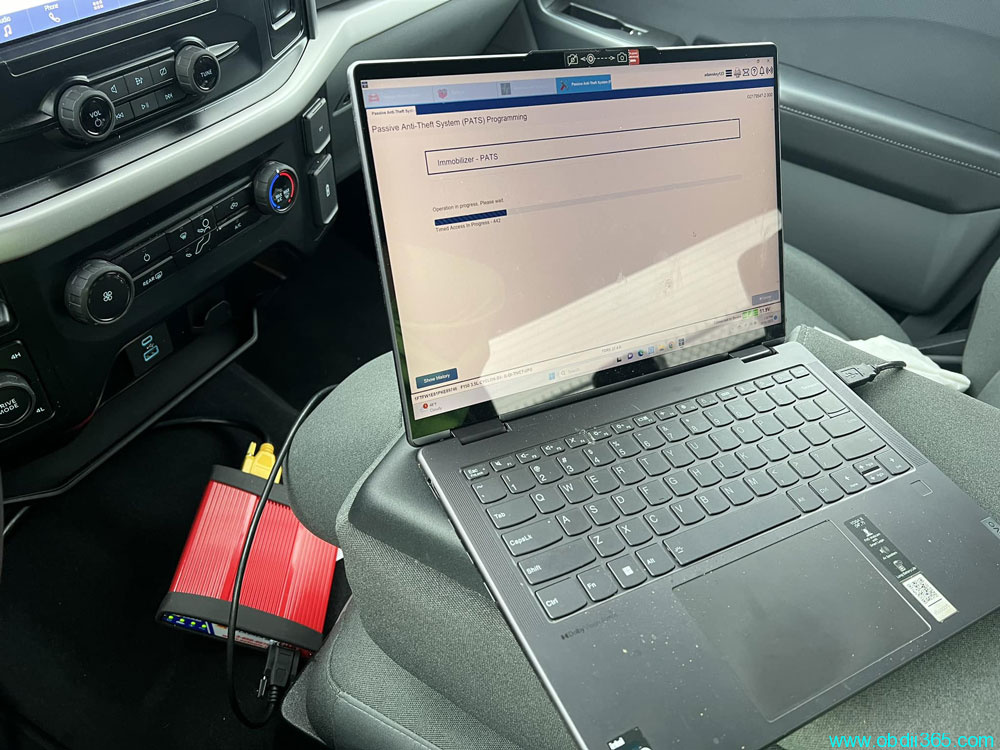
2023 Ford F-150. With J2534 and FDRS dealership software. Was a little nervous about this one with an active alarm. But all well. Programmed 2 keys no problem.


Program 2023 Ford F-150 Key J2534 FDRS