2024/01/23

How to Enable Porsche Multi Function Steering Wheel with Thinkdiag?

I got my Multi Function working using an $89 ThinkDiag OBD2 Scannner and my phone. It was stupid easy and did it while at a stop light thumbing through the various sections. 

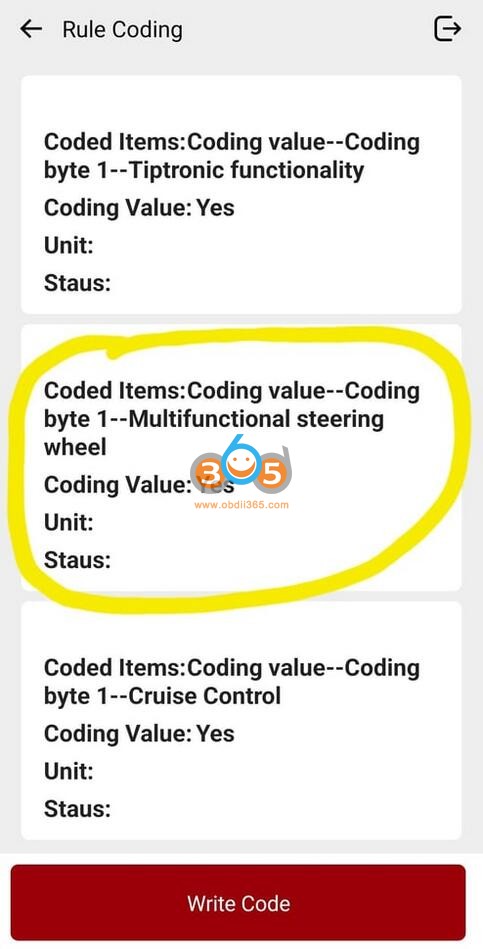
I took a bunch of screenshots and will try to recreate this from memory. I'm only posting a few select select screenshots but the path is noted below. Let me know if the path needs a little tweaking... I found this while poking around the app at a stop light.

All Systems Diagnostic -> Use VIN Decode then then select Porsche (will need to DL) -> Automatic Search -> System Selection -> Steering Wheel Electronic -> Code/brush Hiding -> Rule Coding -> Coding value -> Coding value_1 _MF Steering wheel ->Click on this (window will open) and change from "NO" to "YES" & then click on WRITE CODE.

Enable Porsche Multi Function Steering Wheel with Thinkdiag 1

Enable Porsche Multi Function Steering Wheel with Thinkdiag 2

Enable Porsche Multi Function Steering Wheel with Thinkdiag 3


Thinkdiag Porsche Coding Instructions

 This Thinkdiag obd2 scanner is the coolest gadget ever. You need an Android device to run it.

Here are all the instructions to use Thinkdiag to code/access useful information in Porsche cars.


1.Windows up/down with key

Windows going up/down when you keep pressing the key to lock/unlock

1. System Selection -> Front-End Electronics -> Code/brush Hiding -> Rule Coding -> Coding value -> Coding value_2 -> “Coding value–Comfort functions–Window comfort open” Set to true
2. System Selection -> Front-End Electronics -> Code/brush Hiding -> Rule Coding -> Coding value -> Coding value_2 -> “Coding value–Comfort functions–Window comfort close” Set to true
3. System Selection -> Front-End Electronics -> Code/brush Hiding -> Rule Coding -> Coding value -> Coding value_1 -> “Coding value–Comfort functions–Comfort functions via door lock” (At the very bottom) Set to true
4. System Selection -> Front-End Electronics -> Code/brush Hiding -> Rule Coding -> Coding value -> Coding value_1 -> “Coding value–Comfort functions–Comfort functions via remote control” (At the very bottom) Set to true


2. GT3 steering calibration
Electric Power Steering -> Code/brush Hiding -> Rule Coding -> Coding value
There should be two options with the top one opening a drop down that has 10 or so options.


3. Coolant real temperature
To get the real reading for cool temperature:
Instrument Cluster =>Code/Brush Hiding => Rule Coding => then look for Coolant temperature Characteristics curve
You will get 16 items split in 2 parts:
8 items “Coolant temperature characteristic curve–Real coolant temperature–X n” (n from 1 to 8)
8 items “Coolant temperature characteristic curve–Displayed coolant temperature–X n” (n from 1 to 8)
You have to take the number set for each of the “Real” items and set it to each equivalent “Displayed” item.

Thinkdiag Porsche Coding 1

Thinkdiag Porsche Coding 2

4. Silence GT3 steering warning
For those who changed steering software to GT3 and getting warning on the dash (early 991s), here is the trick to silence the warning.
Keep in mind that this trick silences all warnings related to the Electric Steering but not failures (you still get messages about failures).

Instrument Cluster =>Code/Brush Hiding=>Rule coding => you get a list of Warning Configurations (0 to 5 if I remember correctly)
In one of those Warning Configurations (I think it was the 3rd) you’ll need to look for item number 121 (Warning Configuration –EPS warnings–Power steering fault warning (121). You set that to 0.

Thinkdiag Porsche Coding 3

5. Turning on Multi Function Steering wheels (991.2)
For turning on Multi Function Steering wheels (991.2) where it was retrofitted (compatible parts need to be installed)

System Selection -> Steering Wheel Electronic -> Code/brush Hiding -> Rule Coding -> Coding value -> Coding value_MF Steering wheel ->Click on this and change from “NO” to “YES”

Thinkdiag Porsche Coding 4

6. Disable Seat Belt Warnings

Thinkdiag allows you to disable the seat belt warnings and chimes. There are either 1 or 4 params to change, depending on your preferences. Change all four codes to completely disable all of the belt warnings and chimes. Change only the last one to simply kill the chimes without affecting the lights and warnings.

Instrument Cluster: Coding value–Coding byte 2–Driver seatbelt warning = 0 {Default: 1}

Instrument Cluster: Coding value–Coding byte 2–Passenger seatbelt warning = 0 {Default: 1}

Instrument Cluster: Coding value–Coding byte 2–USA seatbelt warning = 0 {Default: 1}

Instrument Cluster: Coding value–Coding byte 2–Acoustic belt warning (Not USA, not Canada) = 0 {Default: 1}


7. Changed/increased the max boost scale 

changed/increased the max boost scale so its not maxed out so quickly.

Instrument Cluster > code/brushing > Rule coding > Further coding > max boost pressure – changed from 1.2 bar (default – 17 psi) to 1.4 bar (20 psi)

Thinkdiag Porsche Coding 5

8. PTV (Porsche Torque Vectoring) 

it’s standard in Carrera S/4 and optional for other models.

For those who want to activate it or maybe turn it off (to reduce break wear, for track use or whatever reason…) it’s very straight forward:
In the PSM module -> Hidden/Brush…->Function Coding->Coding Byte 2–PTV: Porsche Torque Vectoring and you change the value.

Thinkdiag Porsche Coding 6

Thinkdiag Porsche Coding 7

9. Gear shift assist

System Selection -> Instrument Cluster -> Code/brush Hiding
Search for “upshift display
When you find “Board computer menu configuration – byte 7 – Upshift display, enable it & write code

Thinkdiag Porsche Coding 8

Note that there are a couple of other locations where “upshift display” will show up, but they are specific to the key memory for your car, not to enable the function overall.

Thinkdiag Porsche Coding 9

10. TPMS Coding

Instrument Panel: Board computer menu configuration=Board menu configuration – byte 7- TPM circuit=1 {Default: 0}

Instrument Panel: TPMS Coding – Display summer menu item (freely selectable) =Yes {Default: No}
Instrument Panel: TPMS Configuration – Set of Wheels Designation =20” Track {Default: xxxx}


Here is the revised list of what can be able to do with the Thinkdiag. All settings are working on Prosche 991 (2019):


· Free navigation map update

·  Overrev Report accessed (ranges 4-6 =0!)
· Brake lights EBD enabled, g-values (-0.65g/-0.35g), speeds (15kph/1kph) and timing (1 sec.) set
· Remapped Coolant Gauge Curve to real (sensor) values
· Set Auto Start/Stop to “remember last setting”
· Comfort Key FOB opening/closing for windows and sunroof
· Wiper Teardrop Function ON
· Turn light one-touch set to 5x (instead of 3x)
· Front DLR 4-point LEDs always on, even when headlights on
· Cluster Lights (Speedometer/RPMs) always on (“non-Scandinavian” solution)
· Seatbelt Chime off after 4x (Warning still in Cluster Display)
· Spoiler extend/retract speed reduced by 15kph/10kph (90kph/60kph)
· Expert Menu permanently enabled
· Performance Menu (Torque/Power) permanently enabled
· Oil Fill Level displayed in 4 segments instead of one
· HVAC Setting to “Driver Memory” from Basic (key-coded memory)
· Automatically tilt the Passenger’s Mirror when in Reverse

· Enabling a race track mode in TPMS (Enabling a race track mode so that the TPM system is not sensitive to the big pressure swings from cold tires to hot tires and back to cold again, which is common at the track.)

Most of the 718-programming works just fine, and occasionally on 2019 991.2, the respective “switches” are in different places of the sub-menus. But all are very easy to work with.

People have coded 987, 981, 718, 991.1 and 991.2 and 992 with the thinkdiag scanner.

2024/01/22

How to Configure Subaru SSM3 SSM4 for SM2 Pro?

 How to get the Scanmatik 2 PRO interface to work with Subaru SSM3 and SSM3 software?


Here is the clue.

SSM3 is configured for Scanmatik 2 Pro – Only Install SM2 Pro Drivers & Select SM2 Pro.
SSM4 is configurated Passthru – Only Install Passthru Drivers & Select Interface.

You need driver/emulator for you to use a j2534 with SSM3.

For SSM4 you can use any J2534 VCI. Only SSM 4 supports J2534 interface.


Download SSM3/SSM4 VM for passthru

Subaru Select Monitor 3 – 04.2019
Subaru Select Monitor 4 – 07.2021

Subaru SSM3 SSM4

For SSM3 the 1st thing you need to do is install Scanmatik Drivers, after start SSM3 and select SM2 USB.
SSM3 should close and when re-opening everything should work.

For those who want Scanmatik 2 Pro as an option in their Native installation, here is the setup file to those who like to have Scanmatik 2 Pro configurated to SSM3,
SSM3xSM2Pro setup
If you are using x64 then Download SSM3 x SM2Pro . rar  and run the x64 .exe in the VM. It should solve the issue.

SSM3 & Scanmatik 2 Pro

The Interface must support old “PassThruSupport” (02.02 NOT 04.04) with registry entry. Then You must export this entry and import and replace it in Subaru Section under:
Right click and Export “PassThruSupport.reg” and upload it.


SSM3 and SM2 Pro some reports:

1.
Legacy 2004
Tested accessing immo, seems to work but did not have security id

2.
Tested on XV, Can connect to ECU and one other system

3.
I can confirm SSM3 is working with Scanmatik 2 Pro 100% (tested on Outback diesel MY 2012). I was able to connect all available modules (although a main purpose was i needed to do EGR compulsory setting).


4.
original scanmatik application easely connect to ECM and TCM. Read DTSs and params via ODB. Launch x431 too connect but can’t connect to Air Conditioner. FreeSSM can connet only to ECM and TCM.


SSM4 & Scanmatik 2 Pro

If SSM4 ask key for activation, you can use WinSpy to activate it by yourself.

SSM4 & Scanmatik 2 Pro

How to activate with WinSpy?

Run SSM4.
Run WinSpy.
In WinSpy, click Tree and in the window that appears, click Activation and Skip 2 times with the left mouse button.
Click on Command in the WinSpy window and enable the Enabled checkbox.


Feedback:

Before installation, set the date on the computer to July 1, 2021 and after installation, the date can be returned back.

To activate, copy the ssm4_loader.exe file to the c:\Program Files (x86)\subaru\SSM4\BrandCommon\Bin\ folder, display a shortcut from it to the desktop and run from it.


If you have other J2534 passthru interfaces, set up as following

How to Set up Subaru SSM4 with J2534 Device?


If need a good SSM3 emulator also j2534 for SSM4, VXDIAG Subaru is the best choice.

Free Download Subaru SSM3 SSM4 V2020.7 Software and Patch

Autel IM508 Add Suzuki Dzire 2021 Key Car Not Start Solution

 Problem:

Suzuki dzire 2021 model tried add key with Autel IM508 but with no success. Now all keys were erased and car wont start. when the car come to me the original remote only start the car when put the remote start bottom so now it cant take back the original and new one. Any advice?

Autel IM508 Add Suzuki Dzire 2021 Key

Solution:

Had same problem with Suzuki swift, try to clear
Fault code with AUTEL or equivalent & reprogram at least the original.

If failed to erase fault code, Replace Battery in the original remote and try again.


Or try:

Disconnect battery on car
Remove bcm key memory fuse reconnect battery
Wait 20 minutes
Replace fuse (On the fuse box inside car).
Reprogramme original key
Done.

www.obdii365.com

2024/01/18

Tools Program Porsche 2018+ Smart Key

 What tool to program Porsche 2018+ smart keys?


Depends on the key style.

porsche old vs new key

Old key:

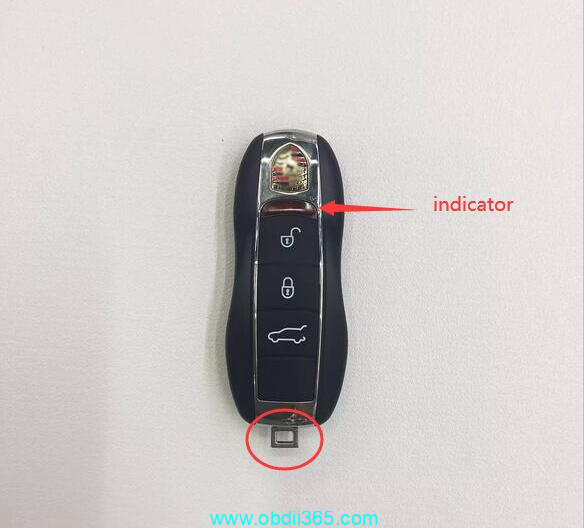
porsche old key

Applicable to old Porsche models

  • Macan 2014-2023
  • Cayenne 2011-2017
  • Panamera 2010-2016
  • 911 2013-2018
  • Boxster/Cayenne 2013-2016
  • 718 2016-2023

these models use old key.


Autel IM608, IM608 II/IM508Yanhua Mini ACDp/ACDP2Xhorse VVDI Key Tool PlusVVDI Prog+ VVDI2,  Xtool etc all these tools can program 2018+ Porsche old style keys (both add key and all keys lost).

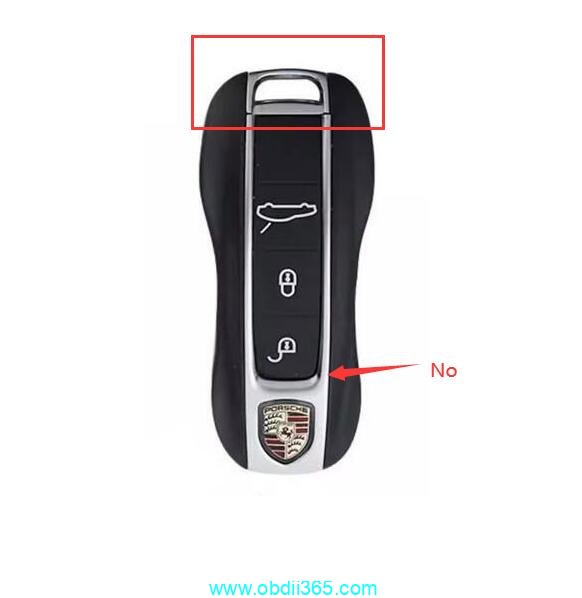
Verify the key- placement of LED. If it’s right above the lock unlock, yes.. if around the logo, no.

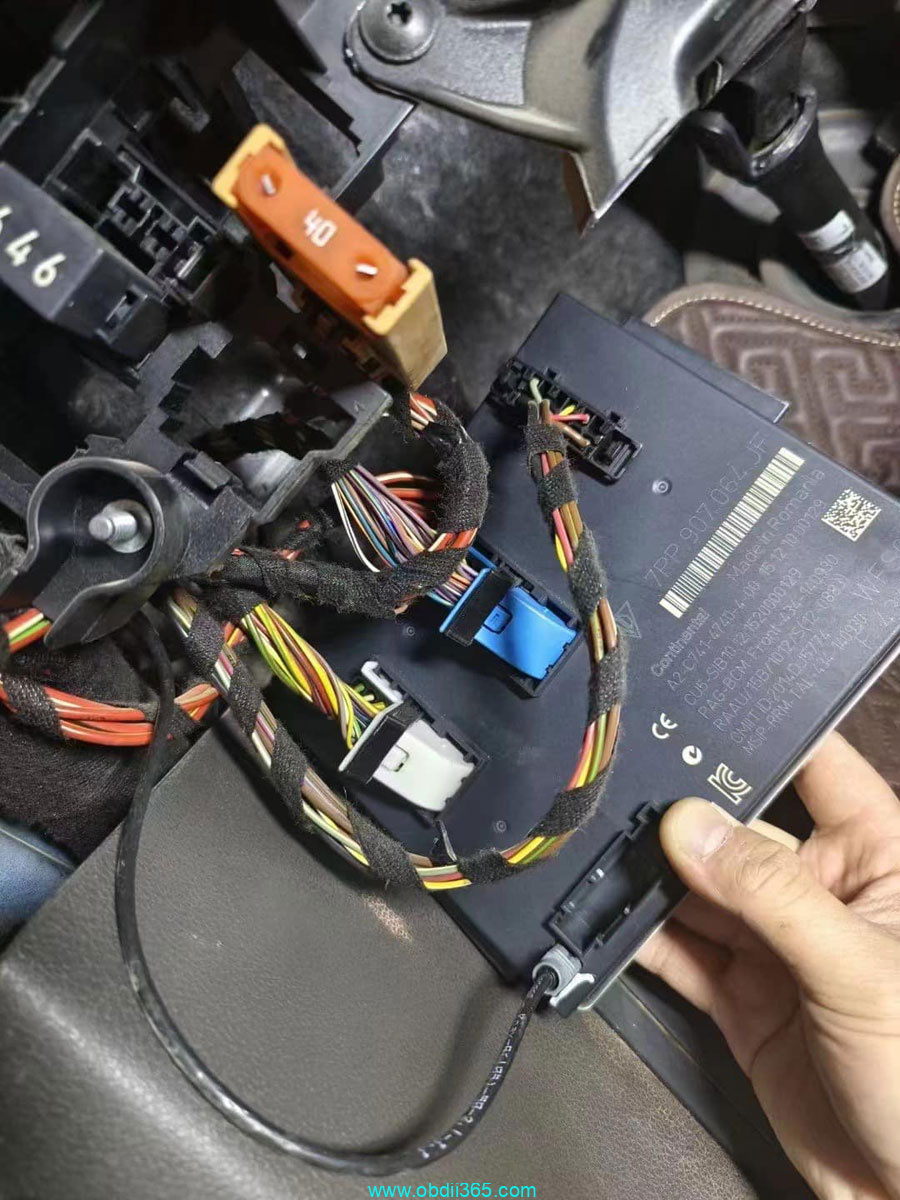
Need BCM out.
With Xhorse you can read Porsche BCM with solder free adapter which is easier.

xhorse porsche bcm

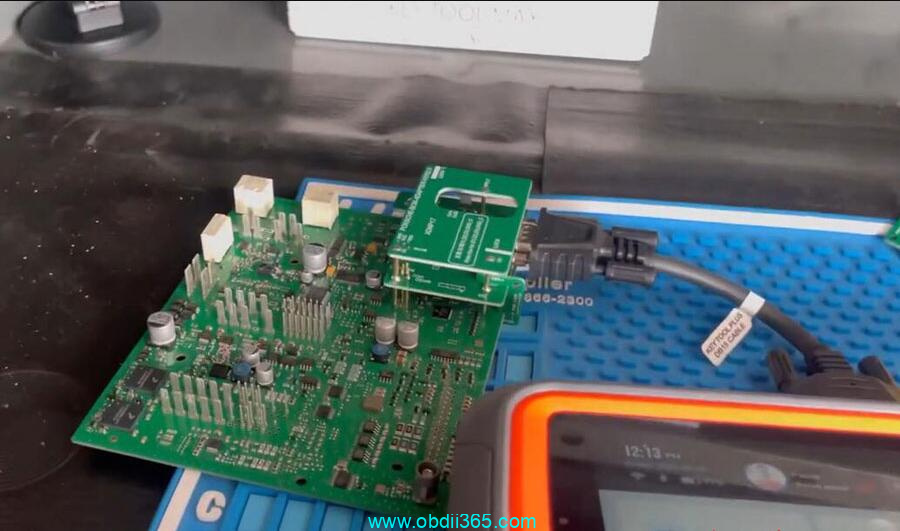
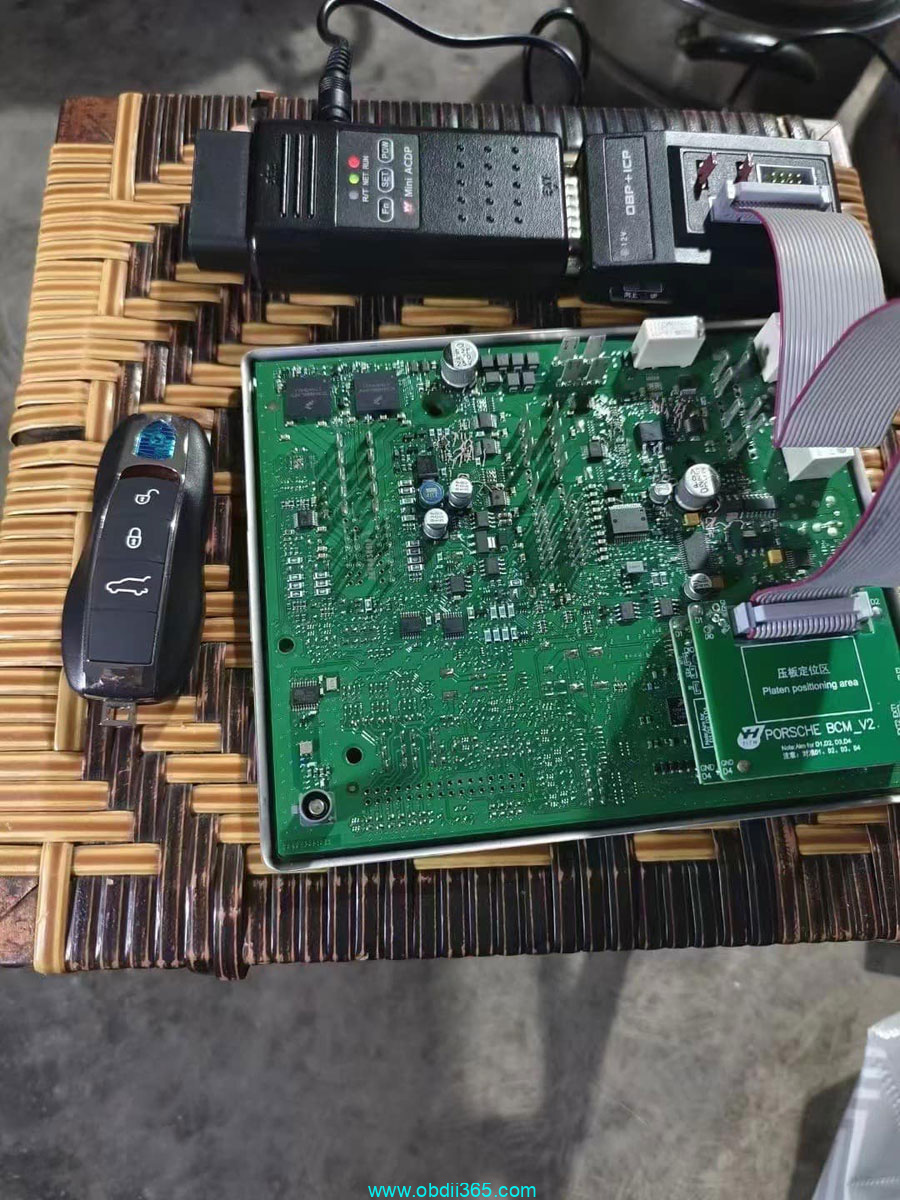
Yanhua also has Porsche interface board to read BCM without soldering.

yanhua acdp porsche bcm 1

yanhua acdp porsche bcm 2

yanhua acdp porsche bcm 3

Read Dflash, generate dealer key and learn key.


New key 

porsche new key

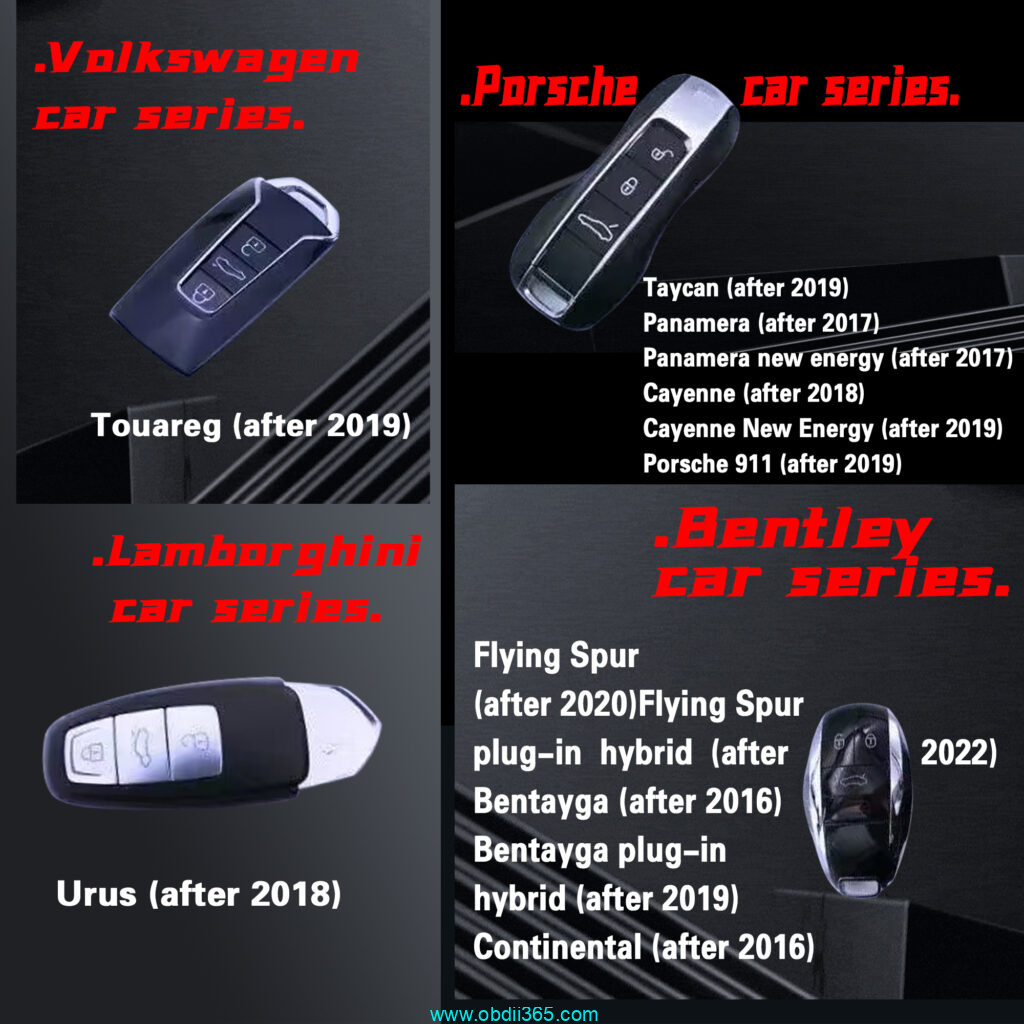
Applicable to new Porsche models

  • Cayenne 2018-2023
  • Panamera 2017-2023
  • 911(992) 2019-2023
  • Taycan 2019-2023

these models use new key.


Autel, Xtool, Xhorse etc CANNOT program new style MLB keys. Need MLB tool, i,e KYDZ MLB tool.

KYDZ will generate and program keys for the following Porsche MLB models

Taycan 2019-
Panamera 2017-
Panamera New Energy 2017-
Cayenne 2018-
Cayenne New Energey 2019-
911 2019-

porsche mlb model

Read KYDZ MLB tool instruction

How to Use KYDZ MLB Tool to Program VAG MLB Key?

So before asking which tool will add key or do all keys lost, check your key style first.

2024/01/17

KESS3 Update Suzuki MED17.9.63 OBD

 Alientech KESS3 world exclusive! Reprogram via OBD on some models within the Suzuki range with the Bosch MED17.9.63 engine control unit.


UPGRADE 1.82

Work on Suzuki Baleno, Swift, SX-4, and Vitara, thanks to the new Virtual Reading protocol for KESS3. Expand your workshop’s business opportunities with a quick and precise service dedicated to the small turbo-petrol engines from the Japanese manufacturer. With KESS3, you won’t just perform tuning but also meet various other demands from your clientele, such as fuel efficiency and repairs.


Focus on the new ECU:

Work without risks using KESS3’s OBD mode, ensuring a new performance configuration for vehicles entering your workshop in just a few simple steps.

SUZUKI

VR, W/R in OBD

Baleno1.0 12v Boosterjet 5MTPetrol82 kW
Baleno1.0 12v Boosterjet Automatik 6ATPetrol82 kW
Swift1.0 12v Boosterjet 5MTPetrol82 kW
Swift1.0 12v Boosterjet Automatik 6ATPetrol82 kW
Swift1.0 12v Boosterjet SHVS 5MTPetrol82 kW
Swift Sport1.4 16v Boosterjet 6ATPetrol103 kW
Swift Sport1.4 16v Boosterjet 6MTPetrol103 kW
SX4 S-Cross1.0 12v Boosterjet 5MTPetrol82 kW
SX4 S-Cross1.0 12v Boosterjet Automatik 6ATPetrol82 kW
SX4 S-Cross1.4 16v Boosterjet 6ATPetrol103 kW
SX4 S-Cross1.4 16v Boosterjet 6MTPetrol103 kW
Vitara1.0 12v Boosterjet 5MTPetrol82 kW
Vitara1.0 12v Boosterjet Automatik 6ATPetrol82 kW
Vitara1.4 16v Boosterjet 6ATPetrol103 kW
Vitara1.4 16v Boosterjet 6MTPetrol103 kW

This solution allows you to integrate a new and broader customer portfolio. Activate CAR – OBD protocols to seize this opportunity.