2024/02/03

Launch X431 vs Autel vs Xtool EV Kit

 Are you looking for a universal diagnostic tool for EV (new energy) and hybrid vehicles? Here we listed top 3 EV diagnostic kits on the aftermarket.


ItemAutel EV kitLaunch X431 EV KitXtool EV Kit
Compatible tabletsWorks with MaxiSys MS909, MS919, UltraWorks with X431 PAD V, PAD VII, EuroTab IIID9EV
StandaloneNoNo
FunctionAdvanced diagnostics for U.S, European and Asian electric, gas and diesel, and hybrid vehicles.Advanced diagnostics for U.S, European and Asian electric, gas and diesel, and hybrid vehicles.Supports abundant diagnostic functions, including battery pack detection, Tesla diagnosis, reading ECU information, reading/clear DTCs, reading live data, and more than 40 special functions
Battery pack detectionYesYesYes
Software Update1 Year Free Update1 Year Free Update3 Year update online
EV GMYesYesYes
EV Link&CoYesYes
EV Honda AcuraYesYesYes
EV MiniYesYesYes
EV VAG VW AudiYesYesYes
EV Baic/Basic BJEVYesYesYes
EV BMWYesYesYes
EV BYDYesYesYes
EV BaojunYesYesYes
EV BorgwardYesYesYes
EV Changean/Changan SuzukiYesYesYes
EV Renault Dacia DSYesYesYes
EV ChangeheYesYesYes
EV CheryYesYesYes
EV WulingYesYes
EV ZeekerYesYes
EV ZotyeYesYes
EV ZxAutoYesYes
EV_CHRYSLER DodgeYesYes
EV_CITROENYesYesYes
EV_DONGNANYes
EV_FIATYesYes
EV_FUTIANYesYes
EV_HD_GEELYYes
EV_HD_JMCYes
EV_HD_JACYes
EV_HD_MANYes
EV_HD_NANJUNYes
EV_HD_RENAULTYes
EV_HD_SCANIAYes
EV_HD_SHACMANYes
EV_HD_SINOTRUKYes
EV_HD_SUNLONGYes
EV_HD_VOLVOYes
EV_HD_WEICHAIYes
EV_HD_YIQIYes
EV_HD_YUCHAIYes
EV_HYUNDAIYesYesYes
EV_MAZDAYesYesYes
EV_MITSUBISHIYesYesYes
EV_NISSANYesYesYes
EV_OPELYesYesYes
EV_PEUGEOTYesYesYes
EV_PORSCHEYesYesYes
EV_SAICMGYesYes
EV_SAICROEWEYesYes
EV_TOYOTAYesYesYes
EV_TRUMPCHIYesYesYes
EV_USAFORDYesYesYes
EV_VOLVOYesYesYes
EV_KIAYesYesYes
EV_LANDROVERYesYes
EV_LEAPYes
EXEEDYesYes
EmgrandYes
EnglonYes
TeslaYesYes
GreatWall New EnergyYes
Iveco New EnergyYes
EV BentleyYesYes
Check CoverageAutel EV coverageLaunch X431 EV CoverageXtool EV Coverage

In sum:

They all perform similar functions including battery pack detection.

Software is different, Launch X431 covers most car brands including HD EV and many unlisted Chinese brands above (up to 139 brands).

Autel and Xtool cannot do HD EV diagnostics.

2024/01/31

KESS3 Adds Peugeot SID208 Citroen Valeo V56 via OBD

 Remap via OBD Peugeot 208 and Citroen C1 and C3 with Valeo V56 ECUs.

Thanks to Alientech KESS3, you can now work quickly and efficiently on the Valeo V56 ECUs equipped with 1.2 Pure-Tech and 1.0 VTi turbo-petrol engines from some PSA Group vehicles. To read ECU information for the first time, allow the ECU to be unlocked by applying a patch in BOOT mode on the bank. Immediately following this surgery, you can always reschedule via OBD.

KESS3 Adds Peugeot SID208 Citroen Valeo V56 via OBD

LATEST UPDATES AND NEWS FROM THE ALIENTECH WORLD! UPGRADE 1.84


New ECU: Valeo V56 With KESS3, you provide a complete and professional service in all aspects, from Tuning to repair, reprogramming hundreds of ECUs with a single tool. This increases your customer base and revenue opportunities for your shop.


CITROEN

RD, WR in OBD

C31.2 PureTech 82Petrol61 kW
C11.0 Vti 72Petrol53 kW


  • SID208

PEUGEOT

 RD, WR in OBD

2081.2 PureTech 82Petrol61 kW
2081.2 PureTech 75Petrol55 kW


Activate the CAR – OBD or CAR – BENCH/BOOT protocols to work with maximum effectiveness in all connection modes in the latest compatible vehicles, included in the subscription.

Top Tools to Program 2020-2023 Nissan Sentra Smart Key

What tool to program 2019, 2020, 2021, 2022, 2023 Nissan Sentra proximity smart key? add key and all keys lost?


1.

Lonsdor K518 Pro/K518 Series:

2019-2021 Nissan Sentra: Lonsdor will only add key (with Nissan gateway adapter), it cannot read security password (pin code), it cannot do all keys lost.

2021.08-2023 Nissan Sentra: Lonsdor will add key and do all keys lost. Require B18 Chassis License Online Activation and Nissan 40 pin BCM cable.


Some FAQs of Lonsdor & Sentra

Q: I have Nissan Sentra 2021 All key lost.
It’s with pincode 28 digits.
Will Lonsdor k518 program this proximity?

A:  Lonsdor cannot read pin code. Need pin code from the manufacturer.

lonsdor k518 pro nissan sentra

Q: Will Nissan Sentra 2020 all smart key lost if i can get pin code?

A: Yes, need a gateway adapter.


Q: Will Lonsdor read 2021 Nissan Sentra pin code?

A: No, it cannot read pin code


Q: Will lonsdor k518 program 2022 nissan Sentra all keys lost?

A: No, it cannot read pin。


Q: Will K518PRO do 2020/2021/2022 Nissan kicks, Sentra, versa/rouge all keys lost?

A: Nissan kicks ok, Sentra/Rouge 2021- yes with gateway adapter,  19-21 requires password, Versa 2020-2022 All keys lost need luck.


Q: If the Lonsdor Nissan 40 pin BCM cable will work on the new Sentra 2020 and up?
Also do I need to buy a license and how does it work?

A: Yes, does require Nissan license.


Q: Does Lonsdor make key Nissan Sentra 2021 all key lost without pincode?

A: No, does require pin code.


2.OBDSTAR Tools

OBDSTAR x300 dp plus (key master dp plus) and x300 pro4 (key master 5) will do 2019 to 2023 Nissan Sentra add key and all keys lost bypass pin code.


May 2023 New Update:
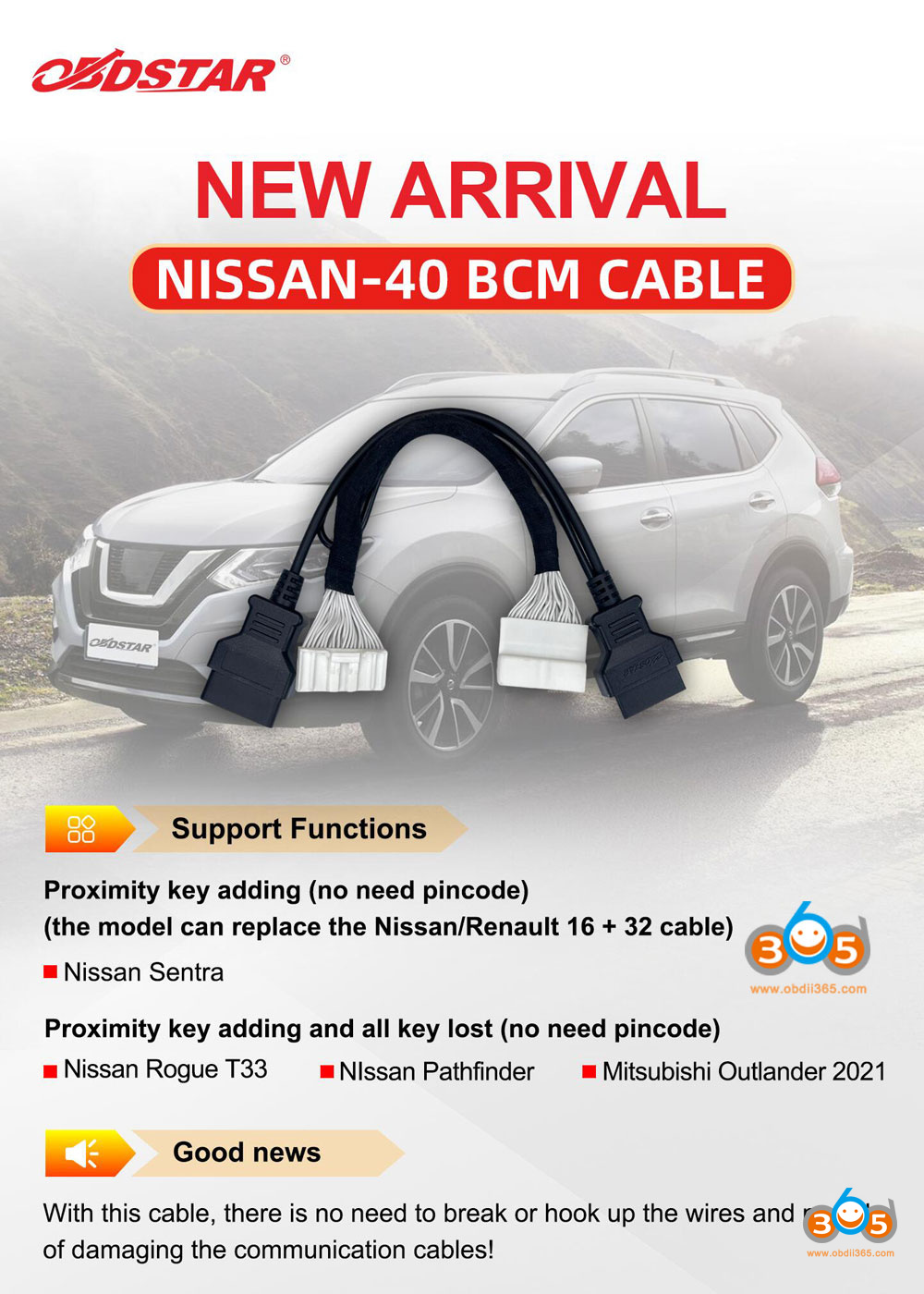
Adds Nissan Sentra 2021.08- smart key add key & all keys lost (require Nissan 40 BCM cable)

obdstar nissan sentra 1

The Nissan BCM40 gateway adapter can be used to replace Nissan/Renault 16+32 cable.

obdstar nissan sentra 2

Here comes the OBDSTAR Nissan Sentra car list

It will do North American Sentra proximity 2019-, add key and all keys lost. Need gateway adapter to bypass pin code.

It also does Sentra blade key till year 2019.

obdstar nissan sentra 2


3

Autel IM508/IM608

IM508/IM608 will do 2019 Nissan Sentra add key and all keys lost.


autel im508 im608 nissan sentra 1

For 2020-2023 Nissan Sentra

autel im508 im608 nissan sentra 2

If all keys lost, it cannot read password pin code. But yes if you can get pin code.

If add key, it will do, but it can only read pin code for part of vehicle software numbers.

autel im508 im608 nissan sentra 3

Read also:

2024/01/29

Download and Install VNCI Ford VCM3 IDS V130

 The new VNCI Ford VCM3 is different from other Ford VCIs (VXDIAG, VCM2 Clone, SVCI 2534, VNCI MF Ford etc).  It supports 4 channel CAN BUS and work on new Ford pickup and EV vehicles.

Our customers are very happy with the tool. Even works on Ford F150 for programming that most VCM2 would not work on.


Download and Install VNCI Ford VCM3 IDS V130 1

The tool does not come with the software.

Here you can download software and driver for free.


Ford IDS software driver for VNCI VCM 3

Software including

Ford IDS V130

IDS Loader

VCI Driver

Installation video

Download and Install VNCI Ford VCM3 IDS V130 2

Operating system: Windows 10

Multi-language


How to Install Ford IDS V130 for VNCI VCM 3?

1. Download the VCM3 installation package, unzip it and put it on the desktop

2. Install IDS-130.01 setup

Download and Install VNCI Ford VCM3 IDS V130 3

Download and Install VNCI Ford VCM3 IDS V130 4

3. Install JavaSetup

Download and Install VNCI Ford VCM3 IDS V130 5

4. Install VCI_Software_1.0.1.18. If the IDS software is registered and activated, there is no need to continue to the next step.

Download and Install VNCI Ford VCM3 IDS V130 6

Select device type as VCM3

Download and Install VNCI Ford VCM3 IDS V130 7

If run IDS shortcut from desktop, it says IDS software license not found

Download and Install VNCI Ford VCM3 IDS V130 8

You need to install IDS loader.

5. Install IDSFordLoaderDriverSetup. vc. x86 .1v6.exe startup program

Download and Install VNCI Ford VCM3 IDS V130 9

Download and Install VNCI Ford VCM3 IDS V130 10

6. Connect the device and run software from “IDS Loader for Ford” icon.

Download and Install VNCI Ford VCM3 IDS V130 11


VNCI Ford/Mazda is also compatible with original Ford FDRS and Mazda Mdars software for OEM online programming.

Download software on Ford/Mazda official

Ford FDRS software download

Mazda MDARS software download


Read also:

VNCI VCM3 vs OEM VCM3 vs VNCI J2534 vs VXDIAG Ford

How to Read Mercedes ME9.7 ECU with Alientech KESS3?

 Can Alientech KESS3 clone Mercedes ME9.7 ECU? via OBD or BDM?

Read Mercedes ME9.7 ECU with Alientech KESS3 1

Here is the clue.

No VR file at alientech, only option left is BDM.

Read Mercedes ME9.7 ECU with Alientech KESS3 2

If you have BDM adapter, follow kess v3 wiring diagram to read and write ME 9.7 via BDM.

Reading was a bit faster but the writing was really slow. Well over 30.
The old Kess v2 master version takes 45 minutes.

Read Mercedes ME9.7 ECU with Alientech KESS3 3

Read Mercedes ME9.7 ECU with Alientech KESS3 4

Read Mercedes ME9.7 ECU with Alientech KESS3 5

Read Mercedes ME9.7 ECU with Alientech KESS3 6

Read Mercedes ME9.7 ECU with Alientech KESS3 7

If currently don’t have an adapter for this ecu, just use needles or solder wires.

Found the pinout and soldering did the trick.

You have no issue with ID by obd. This ecu is a lot safer to do boot.

Read Mercedes ME9.7 ECU with Alientech KESS3 8

Read Mercedes ME9.7 ECU with Alientech KESS3 9

If you are looking for a tool to do it via OBD, go for original pcmflash.  (Clone pcmflash has no me9.7 in module 69).

2024/01/25

How to Set up Openport for Nissan Consult 3 Plus?

 We have pointed out how to configure J2534 passthru devices (Godiag j2534, 5054a, PCMTuner, SM2 pro) for Nissan Consult III Plus software.

How to Configure Nissan Consult III+ with Passthru Devices?

Here we show how to set up Tactrix Openport  2.0 with Nissan Consult 3 plus specifically.

Got the Openport 2.0 clone cable

Set up Openport for Nissan Consult 3 Plus 1

Nissan Consult version 73 downloaded online

Need to configure diagnostic tool.ini to let the software see the adapter
Where is the folder in which you need to correct this file
C:\CONSULT-III_plus\System\Application\ApplicationData\CommonSetting
There we edit/replace the DiagnosticTool.ini file with the one we made and everything will work.

Set up Openport for Nissan Consult 3 Plus 2

At first it was like this

Set up Openport for Nissan Consult 3 Plus 3

Then like this

Set up Openport for Nissan Consult 3 Plus 4

Set up Openport for Nissan Consult 3 Plus 5

Incorrect configuration

Install openport driver

Set up Openport for Nissan Consult 3 Plus 6

To do this, download Link openport driver

The driver file is located in the folder C:\Program Files (x86)\OpenECU\OpenPort 2.0\drivers


After install driver and configure DiagnosticTool.ini

it works fine with openport.

Set up Openport for Nissan Consult 3 Plus 7

Set up Openport for Nissan Consult 3 Plus 8

Set up Openport for Nissan Consult 3 Plus 9

Related reading:

How to Use Godiag J2534 with Nissan Consult III+?