2022/07/20

Yanhua Mini ACDP Clone Ford 6 Speed DPS Gearbox

 Yanhua Mini ACDP released new module 26 Ford 6-speed dual-clutch gearbox clone for Ford Focus, Ecosport, Fiesta, Aspire, Figo etc. The special interface board connection method replaces the traditional wire plugging method so that wires are NOT plugged to the wrong direction and place. This special interface board connection method is simple and efficient, plug and play, safe and reliable.


How to Clone Ford DPS6 Gearbox TCU with Yanhua ACDP Module 26?
ACDP app will show you connection diagram

Yanhua Mini ACDP Clone Ford 6 Speed DPS Gearbox 1

Follow diagram to connect ACDP, Module 26 interface board and gearbox

Yanhua Mini ACDP Clone Ford 6 Speed DPS Gearbox 2


Run ACDP App, select Ford- Gearbox Clone- DPS6

Step 1: Check connection

Yanhua Mini ACDP Clone Ford 6 Speed DPS Gearbox 3

connect ACDP with the gearbox
Detect TCU serial and hardware number and system information
Auto backup information

Yanhua Mini ACDP Clone Ford 6 Speed DPS Gearbox 4

Select Step 2: Read and Write Data-> Full Backup Data
Read and save chip data

Yanhua Mini ACDP Clone Ford 6 Speed DPS Gearbox 5

Yanhua Mini ACDP Clone Ford 6 Speed DPS Gearbox 6

Back to Step 3: Disconnect
Disconnect TCU with ACDP

Yanhua Mini ACDP Clone Ford 6 Speed DPS Gearbox 7

Connect the new DPS6 gearbox TCU and prepare to write the original data
Go to step 1 and check Connection as well

Yanhua Mini ACDP Clone Ford 6 Speed DPS Gearbox 8


Go to Step 2: Read/Write data-> Full Write Data
Select chip data you saved in the previous step

Yanhua Mini ACDP Clone Ford 6 Speed DPS Gearbox 9

Ready to write chip data, don’t cut the power nor pull out the device during the programming
Write chip data succeed
Save new data

Yanhua Mini ACDP Clone Ford 6 Speed DPS Gearbox 10
Again perform Step 3 Disconnect
Ford DPS6 gearbox TCU cloning with Yanhua ACDP is completed.

https://www.obdii365.com/service/clone-ford-dps6-gearbox-with-yanhua-mini-acdp.html

2022/07/18

How to Connect Yanhua BMW FEM BDC Clip Adapter?

 The 2022 new version Yanhua BMW FEM/BDC clip adapter is used to read 95128/95256 chip without soldering when pre-processing BMW FEM/BDC module.


Function:
No need to remove and solder 95128/95256 chip when pre-processing BMW FEM/BDC module

Advantage:
Clamping fast, safe and reliable, simple positioning, not easy to slip.
No need to worry about how thick the paint on the chip.
Easy to solve the problem of puncture socket off.


Compatible with lots of BMW FEM key programmers, CGDI BMWVVDI BMWYanhua Mini ACDP, Autel IM508, IM608, Londsor, OBDSTAR etc.


How to Install or use the Yanhua ACDP BMW FEM/BDC Clip Adapter?

Insert the two screws of the special programming clip into the two holes of the PCB plate, then lock the PCB lock

Connect Yanhua BMW FEM BDC Clip Adapter 1

Connect Yanhua BMW FEM BDC Clip Adapter 2

Connect Yanhua BMW FEM BDC Clip Adapter 3

Connect Yanhua BMW FEM BDC Clip Adapter 4

Connect Yanhua BMW FEM BDC Clip Adapter 5
Connect Yanhua BMW FEM BDC Clip Adapter 6

Connect Yanhua BMW FEM BDC Clip Adapter 7

2022/07/17

Solve Nissan ‘Key System Error’ After Program New Keys?

 The problem goes like this:

I’ve programmed a new key to 2016 Nissan Maxima with autel im608 successfully.  Everything works fine besides this key system error message. Is it because it’s aftermarket key ? Or because I have used the one with remote start and this might not have it ? How did you solve it?

Solve Nissan ‘Key System Error’ After Program New Keys?

Solution:

Wrong buttons. configuration. Car doesn’t have remote start.

16 and up on Nissan need the exact key with the same number of buttons.

Had to make the one with the correct buttons.

Delete the amount of wrong buttons delete and program original key with different buttons and done.

You programmed a key with correct focos but button configuration incorrect, delete and add the correct key. If it doesn’t have remote start don’t add a remote start key.

www.obdii365.com

2022/07/15

Free Download Volvo PTT 2.8.130 with Activation

 The new VOCOM II Mini Bluetooth Volvo truck diagnostic interface requires PTT 2.7.116 and later version support. Obdii365.com here provides two versions of Tech Tool free download- 2.8.130 and 2.7.116.

New Premium Tech Tool Development PTT Diagnostic Software can be used for Volvo trucks, construction equipment, Volvo Buses, Mack trukcs, Renault trukcs and Nissan UD trucls.
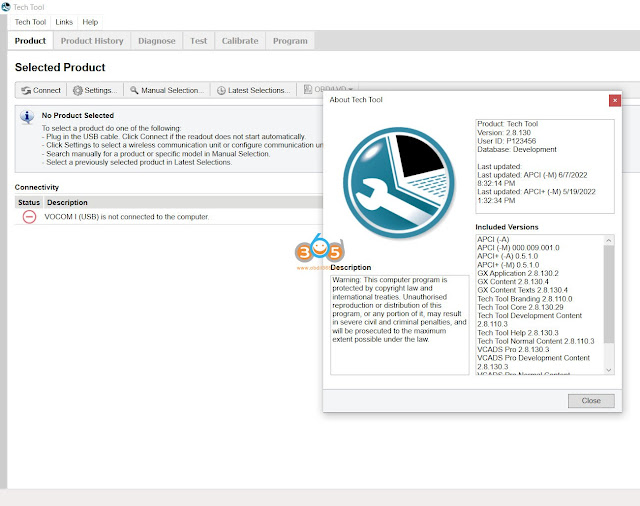


I. Volvo Tech Tool PTT 2.8.130

volvo ptt 2.8.130

Volvo Premium Tech Tool PTT 2.8.130 Development Mode & Dev tool Plus

Note: After your payment, please contact us (Skype: OBDII365.com, Email: Sales@OBDII365.com, Whatsapp : +86 18150118226)to sent download link to you, after then our tech team will install and activate it for you.

$99. Price only for One PC installation and activation, promise 100% Work!!!


Volvo Premium Tech Tool Software Include:

1.Volvo Tech Tool

2.Developer tool Plus (Acpi+ 2022/05)

3. Online Installation and Actvation by Teamviewer

4. Online support in contact with your truck or machine by Teamviewer


What’s new in 2.8.130?

1.2.8 version Only work with original nexiq, Vocom 2/Vocom ii mini, Vocom 1.

2.Premium Tech Tool 2.8.130 work on Windows 10 64bit (it can not support WIN7 and WIN11)

3.Devtool work on Window 7/8/10 (only 64bit)

4. Multi-languages, more than 25 languages

With the Development version of PTT 2.8.130, the user can diagnose, change parameters, clear DTC calibration, test, programming, change Chassis ID, Edit parameter all version v2 v3 v4 and many other features.

Installation on Windows 7 is no longer supported.
With Windows 7, the installation of 2.8.130 will fail, but the last installed version will remain, and the user can continue to use it


Developer Tools Featured options: 
• Chassis ID Change.
• Immobilizer ON/OFF.
• Injector programming.
• Speed Limit programming.
• EUR6 trucks supported.


Recommended laptop requirements for PTT2.8:

Computer/Processor Intel Core i5, i7 or i9 or AMD Ryzen 7, 9 series
Memory RAM 8GB, more memory improved performance
Hard disk type SSD sold state drive with 100GB free space
OS support: Wdinwso 10 64bit professional


Premium Tech Tool (PTT) supports the following brands/models:

Volvo Trucks Older electrical system
Volvo Trucks Vehicle electronics ’98
Volvo Trucks VERSION2
Volvo Trucks VERSION3
Volvo Trucks VERSION4

Volvo Buses Conventional
Volvo Buses Multiplexed
Volvo Buses Multiplexed version 2
Volvo Buses Multiplexed version 3

Volvo Penta

Volvo Construction Equipment

Mack V-MAC I/II/III, ITC
Mack V-MAC IV
Mack VMAC IV+

Renault Version2 ACCESS
Renault Version2 CAESAR
Renault Version2 COMPRT
Renault Version2 EXTRT
Renault Version2 HYBRYS
Renault Version2 KERAX
Renault Version2 KERAXMIL
Renault Version2 MAGNUM
Renault Version2 MIDLUM
Renault Version2 PREMIUM
Renault Version2 SHERPAL
Renault Version2 SHERPAM
Renault Version2 VAB
Renault Version2 VBCI
Renault Version2 VLRA

UD Trucks Version2 UD-HD
UD Trucks Version2 UD-MD


II. Volvo Tech Tool PTT 2.7.116

Version: 2.7.116
User ID: TT112233
Database: Development

Free Download Volvo PTT 2.7.116

Volvo Tech Tool (TT) 2.7.116 [2021] (REAL Development) with Newest APCI+ 2021. database

Includes:

  • 1*Tech tool Program V2.7.116 2021 new programwith Newest APCI+ 2021.04

(full Truck and CE license. offline access)

  • 1*Developer tool plus (APCI+) Plus

Note: After your payment, please contact us (Skype: OBDII365.com, Email: Sales@OBDII365.com, Whatsapp : +86 18150118226)to sent download link to you, after then our tech team will install and activate it for you.

$49.99. Price only for One PC installation and activation, promise 100% Work!!!


What’s new in 2.7?

  • Add Client update notification settings
    Add odometer reading
    Add work order number-0battery status
    New design settings- Radio button style
    Added Session timeout
    Add firmware automatically updated in vocom ii
    New Update VOCOM II new driver and firmware verison
    New design, status tag-firmware update
    New design, add tab. VPCOM II temperature status, vehicle battery status
    New function: Device test located under Test tab

With the Development version of PTT 2.7.116, the user can diagnose, change parameters, clear DTC calibration, test, programming, change Chassis ID, and many other features.


Free Download Volvo PTT 2.7.116 2


Language: English, German, Spanish, French, Italian, Dutch, Polish, Portuguese, Russian, Turkish, Greek, Czech, Danish, Latvian, Lithuanian,  Romanian,  Finnish, Swedish, Korean, Japanese, Thai, Serbian, Montenegrin, Magyar, Chinese Traditional, Chinese Simplified.

Free Download Volvo PTT 2.7.116 3

Recommended laptop requirements for PTT 2.7:

Computer/Processor Intel Core i5 or i7
Memory RAM 8GB, more memory improved performance
Hard disk type SSD sold state drive with 80GB free space
OS support: Windows 10 64bit professional


Feedback: The engineer installed 2.7.116 recently and it works beautifully on newest US trucks, including u.s. units, latest aftertreatment and fuel systems diagnosis and testing. When any problems occured, he responded and fixed any issue fast.


2022/07/12

Free Download Caprog 8.21 9.31 10.93

 Obdii365.com provides different versions of carprog software including V8.21 v9.31 v10.05 and v10.93 download free.


Free Download Carprog V8.21 

Resource 1: online version, need activation with keygen

needs activation but you will automatically get token renew after it used up.

You can also activate thru keygen by yourself.

https://mega.nz/file/SngCkZ4B#tjJA__mUbnyrKDLOPOtXu14GoMaYdXhTQj-1ha2kBfU

8.21 can only be used with carprog version 8.21 with firmware (perfect online version clone)

carprog firmware 1

carprog firmware 2


Operation system: WinXP, Win7, Win8 and Win10

If don’t have keygen, follow instrution below to send the hardware ID to get the activation code

How to install and activate Carprog V8.21 on Win7

Resource 2:  No activation needed

Carprog 8.21 01 zip.

Carprog 8.21 02 zip

Carprog 8.21 03 zip

Carprog 8.21 04 zip

CarProg 8.21 included with lib, exe, firmware with no activation needed. Extract 4 zip and then open zip file and extract.

Adding Carprog Antenna Fix:

Carprog Antenna Fix

1. replaced 150k with 15k (resistor)
2+3+4 here we need to solder a capacitor with approximately 6-7 nF(put one or combine from 2-3 capacitors)
5. removed 100 nF capacitor
6. removed 100 pF capacitor
in position 2 it was a 2.8nF capacitor
in pos 3 it was 0.5 nF cap
in pos 4 it was 100 nF cap

after done flashing you would have to replace HC125 to HC125M as marked in step 4..Other wise it will never actually write to anything.


Free Download Carprog V9.31 

https://mega.nz/file/izJymBRZ#7gxFEYgtNajeSiMJLaVgcYyhs7vdjCG9xKifQOedJXw


Free Download Carprog V10.05

https://mega.nz/file/Kyo1zB5D#gsP4mDtDFGQ-Obffan1uG2uuTp5Nsnhz0FFr8Ll50ow


Free Download Carprog V10.93

https://mega.nz/file/6uJjEaqZ#ni_eUK8by0F2Ry56pByINEtdqu-rWbZvWFnXOgq6MG0


What are the differences among each carprog versions?

Carprog full v7.28 vs. Carprog v8.21 vs. Carprog v9.31


Carprog full V8.21 vs V10.93

1. Carprog 8.21 is online version with all software activated. carprog V10.93 is offline version, no network connection, only some software activated, many functions don’t work properly.

2. car prog v8.21  included much more authorization, all function can be activated by keygen/activator


Read also:

How to repair Carprog A1 adapter for CAN BUS communication

How to Install V216 Renault CAN CLIP on Win10?

 V216 Renault CAN CLIP diagnostic software for Renault/Dacia has been tested working with Renault CAN CLIP interface (SP19-D, SP19-A) by obdii365.com engineer.

Software can be downloaded free here

http://blog.obdii365.com/2022/07/01/free-download-renault-can-clip-v216-reprog-v191/

V216 CAN CLIP software can be installed on Windows 7 and Windows 10 operating systems.


Here is the guide to install and activate Renault CAN CLIP V216 on Windows 10.


Step 1: Install NET Framework

Before starting to install software, check if your system has NET 3.5 and 4.7 Installed.
Go to Control Panel- Category- Programs
Go to Turn Windows features on or off
check if NET 3.5 and NET 4.7 installed

if don’t install, select Download files from Windows Update

install-renault-can-clip-v216-1

install-renault-can-clip-v216-2

install-renault-can-clip-v216-3

Step 2: Merge Renault CLIP V216
Open can clip v216 folder
Extract Renault CAN CLIP V216 iso
Open Activation folder- > Activation_Patch_RSRWin_2029
Merge Crack Renault CAN CLIP, press Yes to continue
Register success

install-renault-can-clip-v216-4

install-renault-can-clip-v216-5

install-renault-can-clip-v216-6

Step 3: Install CAN CLIP Setup

Open Renault CAN Clip V216 folder
Install setup.exe
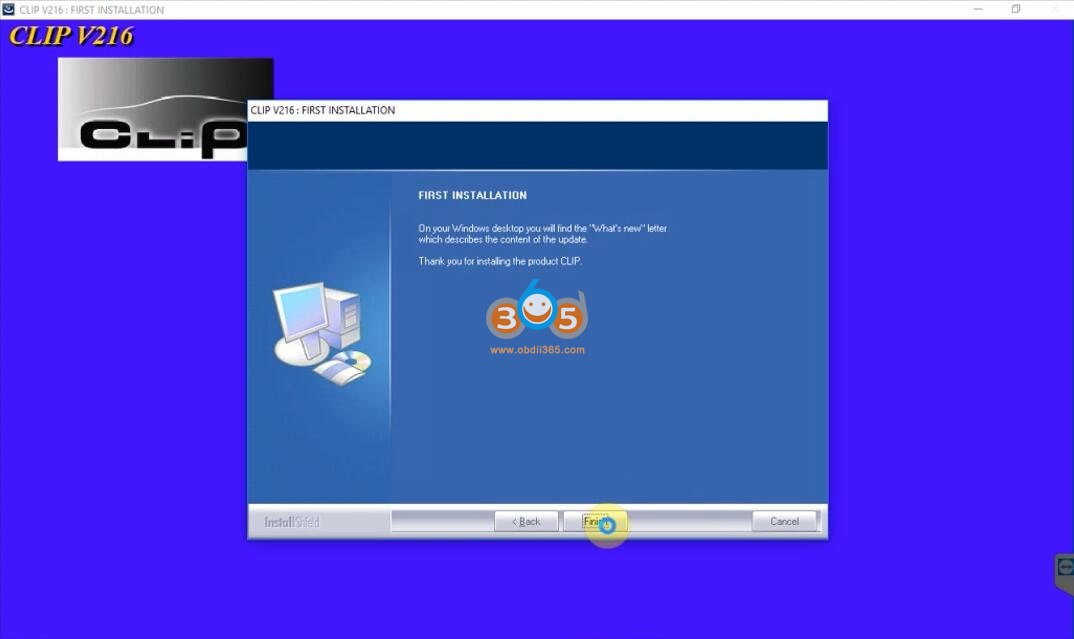
Select First Installation
Accept license agreement
Select Other Countries
Select Installation language
Follow the system prompts until the first installation completed

install-renault-can-clip-v216-7

install-renault-can-clip-v216-8

install-renault-can-clip-v216-9

Step 4: Register CAN Clip V216

1st rep1ace the original RSRwin.exe file (backup 1st your original file!!!) with the cracked .exe file in C:\CLIP. x91\L ib\Application\
NOW from the SANE location as you are (C: \CLIP -X91)Lib\Application\) run the RSRwin. exe. choose “Register me now” and in the next window select “NO”!

install-renault-can-clip-v216-10

install-renault-can-clip-v216-11

Open key notepad on the Activation folder
copy and paste the registration key here

install-renault-can-clip-v216-12

Registration successful.

Paste and replace the original RSRWin file to C:\CLIP. x91\L ib\Application\ folder

install-renault-can-clip-v216-13

Open Patch folder, copy probesConfiguration and probesConfiguration_logs file to (C: \CLIP\Config\ folder

install-renault-can-clip-v216-14

install-renault-can-clip-v216-15

Step 5: Run CAN CLIP V216

Run your CLiP on the desktop, accept the Terms and CLiP it will load.

install-renault-can-clip-v216-16

install-renault-can-clip-v216-17
http://blog.obdii365.com/2022/07/12/install-and-activate-renault-can-clip-v216/