2026/01/12

Xhorse VVDI MLB Tool vs Keydiy KD-MP Tool

 This article focuses on the key differences between the Xhorse and Keydiy MLB Tools. The comparison draws from hands-on testing, highlighting hardware design, usability, features, performance, and overall recommendations. Both tools ultimately perform the core functions effectively, but they differ in execution and convenience.


vvdi mlb tool vs keydiy kd-mp

Hardware Design and Setup
One of the most noticeable differences lies in the hardware setup and integration.

  • Xhorse MLB Tool: This device requires an additional MQB adapter to handle MQB keys, which transforms it into an MLB adapter. The setup involves two separate cables: one for the adapter and another for connection.
    This can feel cumbersome, as it adds extra components to manage. However, Xhorse was the pioneer in this space, and the design reflects its initial focus on MLB rather than MQB. The adapter includes a ring and microchips, which could potentially be integrated in future versions. Spare resistors are provided for desoldering tasks, and the kit includes everything needed for basic operations.
  • Keydiy MLB Tool: In contrast, the Keydiy is more streamlined and integrated. It uses a single wired USB connection to a computer, without the need for separate adapters for MQB tasks. Many users appreciate this simplicity, noting that it avoids the “lot of everything” feel of the Xhorse. The kit comes with a “whistle” (a small OBD connector device) that allows key programming via a phone app, which was successfully used for a Porsche. It also includes three keys and the main device. While a 12V power supply is included (and sometimes required for MLB tasks), it wasn’t necessary in this MQB test, adding flexibility.

Overall, Keydiy edges out in hardware convenience due to its all-in-one approach, while Xhorse’s modular design might appeal to users who value upgradability but requires more setup time.

vvdi mlb tool 1

collect Porsche MLB Key data with kd-mp -7

Usability and Workflow

Usability is a critical factor, especially for time-sensitive jobs like key programming.

  • Xhorse MLB Tool: The workflow involves desoldering a resistor from the key, connecting the adapter, and running the software. Data collection takes time (around 8-10 minutes), and immo data can be saved locally on a computer for reuse. This is a plus for offline work. However, the practitioner encountered issues with the latest firmware (V1.1.8), which failed multiple times until downgrading to V1.1.7 resolved it. Cloud loading of previous data is also possible by key. The interface is straightforward but requires managing multiple components, which can lead to lost cables or frustration.
  • Keydiy MLB Tool: Similar workflow for desoldering and data collection, but it’s more intuitive with a single connection. Data is primarily stored in the cloud, allowing easy reloading for repeat clients without recalculating. Local saving is possible but less emphasized; the practitioner noted that dealer key generation might require a specific Keydiy device with a screen (not the software alone), which feels less client-oriented due to the tangled navigation. It costs 200 “point coins” per operation, adding a micro-transaction element. Self-checking features provide reassurance, and the 8-minute calculation time matches Xhorse’s.

Keydiy feels more modern and user-friendly for quick setups, but Xhorse offers better local data control. Both support third-party devices for VIN modification if needed.


Features and Additional Capabilities
Beyond core MLB/MQB functions, the tools offer extras that set them apart.

  • Xhorse MLB Tool: Strong in data management, with easy local file saving and cloud backups. It’s reliable for reading locked keys once firmware issues are addressed. No mention of extra power needs for MQB, which is a convenience. We speculate future iterations might integrate everything into one unit.
  • Keydiy MLB Tool: Includes the OBD whistle for mobile programming, expanding usability (e.g., phone-based key programming). However, some features like dealer key generation are split across devices/software, and cloud reliance could be a risk if servers fail. It also supports viewing and modifying immo files in the cloud.

Both tools allow skipping recalculations for returning clients via cloud or local files, but Keydiy’s mobile integration gives it an edge for on-the-go work.

vvdi mlb tool software

keydiy pc software

Performance and Reliability

In testing, both tools successfully read immo data and prepared dealer keys after troubleshooting.

  • Xhorse VVDI MLB Tool: Initial failures were firmware-related, but downgrading fixed it, suggesting software stability issues in newer versions. Once working, performance is solid, with no hangs during data collection.
  • Keydiy KD-MP Tool: More consistent out of the box, with no firmware issues reported. It handled the task in about 8 minutes, matching Xhorse. The self-checking step adds reliability.

Both are effective, but Xhorse requires more vigilance with updates, while Keydiy feels more plug-and-play.


Recommendations

We recommend owning both for redundancy—servers might fail on one, or hardware on the other—emphasizing backups in all tools (e.g., two soldering irons).
For beginners, Keydiy’s simplicity might be preferable; for advanced users, Xhorse’s modularity and local storage could shine.

Neither tool is definitively “better” in terms of raw capability—both got the job done once the Xhorse firmware issue was sidestepped. The choice boils down to personal preference for workflow and philosophy.

  • Choose Keydiy if: You prefer a simpler, more integrated hardware setup with fewer cables. You are comfortable with a cloud-centric data approach.
  • Choose Xhorse if: You value the ability to keep local backup files of your immobilizer data and don’t mind a slightly more complex physical setup with an extra adapter.


Conclusion
The Xhorse and Keydiy MLB Tools are comparable in core functionality, both enabling efficient key programming for MLB/MQB systems. Keydiy stands out for its integrated design, mobile features, and ease of use, making it ideal for streamlined workflows. Xhorse, as the original, offers robust data handling and potential for upgrades but suffers from setup complexity and occasional software glitches. Ultimately, the choice depends on user preferences: opt for Keydiy for convenience or Xhorse for flexibility. Having both ensures reliability in a competitive field where quality and reputation drive success.

Add Seat Arona 2020 MQB49 5C Key with Keydiy KD-X4

 Seat Arona 2020 MQB49/5C non keyless flip remote key.

Read data from working key with Keydiy KD-X4.

Generated KD VW style ZB remote.
Programmed to car OK.
Good job by creating such solution to read CS data, well done.

Add Seat Arona 2020 MQB49 5C Key with Keydiy KD-X4 1

Add Seat Arona 2020 MQB49 5C Key with Keydiy KD-X4 2

Add Seat Arona 2020 MQB49 5C Key with Keydiy KD-X4 3

Add Seat Arona 2020 MQB49 5C Key with Keydiy KD-X4 4

Add Seat Arona 2020 MQB49 5C Key with Keydiy KD-X4 5

Add Seat Arona 2020 MQB49 5C Key with Keydiy KD-X4 6

Add Seat Arona 2020 MQB49 5C Key with Keydiy KD-X4 7


2026/01/11

Keydiy KD-X4 Update VAG 5C 5D Add Key Function!!!

 Good news! Keydiy VAG 5C 5D function is officially published on 11th, January 2026.


New Updates:

  • VW Audi Porsche 5C 5D add key (add key only, reading original key data and learn key)
  • Full series BDC2/BDC3/LCD/U Chassis BCP key cloning (reading original key data to copy key)


Compatible with Keydiy KD-X4 and KD-MAX.


NOTE:

VAG 5C 5D function does not require KD-MP tool.

Directly read original key data and learn key with KD-X4.

If use KD-MAX, read key data with KD-MAX and learn key with KD-MATE.

Keydiy KD-X4 Update VAG 5C 5D Add Key  1

Requirement:

MQB49 5C/5D

  • Requires MQB license activation (share the same license as MQB48). Don’t need points when adding keys.
  • 5C: use KD ZB smart key or original key
    5D: supports original keys only
    5C and 5D support original second-hand keys


BMW G series encrypted BDC2/BDC3 keys:

  • BMW encrypted key cloning function requires BMW G function license activation.
  • Don’t need points when generating KD FGB remote.
  • It takes 180 points to generate an original G key.

Keydiy KD-X4 Update VAG 5C 5D Add Key  2

VAG 5C 5D and BMW G series encrypted key cloning interface boards are not released yet.

Users can also use wire soldering method. Keydiy does not have a direct data-reading adapter; you need to modify KD’s adapter yourself according to the diagram below.

Keydiy KD-X4 Update VAG 5C 5D Add Key  3

Check the KD 5C and 5D key wiring diagram here:

Keydiy KD-X4 KD-MAX VAG 5C 5D Key Wiring Diagrams

BMW encrypted BDC2/BDC3 key cloning procedure is the same as that of unencrypted keys.

Keydiy KD-X4 Copy BMW G series BDC2 Encrypted Display Key

As for VAG 5C 5C add key function, follow the procedure below:

  • Read original key data
  • Generate dealer key
  • Learn key

After reading original key data, it will generate a service code.
The service code is required when learn key in car.

You can obtain immo from working key and read synch afterwards
If you have the CS which you’ll be able to read from the key using this tool, you can get the synchro from the working key.
CS gives the ability to read synchro from the key.

How to Tell Audi Type 5C or 5D Key by Key Shell?

 How to distinguish whether an Audi key is type 5C or 5D? Here obdii365.com shares an easy guide to tell Audi 5C and 5D key from its key shell.

Tell Audi Type 5C or 5D Key by Key Shell 1

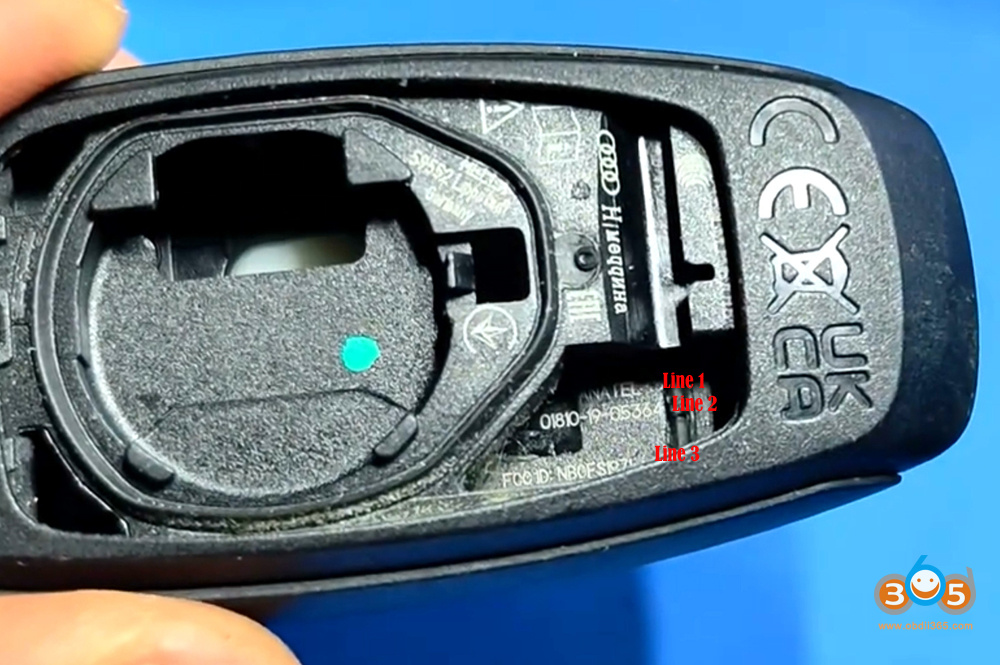
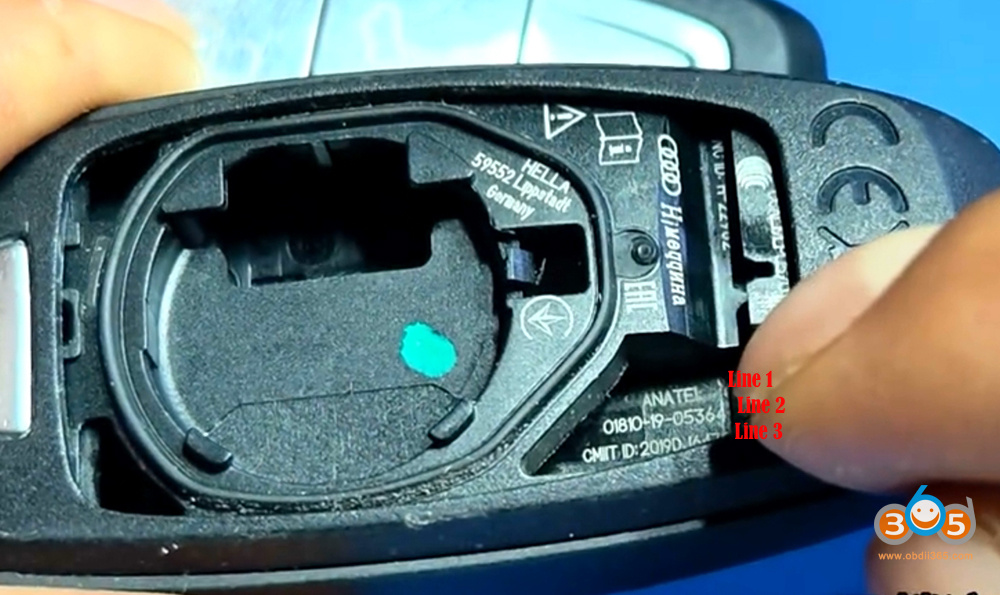
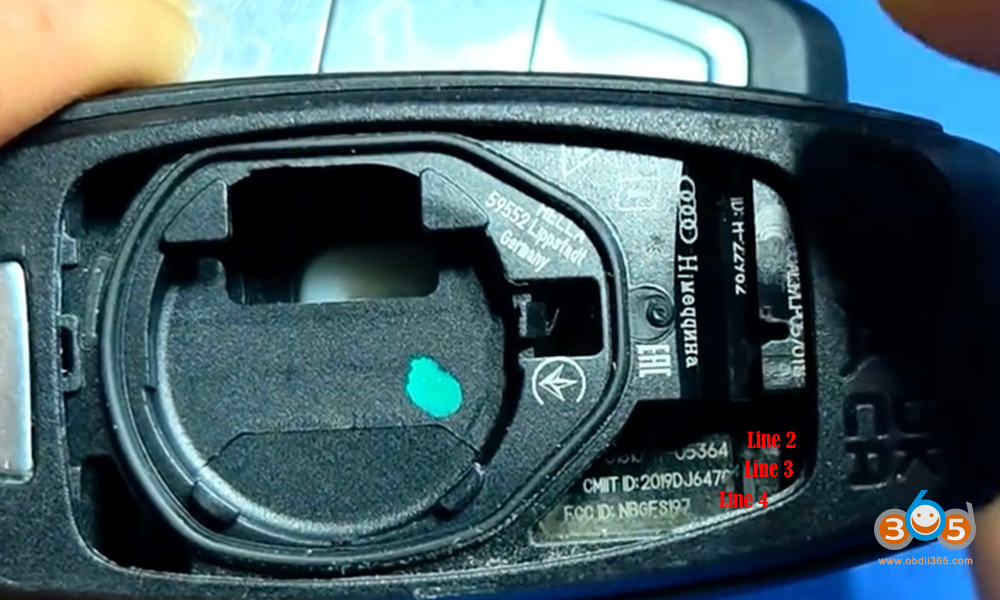
Remove key shell, check the interior of the key shell and observe this part:

if there are only three lines of symbols, it indicates a 5C key;

Tell Audi Type 5C or 5D Key by Key Shell 2

if there are four lines of symbols, it indicates an encrypted 5D key.

Tell Audi Type 5C or 5D Key by Key Shell 3

Tell Audi Type 5C or 5D Key by Key Shell 4

For 5D keys, users must use original key to add a spare key. If it is 5D with UWB function, you will need an original high-version key.


Note: The tips only apply to Audi 5C/5D vehicles. It may not work on VW 5C/5D vehicles.

Users can also easily read key type information by OBD programmers, i.e Keydiy KD-X4, it will show you key chip type and key status.

Keydiy KD FGB57 Remote Not Found Solution

 Problem:

Keydiy KD-X4 cannot read a KD FGB57 remote. It says remote not found.
Xhorse Key tool max pro failed to read it either. It says remote locked and unclonable.

Keydiy KD FGB57 Remote Not Found 1

Keydiy KD FGB57 Remote Not Found 2

Solution:

It is normal. Ignore it.

Go ahead BMW BDC3/BCP cloning function and generate FGB57 remote.

2026/01/06

AutoTuner Update JLR MG1CS201 Remote Unlock

 The ultimate in British luxury is now within reach of your Autotuner Tool! Autotuner is pleased to announce support for the Bosch MG1CS201 ECU tailored for Jaguar Land Rover.

You can now work on the flagship Range Rover (2022+) and Range Rover Sport (2022+) equipped with the powerful 4.4 V8 P530 engine.

Technical Note: This protocol is Bench After Mail-in Unlock. This means the ECU must first be unlocked at Autotuner headquarters before you can proceed with Read/Write operations on Bench.

Ready to unleash the full potential of these V8 beasts?

Key Information

  • Type: Engine Control Unit (ECU)
  • Mode: BENCH NR (After Mail-in Unlock)
  • MCU: TC298
  • Read time: 3 min
  • Write time: 1 min
  • Checksums correction
  • Backup creation

Compatibility List*

Models: Range Rover – 2022 / Range Rover Sport – 2022
Engine: 4.4 V8 P530

AutoTuner Update JLR MG1CS201 Remote Unlock


2026/01/05

How to Add BMW BDC3 Encrypted Key with Keydiy KD-X4?

 Good news! Keydiy now supports BMW G series BDC3 encrypted key cloning via reading original key data method. Here is the instruction on how to add a spare BDC3 locked key using Keydiy KD-X4.


Tools used:

Keydiy KD-X4 (or KD-MAX)

Original BDC3 encrypted key

New original BDC3 key or KD FGB58 remote

New dedicated wiring harness (for encrypted BDC3, VAG 5C 5D key data reading)

KD G Function license activation

Add BMW BDC3 Encrypted Key with Keydiy KD-X4 1

Requirement:

This function requires KD-X4 firmware V1.52 or newer version.


Add BMW BDC3 Encrypted Key with Keydiy KD-X4 2

How to update Keydiy KD-X4 firmware to V1.52?

In App Home page, click Update- Update KD Device. Check latest version and update firmware.

V1.52
Add the function of reading and writing encrypted BMW keys.
Add BMW BDC3 Encrypted Key with Keydiy KD-X4 3

How-to:

Go to Remote Function- Smart Key Clone- BMW BDC3/BCP Smart Key Clone- G Chassis/BDC3 Clone

Solder wires to the original key according to the wiring diagram.

Add BMW BDC3 Encrypted Key with Keydiy KD-X4 4

Add BMW BDC3 Encrypted Key with Keydiy KD-X4 5

Add BMW BDC3 Encrypted Key with Keydiy KD-X4 6

Add BMW BDC3 Encrypted Key with Keydiy KD-X4 7
We have soldered the original car key properly.
Click Read to read original key data.

Connect the wiring harness adapter to KD-X4 main unit.
Read original key data successfully.
Save file.


Add BMW BDC3 Encrypted Key with Keydiy KD-X4 8

Add BMW BDC3 Encrypted Key with Keydiy KD-X4 9

Now start generate key.
Before generating the key, remove the wiring harness with KD-X4.
Put the KD FGB remote PCB to the KD-X4’s coil.
Now start wireless generation.

Add BMW BDC3 Encrypted Key with Keydiy KD-X4 10

Select generating KD-FGB remote.
Generate remote successfully.

Add BMW BDC3 Encrypted Key with Keydiy KD-X4 11

Add BMW BDC3 Encrypted Key with Keydiy KD-X4 12
Then you can install this key into the original factory shell,

Keep in mind, don’t use both keys in the car. Keep them separate.

How to Tell BMW G BDC2 BDC3 Key by PCB or Shell?

 As titled, how to tell BMW G series BDC2, BDC3 or BCP key by  PCB or shell?

How to determine whether a BMW G-series BDC key is encrypted based on the key itself or its appearance?

Tell BMW G BDC2 BDC3 Key by PCB or Shell 1

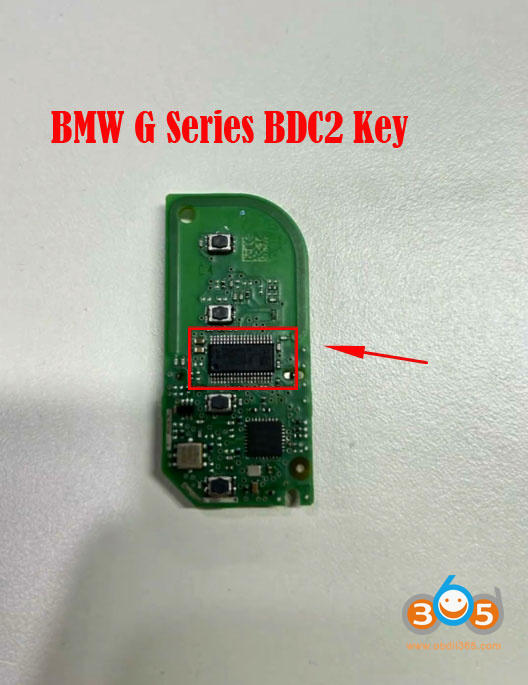
BDC2 keys are relatively easy to identify: if the key’s circuit board has a long encrypted chip, it is a BDC2 key. All BDC2 key are encrypted.

Tell BMW G BDC2 BDC3 Key by PCB or Shell 2
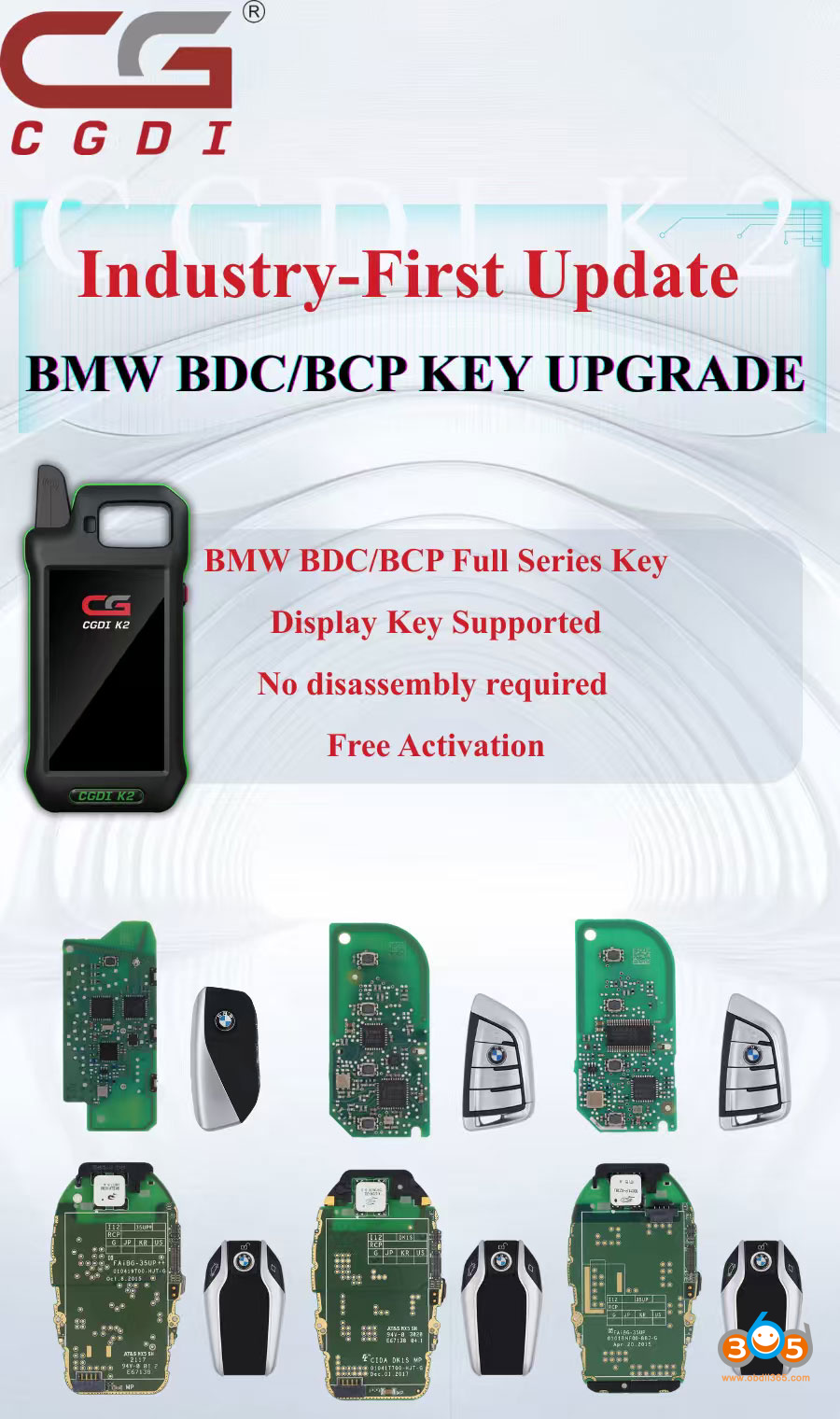
Many device will add key BDC2 by removing BDC2 module and make key on bench. CGDI K2 now will copy BDC2 key via reading data from the original key. No need to remove BDC2 module anymore. Keydiy and more tools will follow this solution.


How to determine whether a BDC3 key is encrypted?
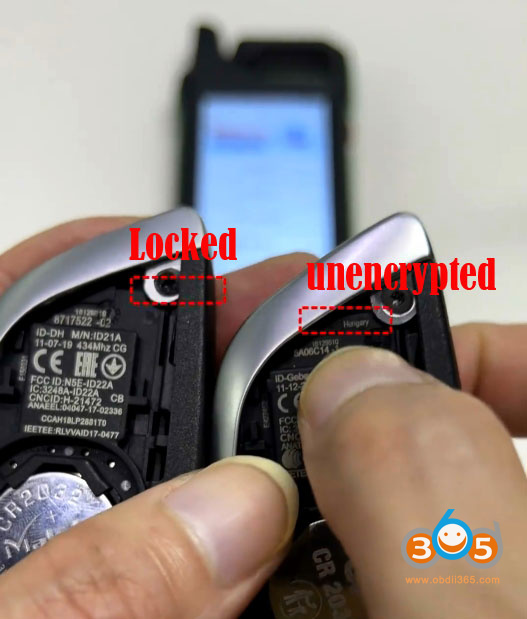
Open the key shell and check the marking at this location on the casing. If there is ‘Hungary’ letter, it indicates an unencrypted key. If there is no marking or if it is marked “Mexico,” it indicates an encrypted key.

Tell BMW G BDC2 BDC3 Key by PCB or Shell 3

How to determine whether a BCP key is encrypted?
Open the key shell, and you will find a laser marking here. If it displays “CG,” it means the key is a low-spec, unencrypted version. If it displays “CA,” it means the key is a high-spec, encrypted version with UWB functionality.

Tell BMW G BDC2 BDC3 Key by PCB or Shell 4

CGDI K2 now will copy all versions BDC2 BDC3 BCP keys. Keydiy will also release this function.

2026/01/04

Flex Cannot Read 2021 DCM7.1A ECU via OBD Solution

 Magic MotorSport Flex failed to read 2021 Opel Vivaro Delphi dcm7.1a ECU via OBD. Are these not able to be done?

Flex Cannot Read 2021 DCM7.1A ECU via OBD 1

Flex Cannot Read 2021 DCM7.1A ECU via OBD 2

Solution:

OBD is not the best solution for after 2021. 2022 onwards problem with obd.
Some users also reported they had problems with Flex on 2021 DCM7.1A OBD.
Do DCM7.1A in BOOT mode. Go for boot its more safe in DCM7.1A. Only do obd if you have a full boot backup. They can die obd mode. Sometimes they can be repaired boot mode, bit sometimes the eeprom data is destroyed.

Sometimes VR not available with flex then need boot. Or use other tool like Autotuner via obd.

Or open and boot with mms repair file and all OK again.

2026/01/03

Iveco Daily 93S56 All Keys Lost with Orange5 + Xhorse Key Tool Plus

 How to program a key for Iveco Daily for Bosch 41221184 immobox, all keys lost, with secured Eeprom 93S56:


Xhorse VVDI Key Tool plus fails to read eeprom 93S56 correctly and process it in Immo Data Tool.

Key Tool Plus does not read this chip sucessfully. With eeprom adapter, it reads security bit and eeprom but the file is not correct and gets not loaded in immo data tool.

Here we have the solution!
Connect the Eeprom 93S56 to your Orange 5 programmer with Soip 8 Clip adapter to STD Port.

Iveco Daily 93S56 All Keys Lost with Orange5 + Xhorse 1

Open Orange5 software:
1. Select eeprom Type. Search for MicroWire 93S56 Eeprom.
2. hit Test Insertion, check if all pins are connected well!
3. hit Read Protection
4. hit Clear Protection
5. hit READ EEPROM

Iveco Daily 93S56 All Keys Lost with Orange5 + Xhorse 2
6. Load the read eeprom in to your key tool plus and open the file with Immo Data tool.
Here you have: Pin, key ID1, ID2, ID3.

Iveco Daily 93S56 All Keys Lost with Orange5 + Xhorse 3

Then you can make dealer key with key tool plus.