2026/01/19

How to Add Benz FBS4 Keyless Smart Key with Keydiy PAK09

How to add new Mercedes Benz FBS4 full keyless keys fast and easy with the Keydiy PAK09 Phone as Key — no more waiting 2–4 weeks!

The job can be completed on the same day.

Tools used:


Instruction:

1. Remove the PCB from the original car key.

Add Benz FBS4 Keyless Smart Key with Keydiy PAK09 1

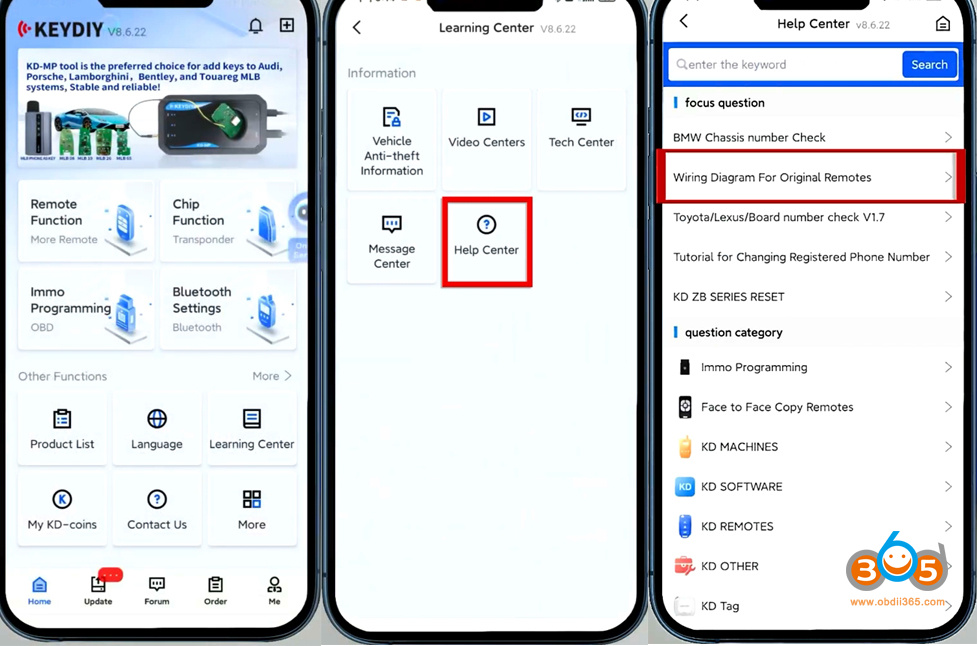
2. Open KD App, go to Learning Center- Help Center-Wiring Diagrams for original remotes.
Find a diagram that matches your original remote.

Add Benz FBS4 Keyless Smart Key with Keydiy PAK09 2

Add Benz FBS4 Keyless Smart Key with Keydiy PAK09 3
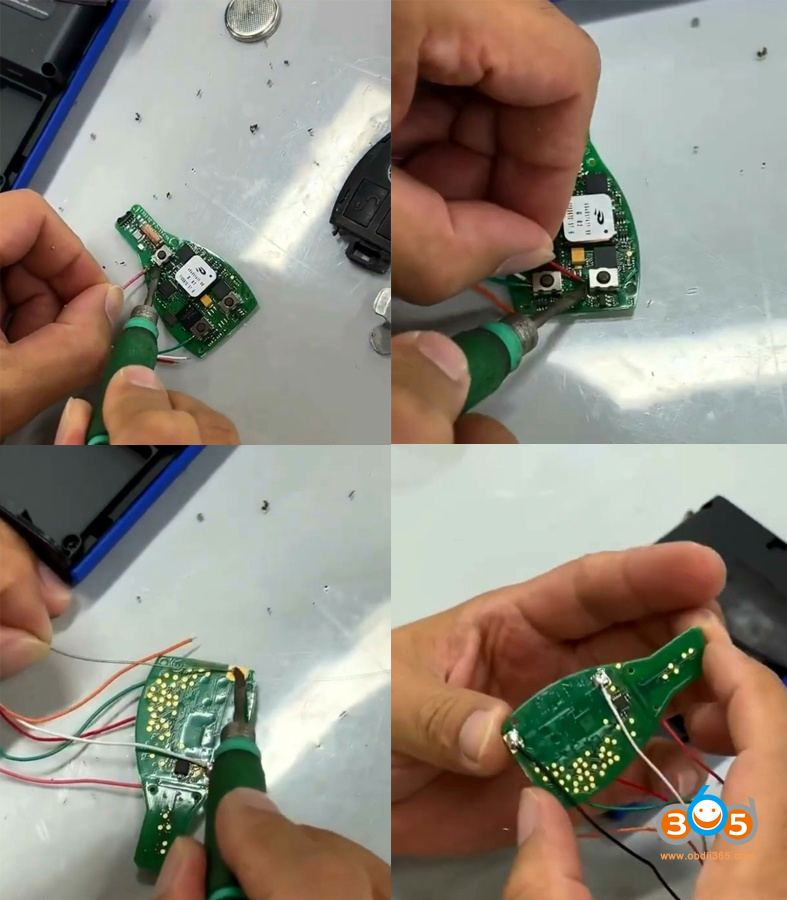
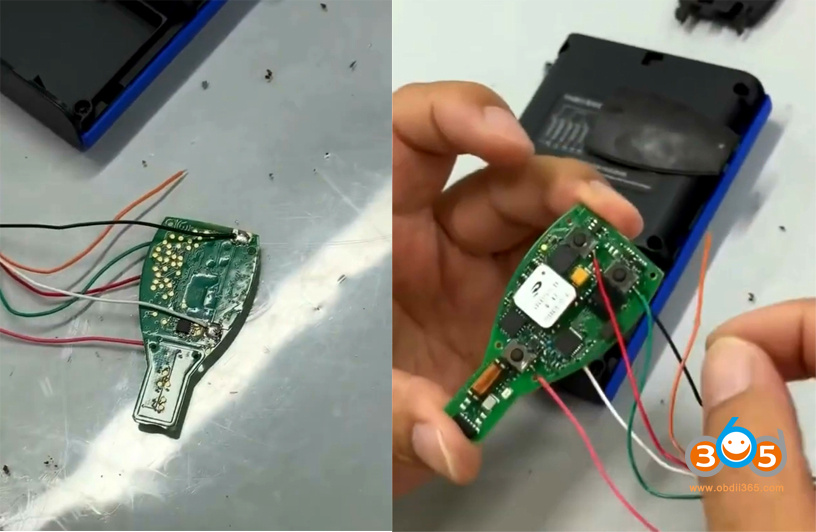
Follow the wiring diagram to solder the PCB properly.

Add Benz FBS4 Keyless Smart Key with Keydiy PAK09 4

Add Benz FBS4 Keyless Smart Key with Keydiy PAK09 5

Remove the back cover of the Keydiy PAK09 phone as key box.
After soldering, insert the adapter cable connector into the corresponding trigger connector.
Place the soldered PCB into the PAK09.
Close the back cover of PAK09.

Add Benz FBS4 Keyless Smart Key with Keydiy PAK09 6

Add Benz FBS4 Keyless Smart Key with Keydiy PAK09 7

Add Benz FBS4 Keyless Smart Key with Keydiy PAK09 8

Turn on the Keydiy PAK09.
Power button: short press once, then long press for 3s.
Indicator light flashes, indicating successful power-on.

Add Benz FBS4 Keyless Smart Key with Keydiy PAK09 9
3. Generate the corresponding program for PAK09 to add one more physical car key.
Support generate with KD B/ZB series remotes. Here we use KD ZB remote.
Place the KD ZB remote to be generated into KD-X4.
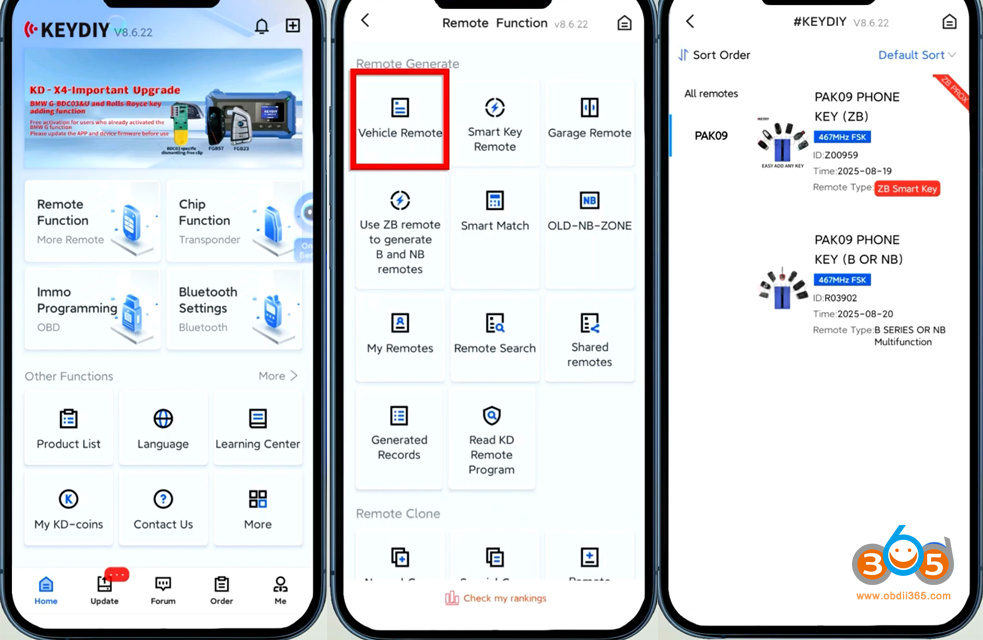
Run KD App.
Go to Remote Function- Vehicle Remote- Select the corresponding remote control program.
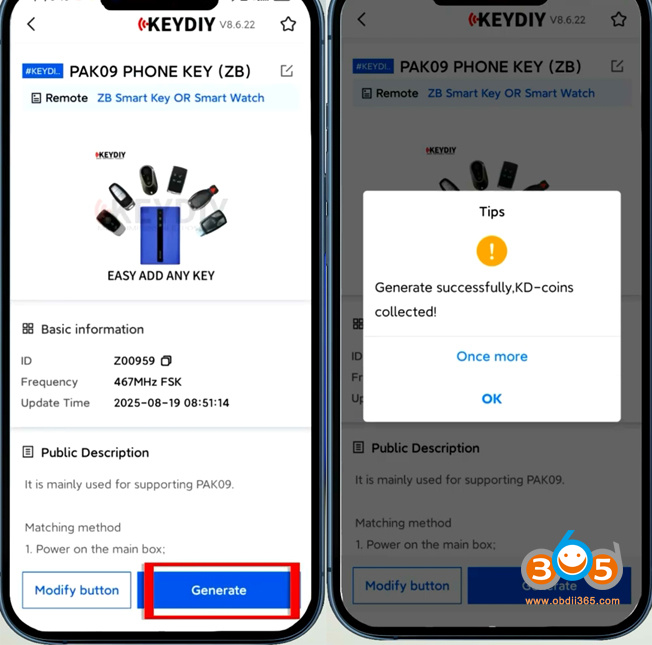
Generate KD ZB smart remote.
Generate remote successfully.

Add Benz FBS4 Keyless Smart Key with Keydiy PAK09 10

Add Benz FBS4 Keyless Smart Key with Keydiy PAK09 11

Go to Phone as Key App.
Click Setting icon on the corner.
Click Device Management.
Click icon to start scanning the device.
Select the PAK kit you want to connect.

Add Benz FBS4 Keyless Smart Key with Keydiy PAK09 12

The default password is 000000.
First-time repairing requires password modification.

Add Benz FBS4 Keyless Smart Key with Keydiy PAK09 13
Start adding key.
Click Setting on the right corner.
Scroll down and select Key Management.
Click Enter matching mode.

Add Benz FBS4 Keyless Smart Key with Keydiy PAK09 14
Before the countdown ends, press any key on the remote to add the key.
You can add up to 6 physical keys.
Now we have successfully add 1 spare FBS4 key.

Add Benz FBS4 Keyless Smart Key with Keydiy PAK09 15 Add Benz FBS4 Keyless Smart Key with Keydiy PAK09 16
NOTE: You cannot directly generate KD FBS4 remote. Must pair with PAK09 Phone as Key first.

2026/01/15

Add Seat ibiza 2019 MQB49 5C Key with Keydiy KD-X4

 How to add Seat ibiza 2019 MQB49 5C key with Keydiy KD-X4 programmer?
OEM used key (original from another car).
Everything works perfectly, remote works on both.
But on used OEM can’t change ID, so You can’t go to dealer with this key.
This key is not a copy like BMW.
You have to solder to write data to the “new” key.
And then perform key learning in car.
(Or can generate dealer key wireless on KD ZB key and learn).

Add Seat ibiza 2019 MQB49 5C Key with Keydiy KD-X4 1

Add Seat ibiza 2019 MQB49 5C Key with Keydiy KD-X4 2

Add Seat ibiza 2019 MQB49 5C Key with Keydiy KD-X4 3

Add Seat ibiza 2019 MQB49 5C Key with Keydiy KD-X4 4

How to Add VAG 5C 5D Key with Keydiy KD-X4 Step by Step?

 Tutorial: add VAG VW Audi MQB49/5C and 5D key using Keydiy KD-X4 key programmer step-by-step.


Tools used:

Add VAG 5C 5D Key with Keydiy KD-X4 1
Requirement:
Update Keydiy App version to V8.7.1 and KD-X4 firmware version 1.53 and higher.


Procedure:

Step 1: Read key data

Select IMMO Programming-VW- 5C/5D Immobilizer Systsem- Start execution
Select Read original car key and generate a dealer key.

Check key wiring diagram.


Add VAG 5C 5D Key with Keydiy KD-X4 2

Add VAG 5C 5D Key with Keydiy KD-X4 3

You’ve got two ways to connect the original key:

Add VAG 5C 5D Key with Keydiy KD-X4 4

1. Use 5C 5D circuit interface board. Remove original key and install the PCB into the circuit board, then connect the circuit board with KD-X4 main unit.

Add VAG 5C 5D Key with Keydiy KD-X4 5

Add VAG 5C 5D Key with Keydiy KD-X4 6
2.Use wire soldering method. Connect original key with a dedicated cable or a modified cable.

Add VAG 5C 5D Key with Keydiy KD-X4 7

Add VAG 5C 5D Key with Keydiy KD-X4 8

Read chip data.

Add VAG 5C 5D Key with Keydiy KD-X4 9

After a successful read, it will generate a service code. Take a screenshot of the service code.

Add VAG 5C 5D Key with Keydiy KD-X4 10

Step 2: Generate dealer key

Then start generate dealer key.
Put a KD ZB remote to the KD-X4 coil.
Generate KD ZB remote successfully.

Add VAG 5C 5D Key with Keydiy KD-X4 11

Add VAG 5C 5D Key with Keydiy KD-X4 12

Step 3: Learn Key
Then we learn key in car.
Connect KD-X4 programmer with the vehicle via OBD.
Go to IMMO Programming-VW- 5C/5D Immobilizer Systsem- Start execution
Select Key Learning function.
Enter number of keys to be learned. All keys need to be learned.

Add VAG 5C 5D Key with Keydiy KD-X4 13

Add VAG 5C 5D Key with Keydiy KD-X4 14
It will ask if it is a smart key, here click Yes. (Click No if it is not a smart key).

Place the original car key close to the induction coil.
Open the vehicle hood.

Add VAG 5C 5D Key with Keydiy KD-X4 15
Confirm vehicle VIN

Add VAG 5C 5D Key with Keydiy KD-X4 16
Keydiy KD-X4 will ask enter the KD service number you have obtained in Step 1.

Select the corresponding service code and confirm.

Add VAG 5C 5D Key with Keydiy KD-X4 17

Learn 1st key successfully.
This indicates that the first key has been successfully learned.

Add VAG 5C 5D Key with Keydiy KD-X4 18

Add VAG 5C 5D Key with Keydiy KD-X4 19
Then stick the second key to the induction coil.
Don’t turn off the ignition until learning is complete.
Key learning completed.

Add VAG 5C 5D Key with Keydiy KD-X4 20
Turn off the ignition switch, wait 5 seconds and then turn ignition switch on.

Key learning finished. Test the remote control and proximity function.

Note: If you perform key learning on 2024 and 2025 models, you will need to unlock SFD gateway before learning key.


http://blog.obdii365.com/2026/01/15/how-to-add-vag-mqb49-5c-5d-key-with-keydiy-kd-x4/

What Device to Program 2025 Infiniti QX60 Smart Key?

 What tool to program 2025/2024 Infinity QX60 (aka 2025/2024 Nissan Pathfinder) smart proximity key?


Here is the clue.

also applied to models like Sentra (B18) 2020+, Rogue T33 2020+, Xtrail T33 2020+, Pathfinder R53 2020+ and similar Infiniti models.


Autel IM508/IM608

Autel failed to add key even with BCM40 pin cable. It still asks for pin code.

Have to remove HFM module and read RH850 chip to get 28-digit password with APB131 adapter.


Example:

Did 2024 Infiniti QX60 with autel but had to read hfm module to get the password.

autel im508 Program 2025 Infiniti QX60 Smart Key 1

autel im508 Program 2025 Infiniti QX60 Smart Key 2

autel im508 Program 2025 Infiniti QX60 Smart Key 3


OBDSTAR G3:

Obdstar g3 failed with Nissan 40 PIN cable.

You will need to read the HFM module to retrieve 28-digit pin code using OBDSTAR’s C4-06 RH850 adapter.

OBDSTAR Program 2025 Infiniti QX60 Smart Key 1

OBDSTAR Program 2025 Infiniti QX60 Smart Key 2


Nissan Consult III Plus:

If you don’t want to read those RH850 chips. Use Consult3+.

Preconditions:

1. Need Consult 3+ with subscription or use a special patched version of Consult 3+ without subscription

2. VCI like Topdon Rlink X7(it was certified by Nissan), Mongoose GM, VXDIAG VCX SE, Smartlink, Cardaq etc


No need to pull of BCM to connect 40 pin cable.

Example:

Consult 3+ did under 5 mins with no hassle to removing BCM.

Use Topdon Rlink J2534 + Consult 3 plus.

This one way is life saver, 5 mins job, no disassembly, no soldering, no 28 digit pincode. All done via obd.


Connect Rlink J2534 with vehicle via OBD port. Select Rlink VCI.

Select Immobilizer function.

Software will identify vehicle information.

Go to Register key function and follow the software prompts to program key.

Nissan Consult Program 2025 Infiniti QX60 Smart Key 1

Nissan Consult Program 2025 Infiniti QX60 Smart Key 2

Nissan Consult Program 2025 Infiniti QX60 Smart Key 3

Nissan Consult Program 2025 Infiniti QX60 Smart Key 4

Nissan Consult Program 2025 Infiniti QX60 Smart Key 5

Nissan Consult Program 2025 Infiniti QX60 Smart Key 6

Nissan Consult Program 2025 Infiniti QX60 Smart Key 7

Nissan Consult Program 2025 Infiniti QX60 Smart Key 8


2026/01/14

What Tool to Read Audi A3 Micronas CDC3217G Cluster?

 If it is Audi A3 or Golf 2007-2009, all keys have lost, you need to read the flash from the instrument cluster Micronas CDC 3217g or 3297g and 24c32 eeprom file for CS code and full immo data.

The flash data contains immo data.

Which device to read Micronas CDC 3217G cluster?

Found the schematic annd good soldering points for Xhorse multi prog, but wasn’t able to get a read using multiprog.

Read Audi A3 Micronas CDC3217G Cluster 1

Read Audi A3 Micronas CDC3217G Cluster 2

Read Audi A3 Micronas CDC3217G Cluster 3

These clusters are some of the hard ones to do.

Xhorse VVDI Prog/Multi Prog/Key tool plus, Autel, OBDSTAR G3 etc won’t read them. 3217 mask not supported, other masks are.
UPA, Xprog or SMOK can read it.


For example
Audi A3 2007 all keys lost.
Reading Micronas CDC3217G with SMOK Jtag to aquire PIN and CS.

Xprog also read it. Smok is Better.

Read Audi A3 Micronas CDC3217G Cluster 4

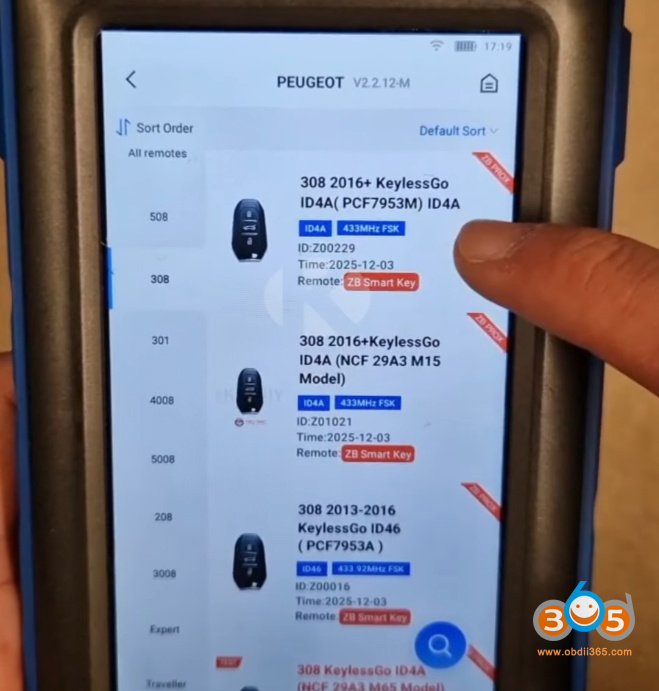
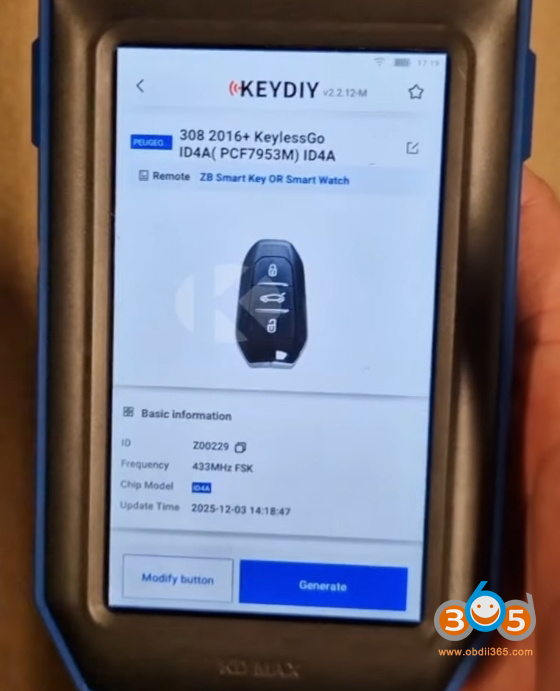
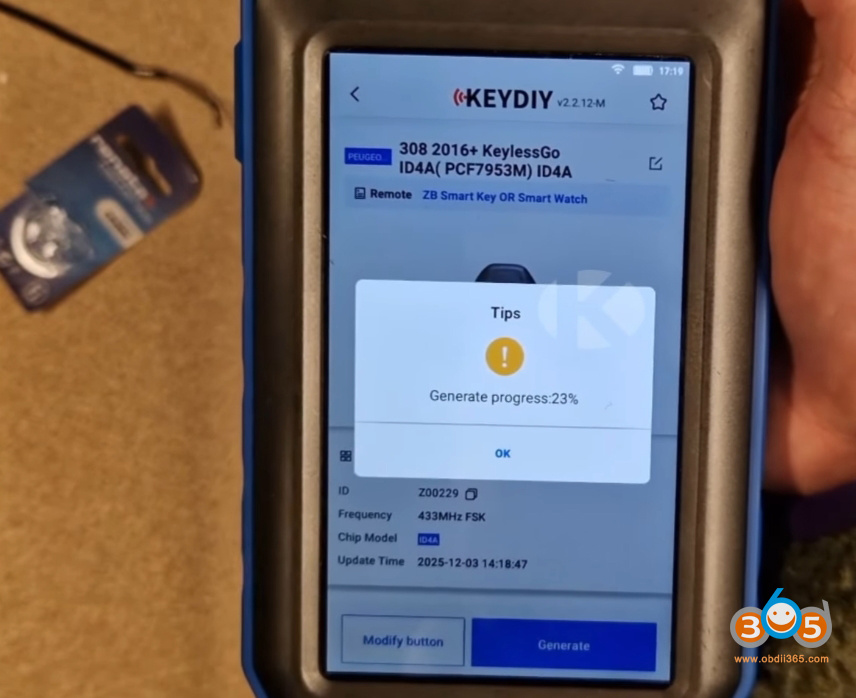
Keydiy KD-MAX Generate PSA 4A Smart Key via Keydiy ZB66

 The Keydiy ZB66 smart remote is a 3-button universal smart key designed as a direct replacement for original Peugeot, Citroën, and DS keys. Its primary selling point is its identical design and build quality to factory keys. The key feels robust, the buttons provide the same tactile feedback and audible click, and it is built to withstand daily use.

This makes it an ideal solution for:

  • Total key replacement for lost keys.
  • Creating duplicate keys.
  • Replacing damaged or broken customer keys.

Keydiy KD-MAX Generate PSA 4A Smart Key via Keydiy ZB66

ZB66 Main features:

  • Universal 3-button smart key
  • Compatibility with Peugeot / Citroën / DS / Opel / Toyota
  • Supported technologies: ID46, ID49, ID4A, IM2A, IM3A
  • Unlimited key reprogramming
  • Solution designed for automotive key professionals


The most significant innovation of the ZB66 is its extreme flexibility. Traditionally, professionals needed to stock multiple key references (blanks) to cover different vehicle protocols. The ZB66 consolidates this into a single, programmable reference.

How does it work? The key is purchased “blank.” Using KEYDIY tools like the KDX2, KD-X4, or KD-Max, a specific file is generated and loaded onto the key. This process allows the ZB66 to be configured into various transponder types, including:

ID46 (Proximity / Hands-free)

ID4A / ID49

PCF / PC (iM2A type)

NCF (iM3A type)

This means one key blank can be transformed to suit a wide range of vehicles, such as a 2022 Peugeot 308 or a 2018 Peugeot 208, drastically simplifying inventory management.


A major cost-saving feature is the key’s unlimited reprogrammability. Unlike some OEM-style keys that are “locked” to a vehicle once programmed, the ZB66 can be reprogrammed without penalty.

If a programming attempt fails, the key is not wasted.

If a key was previously programmed to one vehicle, it can be erased and reprogrammed to another.
This eliminates the risk of losing money on faulty programming attempts and enhances the key’s long-term value.


While generation requires a KEYDIY device, the programming phase is not locked into the KEYDIY ecosystem. Once the key is generated with the correct file, it can be programmed to the vehicle using popular industry tools like the Autel MaxiIM IM508/608, Xtool, OBDSTAR G3, Zed Full etc. This is a crucial advantage for workshops already invested in other diagnostic and programming equipment. Once the key is generated, programming is not limited to the KEYDIY ecosystem. The ZB66 therefore integrates seamlessly into a workshop already equipped with OBDSTAR or ZED tools.


Simple Preparation Process

Preparing the key is straightforward:

  • Remove the emergency blade by pressing the side button.
  • Use a flat tool to gently pry open the case to access the battery compartment.
  • Insert a standard CR2032 battery.
  • Close the case and reinsert the blade.

Keydiy KD-MAX Generate PSA 4A Smart Key via Keydiy ZB66 2

Keydiy KD-MAX Generate PSA 4A Smart Key via Keydiy ZB66 3

Keydiy KD-MAX Generate PSA 4A Smart Key via Keydiy ZB66 4

The key is then ready for file generation, a process shown to take less than two minutes using the KEYDIY software.
Conclusion: The Ideal Solution for Professionals

The KEYDIY ZB66 presents itself as a super-polyvalent, cost-effective solution tailored for automotive professionals—from independent locksmiths and garages to multi-service centers and diagnostic specialists. By reducing inventory needs, eliminating the risk of wasted keys, and maintaining compatibility with popular programming tools, it streamlines operations and improves profitability.

This key represents a shift towards smarter, more adaptable tools in the automotive aftermarket, proving that sometimes, having one master key is better than stocking five.